

Running a business is a challenging task. Yes its about product development and getting it out there. But making a great product is just half the journey; the rest of it depends on the right marketing. It’s only when your product reaches its target audience that the journey you made for all these years gets completed. While you are looking for marketing tools, you definitely would have come across MailChimp.
The truth is, Mailchimp sits in an interesting position today. It’s no longer just a simple email tool. It now includes automation, CRM features, landing pages, AI content assistance, analytics, ecommerce integrations, and social campaign tools. For some users, that makes it incredibly useful. For others, it feels bloated and overpriced.
This guide breaks down everything you actually need to know about Mailchimp, without trying to sell it to you. We’ll go through features, pricing, real pros and cons, comparisons, and the type of users who will genuinely benefit from it.
What is Mailchimp, and Why Do So Many Businesses Use It?
Coming to what in Mailchimp, it’s a leading service provider when it comes to Email Marketing. Along with being an Email Marketing tool, This offers other tools that boost your business and help you with end-to-end marketing. With an email marketing tool, you can communicate with your clients and potential customers. This process is powered by AI and runs automatically. This also comes with other solutions that give you complete business backend support.

So when you wonder what it is, dont go by its name for just being an email support, but it also offers-
- AI marketing tools
- Marketing automations
- Content creation tools
- Social media marketing
Mailchimp got its users loving it just as it launched, because of its simple and user-friendly interface. It made emailing pretty easy, from promotional offers to automated emails; it did everything for you. You dont need a huge team or an expensive coder. The interface is clean, setup is relatively easy, and it integrates with hundreds of apps. But whether it’s “good” depends heavily on what you need.
With Mailchimp, you can-
- Use its email builder to create professional-looking emails
- Create campaigns that look clean and promising
- It has 300+ integrations
- It connects well with CRM platforms, analytical tools, and social media platforms.
Mailchimp Review: Is Mailchimp Still Good in 2026?
Before committing to Mailchimp as your automated marketing tool its always best to look into the Mailchimp review. With an unbiased it review, you can make the right decision about what the user experience is like in real situations. Does it break down or withstand as a supportive tool?
There’s no doubt that Mailchimp’s interface is super smooth and easy to understand. It’s especially useful when it comes to small businesses, because not everyone is tech-savvy. It has a short learning curve, and that’s exactly what you need.
Easy email builder
With its drag-and-drop feature, editing becomes pretty easy.
Simplified User experience
No complicated icons ot tools that need a separate tutorial. The interface is pretty self-explanatory.
Highly reliable
Being an industry trailblazer, Mailchimp has made noticeable improvements, making it highly optimized.
Large integration
It has more than 300 platforms you can use with it, from Wix to Facebook.
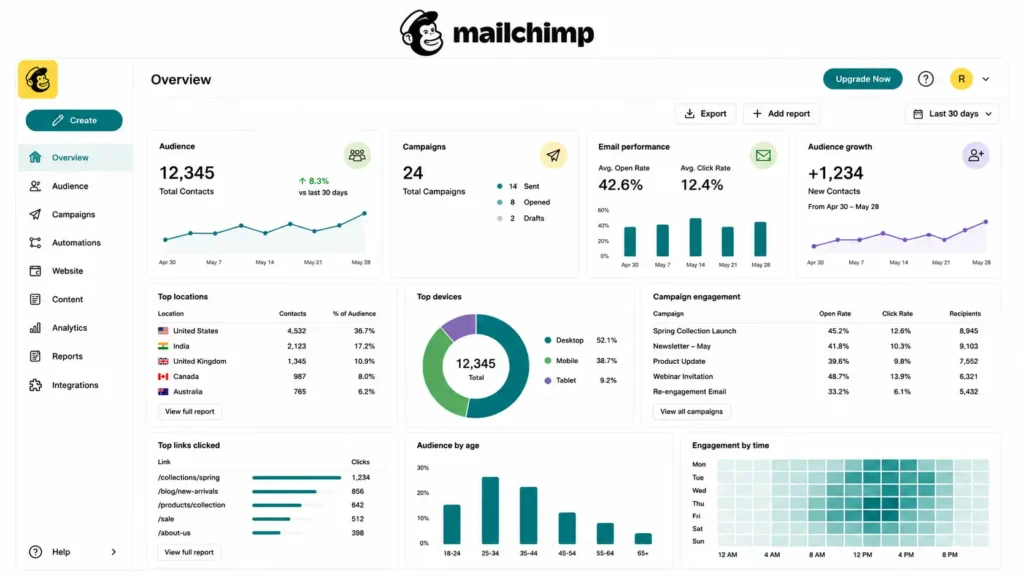
Comprehensive Dashboard
You get all the information you need neatly segregated in categories. From open rates, clicks, audience engagement, and more.
Automation Limitations
Some advanced workflows are simpler in competitor platforms.
Free Plan Restrictions
The free version is far more limited now than it used to be.
Customer Support
Lower-tier plans don’t always provide fast support access.
It is still strong overall, but it’s no longer the obvious “best choice for everyone.” Since there are specialised products for every need and kind of business, now.
Mailchimp Price: Plans, Features, and What You Actually Get
Here is a comprehensive Mailchimp Price, where all the plans and prices are at a glance.
| Plan | Best For | Starting Price | Main Features |
| Free | Beginners and testing | $0 | Basic email campaigns, limited templates, and signup forms |
| Essentials | Small businesses | Around $13/month | Email templates, A/B testing, and scheduling |
| Standard | Growing brands | Around $20/month | Customer journey automation, advanced segmentation |
| Premium | Large businesses | Higher enterprise pricing | Advanced analytics, unlimited audiences, priority support |
When it comes to Mailchimp Price, users often wonder if it is expensive. Or even worth it of the price that you are paying.
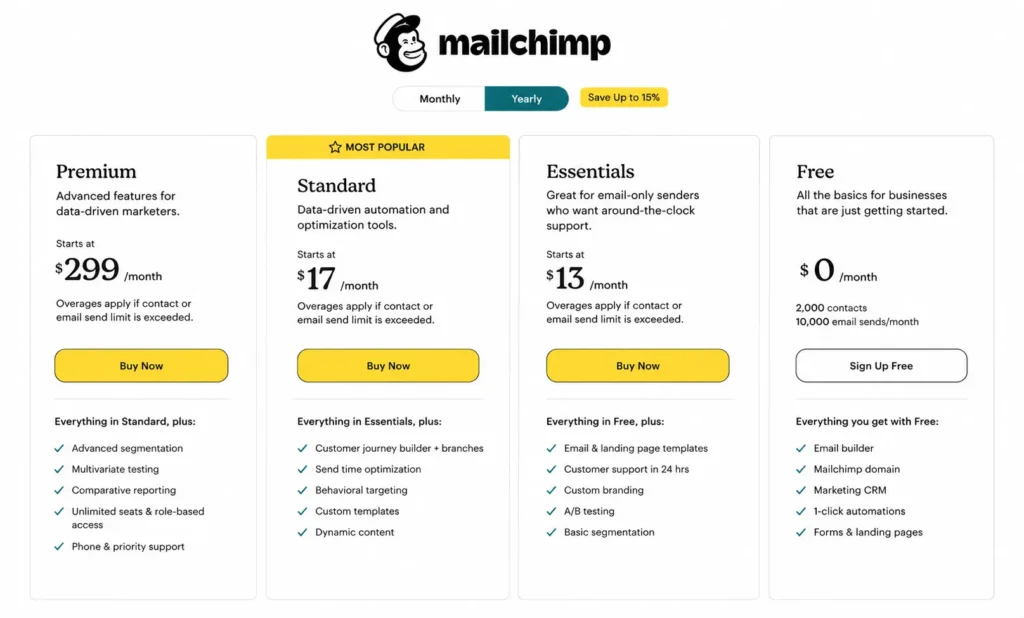
How you justify the Mailchimp price point mainly depends on what stage you are in your business and what level of automation you need. It is affordable when it comes to basic to moderate features if you want to send emails only to a small email list, sending out campaigns is occasional, and you need just entry-level automation.
Mailchimp Feature Breakdown: What Can It Actually Do?
Mailchimp now positions itself as an “all-in-one marketing platform,” not just an email sender.
Here are the main features that matter most.
Email Campaign Builder
The drag-and-drop editor remains one of Mailchimp’s strongest features.
You can-
- Create newsletters
- Add images and buttons
- Customize layouts
- Save templates
- Schedule campaigns
It’s beginner-friendly without feeling overly basic.
Marketing Automation
If you have a moderate workflow, this Mailchimp feature lets you send automated emails. Based on customers’ digital behaviour-
- Welcome emails
- Abandoned Cart notifications
- Follow-ups on products and discounts
- Birthday emails
Audience Segmentation
It can help you segregate and organize audiences in various categories based on user activity-
- Purchase behavior
- Engagement of the user
- Geo location
- Signup benefits
- Tags and interests
Landing Pages and Forms
There are some straightforward Mailchimp features that you will definitely be using.
- Creating sign-up forms
- Landing pages
- Pop ups
E-commerce Integrations
Mailchimp integrates with e-commerce tools, including-
- Shopify
- WooCommerce
- BigCommerce
- Stripe integrations
Mailchimp vs Competitors: Which Platform Is Better?
When it comes to Mailchimp vs Competitors, there are a lot of other options in the market. Each has its unique positioning. And this USP is what helps you decide which platform is ideal for your business.
| Feature | Mailchimp | ConvertKit | Klaviyo | Brevo | Active Campaign |
| Starting Price | Free plan available; paid plans start around $13/month | Free plan available; creator plan starts higher than Mailchimp | Free plan available, pricing increases quickly with e-commerce growth | One of the cheapest paid options | Usually more expensive than Mailchimp for advanced automation |
| Free Plan Limits | Limited contacts and monthly sends | Better for small creator lists | Limited for growing stores | Generous sending limits for small businesses | Trial-focused more than fully free |
| Best For | Small businesses, beginners, newsletters | Bloggers, creators, coaches | E-commerce brands | Budget-conscious businesses | Advanced automation and sales funnels |
| Ease of Use | Very beginner-friendly | Simple and creator-focused | More advanced dashboard | Easy to learn | Steeper learning curve |
| Automation Features | Good basic and mid-level automation | Visual creator automations | Strong e-commerce automations | Basic automations | One of the strongest automation systems |
| E-commerce Features | Good for small online stores | Limited ecommerce focus | Built specifically for e-commerce | Moderate e-commerce tools | Strong ecommerce integrations |
| Email Templates | Large template library | Minimal template styles | Modern e-commerce-focused templates | Decent templates | More functional than stylish |
| CRM Features | Basic built-in CRM | Limited CRM functionality | Customer data-focused | Built-in CRM tools | Advanced CRM and lead scoring |
| AI Features | AI subject lines and content suggestions | Basic AI tools | Predictive analytics and recommendations | Some AI automation | AI-powered automation and segmentation |
| Landing Pages | Yes | Yes | Limited compared to others | Yes | Yes |
| SMS Marketing | Limited, depending on the region | No strong SMS focus | Strong SMS marketing | SMS is included in some plans | Available in higher plans |
| Advanced Segmentation | Available on higher plans | Simpler audience segmentation | Very advanced customer segmentation | Moderate segmentation | Extremely advanced segmentation |
| Reporting & Analytics | Clean and easy-to-read reports | Simple analytics | Deep e-commerce revenue analytics | Good basic reporting | Advanced campaign tracking |
| Integrations | Huge integration marketplace | Creator-focused integrations | E-commerce platform integrations | Business integrations | Sales and marketing integrations |
| Best Advantage | Easy for beginners and non-technical users | Best for creators and newsletters | Excellent e-commerce targeting | Affordable pricing | Powerful automation workflows |
| Biggest Weakness | Pricing rises fast as lists grow | Limited design flexibility | Can feel overwhelming for beginners | Interface less polished | Can become expensive and complex |
| Support Quality | Better support on paid plans | Good creator support | E-commerce-focused support | Mixed reviews | Strong support for business users |
| Who Usually Outgrows It? | Fast-growing brands and advanced marketers | Large e-commerce businesses | Small beginners | Enterprise businesses | Small beginners who want simplicity |
After doing a Mailchimp vs Competitors deep analysis, you will realize that there is something great that each has to offer. With all the great this features, you can definitely use it, especially in the beginning.
Mailchimp Pros and Cons: The Honest Reality
Here are all the honest Mailchimp Pros and Cons-
Pros
- Beginner-friendly interface
- Easy to use for first-time users
- A well-organized dashboard
- Strong Template Library
- Professional email templates save time.
- Reliable Deliverability
- Emails generally perform consistently.
- Large Ecosystems
- Works well with various apps and platforms
- Optimized campaign tracking
Cons
- It can get expensive for some users
- Free Plan Is More Restricted
- Older users often miss the previous free plan flexibility.
- Limited when it comes to automation
- Support Depends on your Plan
- Managing multiple audiences sometimes creates duplicate contacts and higher costs
With all the Mailchimp Pros and Cons laid out clearly its right to say it is great for you if you’re just starting.
Mailchimp Use Cases: Who Should Actually Use It?
Here is what Mailchimp looks for in its perfect user base. If you fall in these categories, then it Use will be promising.
Here are the best Mailchimp Use Cases-
- Small business
- Bloggers
- Coaches and consultants
- E-commerce business owners
- Freelancers
Email Marketing with Mailchimp: What Beginners Need to Know
A lot of people sign up for Mailchimp. They think they will get great results right away.. The truth is, doing well with email marketing has more to do with having a good plan than it does with the platform you use.
It does help you get your emails delivered. It makes it easier to automate things, but businesses still need to do some things to make it work. They need to have what Email Marketing with that has to offer-
- Subject lines
- Valuable content
- Audience targeting
- Consistent sending
- Clear calls to action
Pro Tips for Better Email Marketing with Mailchimp include keeping your emails simple.
- When your emails are too fancy, they often do not do as well as simpler ones.
- You should also segment your audience. Not every person who subscribed to your emails wants to see those things.
- You should avoid using subject lines. When you use many capital letters or make claims that seem too good to be true, it can hurt your ability to get your emails delivered.
- You should use automation carefully. The automated emails you send should feel like they are coming from a person, not a machine.
- You should track your analytics. When you look at how many people open your emails and click on things, you can see what your audience really wants.
Email Marketing with it makes it easier to do all of these things for people who are just starting.
Wrapping up
It’s best described as easy to use, well-designed, reliable, Good for beginners, and still potentially expensive at scale
If your business values simplicity and ease of use, That still holds up very well.If your focus is advanced automation, deep ecommerce funnels, or lower pricing for large lists, there are now stronger alternatives. The important thing is choosing based on your workflow. For people who have their small businesses or are creators or freelancers or have brands that are getting bigger, Its is a good choice because it is easy to use and it does what you need it to do. The templates that Mailchimp Email marketing tool has are simple and nice it is not too hard to set up the automation. It works with most of the tools that businesses use every day. rather than brand popularity.
FAQs
Q. Is Mailchimp free to use?
A. Yes, Mailchimp offers a free plan with limited features.
Q. Is Mailchimp good for beginners?
A. Yes. Mailchimp is considered one of the easiest email marketing platforms for beginners.
Q. What is Mailchimp mainly used for?
A. Mailchimp is mainly used for email marketing, newsletters, automation, audience management, and customer communication.
Q. Is Mailchimp expensive compared to competitors?
A. Mailchimp can become expensive as your subscriber count increases. Some competitors offer cheaper pricing for large email lists or advanced automation features.
Q. Which is better: Mailchimp or ConvertKit?
A. Mailchimp is better for general small business email marketing and design flexibility, while ConvertKit is often preferred by creators, bloggers, and online educators for its automation and creator-focused tools.