


When I signed up for Apollo.io, I thought it was just another B2B contact database. Export some leads, send some emails, move on. Easy enough.
That assumption didn’t last long.
Apollo.io is a full go-to-market intelligence tool that combines a 275M+ contact database with email sequencing, CRM integration, AI writing tools, intent data, and deep analytics. It’s one platform that replaces three or four tools most sales teams are paying for separately.
The problem? Most users scarcely tap 20% of its potential. They build a list, send one email, and wonder why nothing converts.

This guide changes that. These are the ten tips that actually move the needle— drawn from real experience and the patterns of teams that consistently generate pipelines with Apollo.io.
Tip 1: Build Apollo.io Hyper-Targeted Lists with Advanced Filters
Stop Searching Broad. Start Searching Sharp.
Apollo.io does not treat it like an email list. Finding “Marketing Managers in SaaS” and exporting 5,000 contacts sounds productive. It is rare.
And so high-performing teams layer filters to get surgical:
- Industry + Company Size: Target a specific vertical within a specific headcount range.
- Technographics: Filter by tools the company already uses, great for positioning against a competitor or finding integration fit.
- Funding Stage: Series A and B companies often have fresh budgets and real urgency.
- Job Postings: Companies hiring SDRs or “Head of Growth” are often in expansion mode, a strong buying signal.
- Revenue Range: Match your pricing to their reality.
A focused list of 300 right-fit contacts in Apollo.io will always outperform a lazy list of 3,000. Quality beats volume, at least in this regard.
Tip 2: Use AI-Powered Email Personalization
Personalization at Scale Is No Longer Optional
One of the most interesting Apollo.io updates in 2026 is the expanded AI writing assistant. It generates personalized email openers, subject lines, and full drafts based on a prospect’s job title, company news, LinkedIn activity, etc.
Decision-makers receive dozens of cold emails daily. Generic ones get deleted in under three seconds.
How to use it effectively:
- Define your value proposition clearly in the AI settings, the problem you solve and for whom.
- Use personalization tokens to draw in live company data.
- Always edit AI drafts before sending, let AI fill 70% of the structure and add your human voice for the last 30%.
The best emails that convert best aren’t fully AI-written. They’re those in which a real voice is expressed, even if AI built the skeleton.
Tip 3: Master Sequences for Multi-Touch Outreach
One Email Is Not a Strategy
Most deals require 7–12 touchpoints before someone responds. Sending one cold email and waiting is not outbound, it’s wishful thinking.
Apollo.io’s Sequences feature solves this. A strong multi-step flow looks like:
| Step | Day | Channel | Purpose |
| 1 | Day 1 | Short, value-focused opener | |
| 2 | Day 3 | Connection request, no pitch | |
| 3 | Day 6 | Follow-up with new angle or case study | |
| 4 | Day 9 | Brief message referencing email | |
| 5 | Day 14 | Breakup message, often the highest-reply step |
The breakup email (“I’ll stop following up after this…”) consistently generates more replies than steps 1,3 combined. Don’t skip it.
Tip 4: Use the Chrome Extension Like a Pro
Your Best Prospecting Tool Lives in Your Browser.
The Apollo.io Chrome extension is deceptively powerful. Install it and you can:
- Pull verified emails and direct dials while browsing LinkedIn profiles.
- Add prospects to a sequence in one click without leaving the page.
- See company firmographics and intent signals in real time.
- Track email opens and clicks as they happen.
Best practice: Run focused 30-minute research sprints on LinkedIn with the extension open. You’re building your Apollo.io sequences as you research, zero manual data entry, no CSV back-and-forth.
One key thing: always check the email confidence score before adding someone to a high-volume sequence. “Risky” email addresses hurt your deliverability domain-wide, not just for that one contact.
Tip 5: Sync Apollo.io with Your CRM Properly
If Your CRM Doesn’t Know, It Didn’t Happen
Apollo.io integrates natively with Salesforce, HubSpot, and Pipedrive. But a bad integration setup creates more problems than it solves, duplicate records, overwritten fields, missing activity logs.
Do this before your first sync:
- Map fields carefully. Match Apollo.io contact properties to the exact right fields in your CRM before syncing anything.
- Set a sync direction rule. Decide which system is the source of truth for what. CRM typically owns deal stages; Apollo.io owns contact data.
- Enable activity logging. Email sends, opens, replies, and clicks should auto-log to CRM records so AEs have full context.
- Build suppression lists. Sync existing customers and active deals into Apollo.io as “do not contact” lists, never prospect someone already in your pipeline.
Five minutes of setup here saves hours of data cleanup later.
Tip 6: Unlock Intent Data to Time Your Outreach
Reach Buyers When They’re Actually Looking
Timing is everything in sales. Apollo.io’s intent data surfaces companies that are actively researching topics related to your product right now, meaning they’re in buying mode, not just a cold name on a list.
This is one of the most underused Apollo.io features available, even among teams who’ve been on the platform for years.
How to activate it:
- Go to Apollo.io’s intent settings and add topic keywords relevant to your product category.
- When a target account spikes in intent activity, prioritize them immediately.
- Reference the timing in your outreach: “Your team seems to be actively exploring [topic] — wanted to reach out while it’s top of mind.“
Intent-triggered outreach converts at a meaningfully higher rate than cold outreach. It’s not a gimmick, it’s pattern recognition at scale.
Tip 7: Enrich and Clean Your Existing Contacts
Your Old Database Is Probably Worth More Than You Think
Apollo.io isn’t only for finding new prospects. It’s also a powerful enrichment engine for the contacts already sitting in your CRM, many with outdated titles, dead email addresses, or missing phone numbers.
Run an enrichment campaign:
- Export your stale CRM contacts as a CSV
- Upload to Apollo.io’s enrichment tool
- Map your fields and run the update
- Review results before importing back, don’t blindly overwrite
Apollo.io will update job titles, verify emails, add direct dials, and pull in current company data. Teams frequently uncover solid pipelines from contacts they’d written off, the prospect moved to a better-fit company, or the old email was simply wrong.
Tip 8: A/B Test Your Subject Lines and Email Copy
Your Opinion Is Not Data
Every rep has a strong view on what makes a great cold email. The market usually disagrees.
Apollo.io’s built-in A/B testing lets you run two versions of a subject line or email body within the same sequence, then tracks which drives better open and reply rates automatically.
What’s worth testing:
- Subject line format: Question vs. statement (“Quick question” vs. “How [Company] cut churn by 28%”).
- Email length: 4 sentences vs. 10 sentences, shorter usually wins, but tests your audience.
- CTA type: Asking a yes/no question vs. proposing a specific time vs. offering a resource with no immediate ask.
Run each test across at least 200–300 sends before drawing conclusions. Small samples mislead. What works for one segment often fails for another.
Tip 9: Use Apollo.io Analytics to Iterate Fast
The Dashboard That Most Teams Ignore
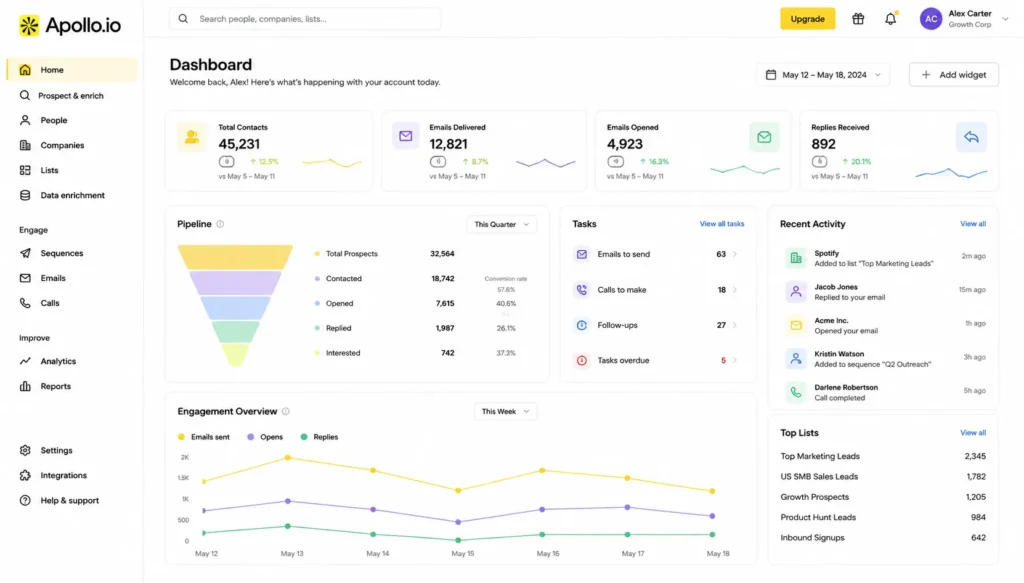
Apollo.io has a deep analytics suite. Most users glance at it occasionally. Top teams check it every week and make decisions from it.
The metrics that matter most:
| Metric | What It Signals |
| Open Rate | Subject line effectiveness |
| Reply Rate | Email body and offer quality |
| Bounce Rate | List cleanliness (keep under 3%) |
| Positive Reply Rate | Are you reaching the right people? |
| Step Performance | Which sequence email generates the most response |
How to use it: Not only track team-level numbers. Dig into individual sequence steps. If Step 4 receives three times the replies of Step 1, your opener might be too aggressive. If bounces creep above 3%, stop the sequence and clean your list before going ahead.
For sales managers, the rep-level view is a coaching goldmine— not for judgment, but to see what your top performers are doing that others aren’t, and replicate it.
Tip 10: Combine Apollo.io with LinkedIn for Full-Stack Prospecting
Two Channels Beat One, Each Time
Cold email alone has diminishing returns. LinkedIn alone moves slowly. Combining Apollo.io with disciplined LinkedIn activity creates a multi-channel presence that’s hard for busy buyers to miss.
A simple system that works:
- Day 1: Apollo.io sends Email 1, sends a LinkedIn connection request the same day (no pitch in the note).
- Day 6: Apollo.io sends Email 2, if connected on LinkedIn, sends a short message referencing the email.
- Day 10: Comment genuinely on a prospect’s LinkedIn post, stay visible without being pushy.
- Day 14: Apollo.io sends the breakup email, try a LinkedIn voice note if still no reply (novelty alone drives opens)
The Apollo.io Chrome extension makes switching between these channels seamless. You’re not bouncing between five tools— it all flows from one hub.
Apollo.io Pricing Breakdown 2026
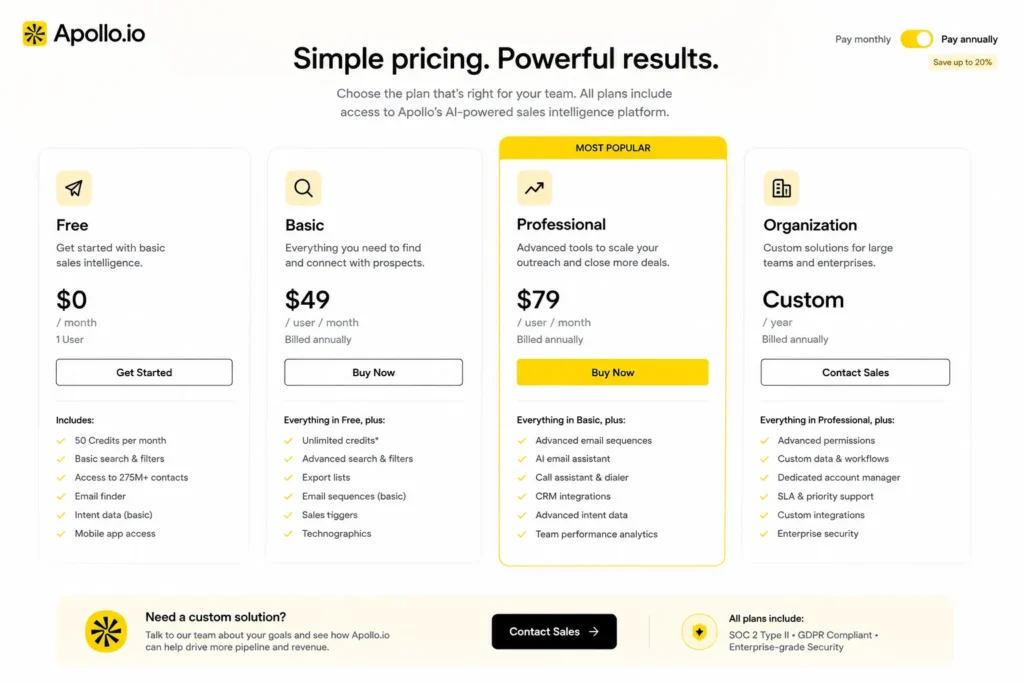
Apollo.io pricing is one of the most searched topics on the platform, so here’s a brief overview:
| Plan | Price | Best For | Notable Features |
| Free | $0/month | Founders, early testing | 10 exports/month, basic sequences |
| Basic | $49/user/month (annual billing) | Small outbound teams | 1,000 exports/month |
| Professional | $79/user/month (annual billing) | Growing sales teams | Unlimited exports, A/B testing, AI tools |
| Organization | $119/user/month (annual billing, minimum 3 seats) | Enterprise teams | Advanced reporting, SSO, custom limits |
The Professional plan is where most serious teams land. Apollo.io’s all-in-one pricing is truly competitive when compared to buying ZoomInfo + Outreach + a data enrichment tool separately. The free plan is a genuine free plan to try before committing.
Conclusion
Apollo.io is only as powerful as the strategy behind it. Teams that merely use it passively, drop contacts in a basic sequence and hope, see mediocre results. Teams who build smart lists, layer multi-touch sequences, sync their CRM properly, test their messaging, and let analytics drive decisions make a real, consistent pipeline.
Start with two or three tips from this guide. Get those right. Then layer in the rest. Apollo.io rewards teams that use it with intention, and the returns compound quickly when you do.
Frequently Asked Questions (FAQs)
Q. What is Apollo.io used for?
A. Apollo.io is a B2B sales intelligence and engagement platform for finding verified prospect contacts, building outreach lists, automating email sequences, and tracking campaign performance, all in one place.
Q. Is Apollo.io free?
A. Yes. Apollo.io has a free plan with limited exports and features. Paid plans unlock more limits, AI personalization, full CRM sync, and advanced analytics.
Q. How accurate is Apollo.io’s data?
A. Data accuracy is very good compared to most B2B databases and email verification is built-in. No platform is 100% accurate, you must always monitor bounce rates as your real-time signal.
Q. What are the best Apollo.io features for sales teams?
A. Advanced list filtering, AI email personalization, multi-touch sequences, CRM sync, intent data, and the analytics dashboard. Teams using all six have dramatically better results than those using it only as a contact database.