 Shikha Kumari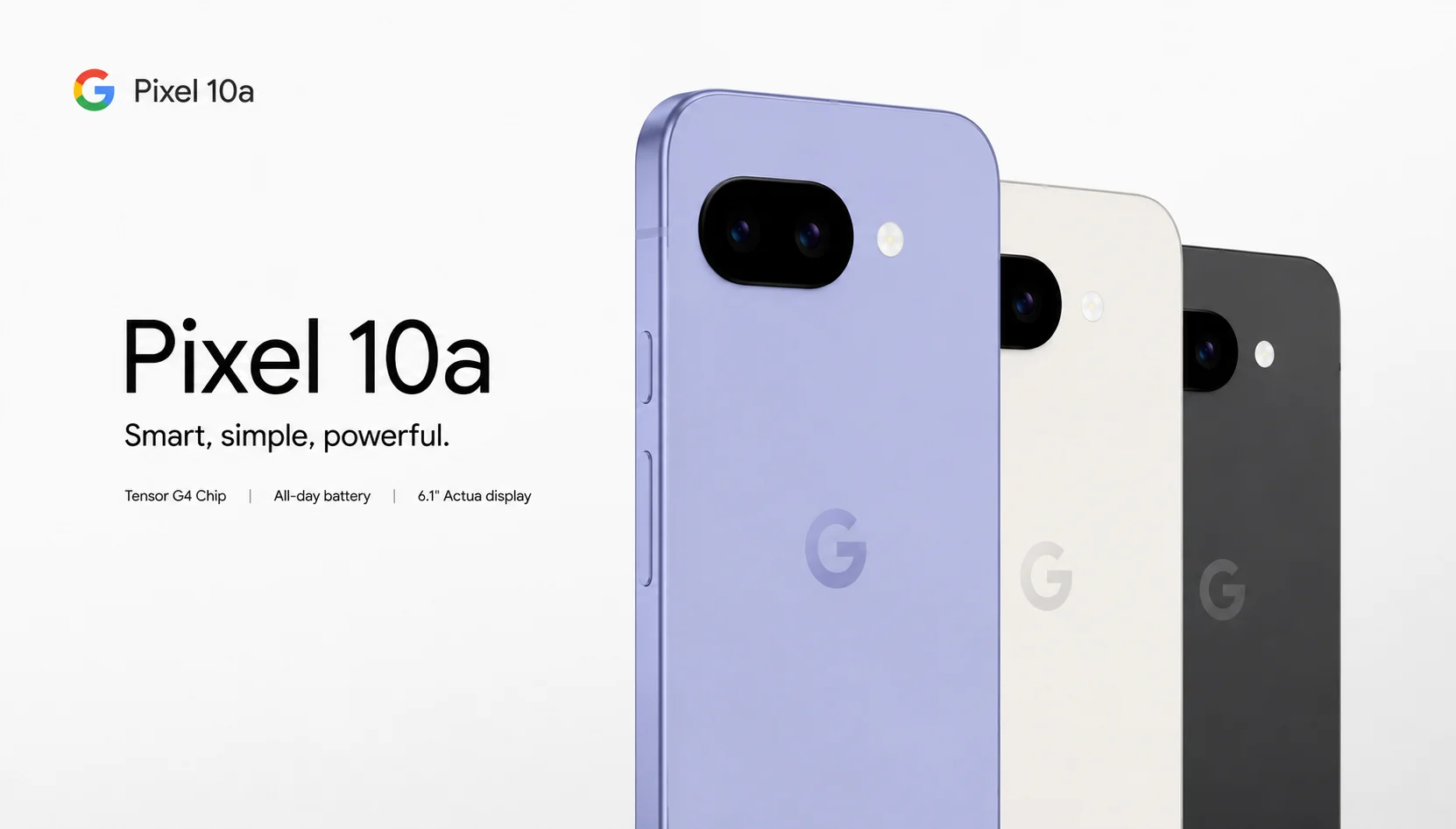
Budget phones usually force you to choose: good camera or good battery. Smooth software or a screen that doesn’t feel cheap. The Google Pixel 10a is Google’s answer to that trade-off for 2026, and after reading through hands-on impressions from reviewers who have actually used it on a daily basis, you can tell that it isn’t trying to be flashy. It’s trying to be the phone you stop thinking about, because it just works.
When you’ve been Googling “Google Pixel 10a review” at midnight to decide whether it’s worth your money, this guide puts everything that matters out there: the camera, the battery, the display, the price and the honest trade-offs nobody puts in the headline.
What’s New in the Google Pixel 10a
Google announced the Google Pixel 10a on February 18, 2026. It will be released in the market on March 5. On paper, it is just a small change but a few are improvements on everyday use:
- A completely flush rear camera housing so that the phone is flat on a table and not wobbling when you press the screen.
- A brighter 6.3-inch pOLED display (about 11% more luminous than the Pixel 9a).
- 45W charging is finally here, and very close to what a few competitors have been able to offer for a few years.
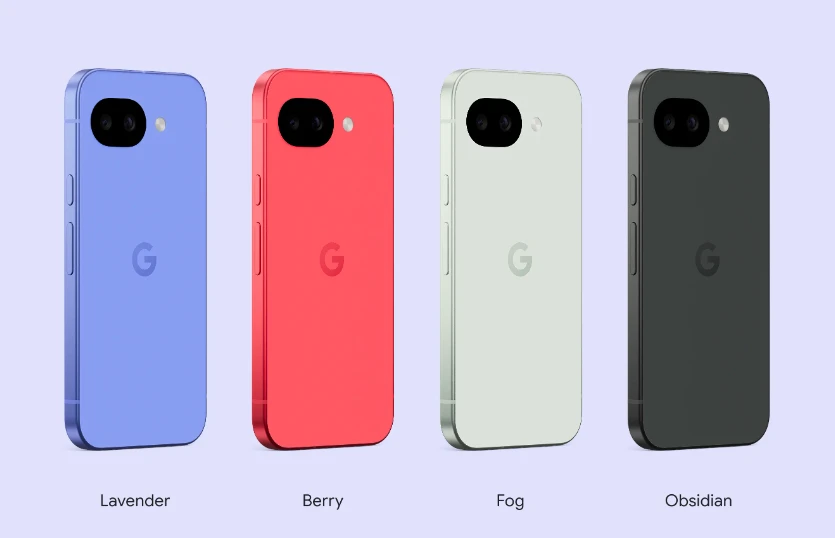
- New Obsidian, Fog, Lavender, and Berry color options.
- The same Tensor G4 chip and Titan M2 security chip as before.
None of these are headline-grabbing on their own. Taken together, they make for a phone that feels more polished without Google raising the price a single dollar. And that last point matters more this year than usual because 2026 has been a rough year for phone pricing industry-wide, with a global memory chip shortage driven by AI hardware demand pushing component costs up across the board. Google holding the line at $499 while competitors quietly raise prices is arguably the most understated “new feature” of this generation.
It’s also worth zooming out for a second. The A-series has always been Google’s way of getting flagship ideas down to a price normal people can justify. The Google Pixel 10a doesn’t reinvent that formula, it refines it, tightening up small annoyances that long-time Pixel A-series owners have grumbled about for years, like the wobbly camera bump and the underwhelming charging speed.
Google Pixel 10a Design and Build Quality
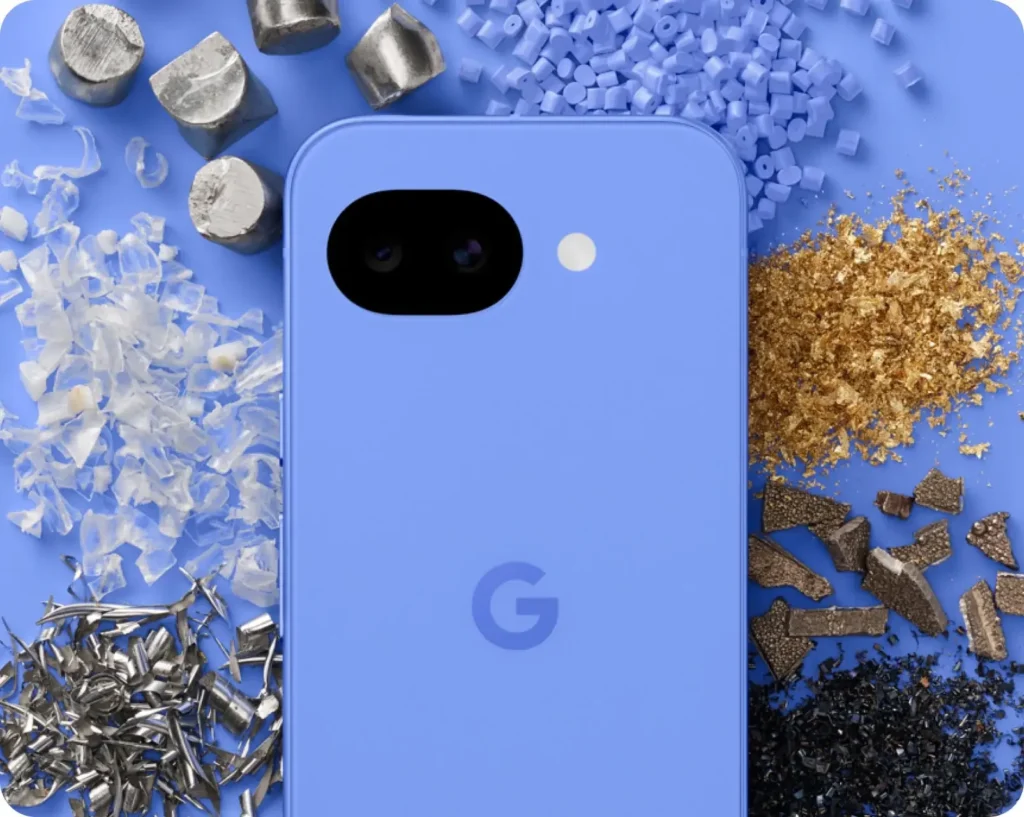
If you pick up the Google Pixel 10a, the first thing you notice is that it’s flat in your hand— no camera bump digging into your palm, no rocking when it’s face-up on a desk. Google achieved this by recessing the camera glass behind the plastic back panel instead of letting it protrude, and it’s a small design change that makes a big difference in the way people work with it. If you’ve ever gotten irritated by the fact that your phone seesaws every time you type a text on a flat surface, you will see why this small tweak deserves its own section.
The build itself is holding up well for the price:
- Gorilla Glass 7i on the front.
- An aluminum frame for rigidity.
- A plastic rear panel (don’t let that word scare you, it doesn’t feel cheap in hand, and it actually helps keep the phone lighter).
- IP68 water and dust resistance, rated for full submersion up to 1.5 meters for 30 minutes.
At 183 grams and just 9mm thick, it is light enough for one-handed use without appearing flimsy. And Google is offering it in four colorways this year: Obsidian for the traditional all-black look, Fog for a muted grey-blue, and Lavender and Berry for people who want their phone to actually stand out on a table full of black rectangles. The color choices are not simply cosmetic fluff; they show Google still sees the A-series as a lifestyle device— not just a spec sheet with a lower price tag.
One small but very real quality-of-life detail: because the back is completely flat, wireless charging pads and MagSafe-style accessories sit flush against the phone rather than rocking on the camera bump, which is a common frustration with rival budget phones.
Google Pixel 10a Display: What You Actually See Every Day {#display}
The Google Pixel 10a has the same 6.3-inch size as its predecessor but is brightening even more with 2000 nits of high-brightness mode and a 3000-nit peak, something that sounds more than it does when you’re trying to read a text message in direct summer sun. Screen brightness is one of those specs that sounds abstract until you’re out on the street at noon and squinting at your phone, unable to read a simple notification. The Google Pixel 10a mostly gets over that problem.
| Feature | Google Pixel 10a |
| Panel type | P-OLED, HDR |
| Refresh rate | 60Hz–120Hz adaptive |
| Resolution | 1080 × 2424 px |
| Pixel density | 422 ppi |
| Peak brightness | 3000 nits |
| Aspect ratio | 20.2:9 |
The adaptive 120Hz refresh rate means that the screen scales down its refresh rate when you just read static content, which boosts battery life, and ramps up when you’re scrolling through social media or gaming, which keeps everything feeling fluid. For streaming, scrolling, and daily browsing, it’s a screen that genuinely competes with phones costing twice as much. Colors are punchy without getting too saturated and cartoonish as some budget OLED panels do, and viewing angles are good enough even in extreme tilts.
Google Pixel 10a Performance: Tensor G4, Real Talk
This is where the Google Pixel 10a gets back to its budget roots, and it’s better to be clear about it than gloss over it. The phone runs the same Tensor G4 chip and 8GB of RAM as the Pixel 9a. Reviewers who spent a lot of time with the phone reported a few stutters in demanding apps, slower game frame rates than flagship phones, and a camera app that takes a beat to wake up when idle.
If your daily habits are messaging, social media, streaming, and photography, you probably won’t notice any of this. If you’re a mobile gamer seeking high frame rates, this isn’t the phone for that job, and really, at this price point, it was never meant to be. Google has always presented the A-series as the “does everything reasonably well” phone versus the “does everything exceptionally” phone, and the 10a doesn’t break from that tradition.
It’s also worth noting that raw benchmark numbers can only tell part of the story with Pixels. Google is heavily reliant on software optimization for software integration (such as predictive app loading, background task management, and AI-assisted memory allocation) to make the phone feel better than its spec sheet might imply on paper. In reality, most people who are using messaging apps, browsers, and social media won’t go to the level where the Tensor G4 starts to show its age. It’s only heavier multitasking or graphically daunting games that can show the gap.
Google Pixel 10a Camera: The Real Reason Most People Buy an A-Series Pixel
The camera hardware of Google Pixel 10a is essentially the same as Pixel 9a:
- Main camera: 48MP, f/1.7 with optical and electronic image stabilization.
- Ultra-wide: 13MP, f/2.2, 120-degree field of view.
- Selfie camera: 13MP.
There’s no telephoto lens so don’t expect optical zoom beyond digital cropping. What has changed is the software layer built on top of it; Camera Coach, Macro Focus, and Auto Best Take are now available on the 10a, tools that were previously reserved for pricier Pixels.

But for everyday photography, food, pets, kids, sunsets, group photos, the computational photography Google is known for still shines here. Skin tones are natural, low-light shots hold detail without becoming a smudgy mess, and portrait mode edges are cleaner than you’d expect from a $499 phone.
We should be aware of a few camera details before we buy:
- Camera Coach actively suggests framing adjustments in real time, and that is really helpful if you are not very confident behind the lens.
- Auto Best Take takes burst shots of group photos and picks the frame where everyone’s eyes are open, which is a small thing that saves a lot of frustration.
- Macro Focus allows you to get close-up details on small objects, flowers or text without the need of a macro lens.
- Night Sight is one of the best low-light modes in the budget category and holds onto detail in shadows without blowing out highlights.
The biggest limitation to be noted is the lack of a telephoto lens. If you frequently shoot distant subjects, concerts, wildlife, sports from the stands, you will notice the difference in image quality once you crop in digitally versus phones with true optical zoom.
Google Pixel 10a Battery Life and Charging
The 5,100mAh battery is one of the quieter wins of this generation. Together with the efficiency of the Tensor G4, most users report getting through a full day of moderate to heavy use without having to hunt for a charger by dinnertime. For lighter users, checking messages, browsing occasionally, streaming music during a commute, squeezing out a day and a half between charges isn’t unrealistic.
Charging finally gets a significant bump too, as 45W wired charging shaves real time off topping up compared to the Pixel 9a. Just know that Google, like always, includes only a USB-C cable in the box and not a charging brick, so you will need your own fast charger to actually hit that speed. If you’re upgrading from an older Pixel, check if your current charger is compatible with 45W output, i.e. plugging into an older 18W brick will still work, it will just take considerably longer.
Wireless charging is also supported (but at a lower wattage than wired, which is quite standard in this price category).
Google Pixel 10a Software and Android 16
The Google Pixel 10a ships with Android 16 out of the box and is promised up to 7 years of major OS upgrades, a completely unheard of commitment in the budget phone industry where most devices get three or four. This is perhaps the most underrated piece of the spec sheet in terms of how long the phone remains secure, fast, and usable before you’re forced into another upgrade cycle.

You also get the full suite of Pixel-exclusive AI tools:
- Gemini AI integration across the system, from writing assistance to smart replies.
- Circle to Search, allowing you to search anything on your screen without switching apps.
- Call Screen and Hold For Me, which quietly handle two of the most annoying parts of owning a phone: spam calls and being stuck on hold.
- Google Wallet with reliable tap-to-pay performance.
This software longevity is probably the single biggest reason to choose the Google Pixel 10a over similarly priced Android competitors, you’re not just buying a phone, you’re buying half a decade of updates, security patches and new AI features that will roll out well after phones from other budget brands stop receiving support entirely.
Google Pixel 10a Connectivity and Everyday Reliability
It’s easy to overlook the connectivity specs until they cause a problem and the Google Pixel 10a quietly gets this right. It enables global 5G (including Sub-6GHz) and 4G LTE on both a physical nano-SIM slot and eSIM, Wi-Fi 6E with 2×2 MIMO, Bluetooth 6 with improved antenna diversity for steadier connections, and NFC for contactless payments.
The phone has a USB 3.2 Type-C port for faster data transfer and external display output— an excellent little addition if you do need to back up photos quickly or plug into a monitor. Stereo speakers also make it work, the earpiece serves double duty as a second speaker channel during media playback, and calls and videos sound more full than the single speakers in cheaper phones.
Google Pixel 10a vs Pixel 9a: Should Existing Owners Upgrade?
But there’s a short answer: probably not. The changes here are real, but incremental— brighter screen, faster charging and flatter camera housing are not a compelling argument to drop a good Pixel 9a. Hold onto the one that you own and wait for the next one, or at least wait until your phone starts to slow.
Where the Google Pixel 10a does make sense is if you’re coming from an older Pixel (8a or earlier), switching to iOS or leaving Samsung behind without wanting to spend flagship money. In those cases, the improvements stack up meaningfully against a two- or three-year-old device, despite them looking modest compared to the 9a specifically.
Google Pixel 10a vs the Competition
In 2026, budget and mid-range Android phones are a crowded field so it’s better to put the Pixel 10a in context rather than judge it in isolation.
As opposed to the low-budget Samsung Galaxy A-series phones, the Google Pixel 10a generally wins on camera software and update longevity, while Samsung has slightly better raw performance on some configurations. When compared to budget phones like the iPhone 17e, the Pixel 10a is a better choice with its dual rear cameras and a higher refresh rate display, even with Apple’s ecosystem integration as a draw for some buyers.
The Google Pixel 10a is where the update commitment is always present. Seven years of major OS upgrades is much longer than what most competitors offer at any price point, let alone this one. If you’re going to hold onto phones for a long time, not upgrade every year or two, that’s more than the small difference in benchmark scores or camera zoom range.
Google Pixel 10a Price and Where to Buy
| Storage | Price |
| 128GB | $499 |
| 256GB | $599 |
Google has kept the starting price identical to the Pixel 9a, which is notable given the general memory chip shortages affecting pricing across the phone industry in 2026. Look for carrier promotions and trade-in deals — Google regularly discounts this phone within months of launch, so patience can save you real money. Bundles also frequently pair the Google Pixel 10a and Pixel Buds for a reduced combined price, especially during peak shopping times.
If you’re buying through a carrier, compare the total cost against buying unlocked directly from Google or a major retailer, carrier financing sometimes hides extra fees or requires a specific plan to unlock the advertised discount.
Accessories Worth Considering
If Google doesn’t provide a charging brick in the box, a 45W USB-C PD charger should be the first accessory on your list if you want to actually use the phone’s improved charging speed. Beyond that, a few other accessories are worth considering:
- A clear or slim case: as the back is now flat, most cases sit flush without the awkward camera bump cutout that other phones need.
- A screen protector, even with Gorilla Glass 7i, if you’re prone to dropping your phone face-down on hard surfaces.
- Pixel Buds 2a, which Google often bundles with the 10a at launch, offering solid everyday earbuds without a huge added cost.
- A USB-C to USB-C cable rated for fast charging, since the included cable is functional but basic.
None of these are actually necessary, but they round out the ownership experience and help you get full value out of the hardware improvements Google made this year.
Tips to Get the Most Out of Your Google Pixel 10a
A few practical tips based on how the phone’s features actually behave in daily use:
Enable adaptive battery and adaptive brightness in settings right away, both help stretch battery life without noticeably affecting usability.
Use Camera Coach when shooting anything important, like event photos or portraits, since it actively helps with framing in real time.
Set up Call Screen if you deal with frequent spam calls, it’s one of the most genuinely useful Pixel-exclusive features and often gets overlooked.
Check your charger’s wattage before assuming you’re getting the full 45W speed; an older charger will still work but noticeably slower.
Take advantage of the seven-year update promise by not rushing to upgrade, this phone is built to stay current far longer than most budget devices.
Who Should (and Shouldn’t) Buy the Pixel 10a
Buy it if you:
- Want a reliable camera without flagship pricing.
- Value long-term software support over raw speed.
- Are upgrading from a Pixel 8a, older Android phone, or switching from iOS.
- Care about battery life lasting a full day without babysitting it.
- Want a phone that will still feel current several years from now.
Skip it if you:
- Already own a Pixel 9a. Need top-tier gaming performance.
- Want a telephoto zoom lens.
- Are chasing the fastest possible chip on a budget.
Final Verdict
The Google Pixel 10a isn’t trying to win benchmark charts. It’s trying to be the phone that gets you a great camera, a display that holds up in daylight, a battery that lasts, and years of software support, all for $499. For anyone shopping in the budget-to-mid-range Android space in 2026, that combination is hard to beat, even with the performance ceiling that comes with the territory.
If raw speed matters most to you, look elsewhere. If you already own a Pixel 9a, there’s no urgency to switch. But if you want a phone that quietly does its job well for years, backed by one of the longest software support commitments in the industry, the Google Pixel 10a earns its spot on the shortlist.
Frequently Asked Questions (FAQs)
1. Is the Google Pixel 10a worth buying in 2026?
A. For most everyday users, messaging, social media, casual photography, streaming, yes. The camera quality and seven years of software updates make it one of the better value picks in its price bracket, especially given how stable Google kept pricing despite industry-wide component cost increases.
2. How does the Google Pixel 10a camera compare to the Pixel 10 Pro?
A. The 10a uses the same core sensors as the standard 9a lineup and lacks a telephoto lens, so it can’t match the Pro’s zoom capability. For standard daylight and low-light shots, the gap is much smaller than the price difference suggests.
3. Does the Google Pixel 10a support fast charging?
A. Yes, it supports 45W wired charging, though Google only includes a USB-C cable in the box, you’ll need to supply your own compatible charger to reach top speed.
4. How long will the Google Pixel 10a receive software updates?
A. Google has committed to up to seven years of major Android upgrades, matching the support window of its flagship Pixel 10 series and outpacing most competitors at any price point.
5. Is the Google Pixel 10a a good upgrade from the Pixel 9a?
A. Not really. The improvements are minor, better brightness, faster charging, flush camera design, but not significant enough to justify replacing a working 9a. It makes far more sense as an upgrade from an older Pixel or a different brand entirely.