 Shikha Kumari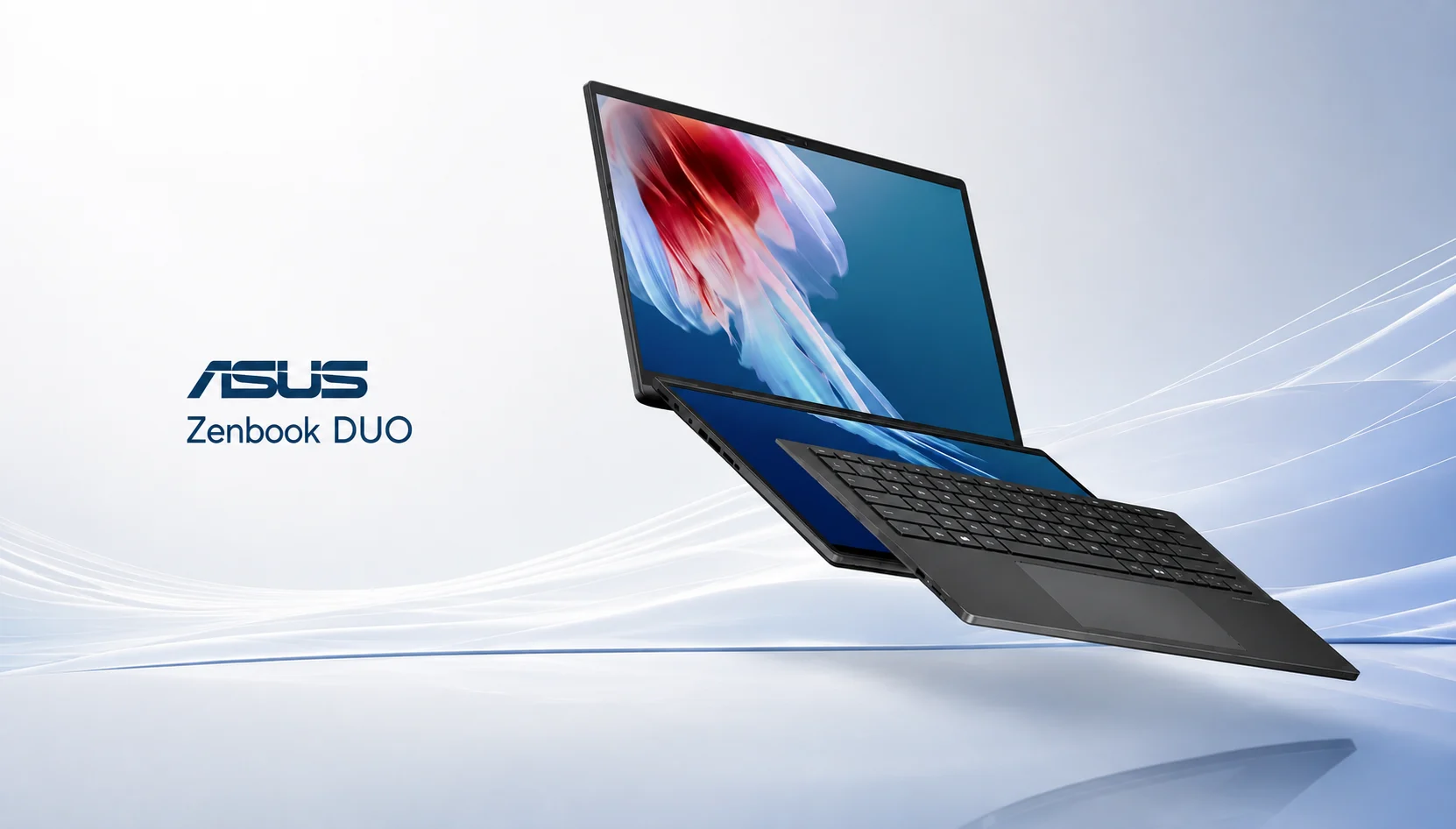
You know the setup. One window holds your research, the other holds the thing you’re building from that research, and you spend the day flicking your eyes between two monitors bolted to a desk. Then you travel, and that second screen vanishes. The ASUS Zenbook DUO is a solution to that frustration by folding a second full OLED panel into a laptop you can slip into a backpack.
ASUS redesigned the machine for 2026 around Intel Panther Lake chips, a bigger battery and a tighter hinge. The question then is not whether two screens are useful. The question then is whether this version is going to be able to deliver its $2,300 price tag. Here we review the specs, the real-world battery numbers, keyboard quirks, how it compares with the MacBook Air, and who should buy one.
Pros and Cons
Pros
- Two color-matched 14-inch OLED panels that serve as one clean workspace.
- Battery life that finally makes dual-screen practical, up to 14 hours.
- Powerful Arc B390 graphics in the top configuration.
- User-replaceable SSD behind a simple access panel.
- Premium Ceraluminum build with a tighter, book-like hinge.
Cons
- High-end price at $2,099 and rising fast.
- The detachable keyboard feels mushy for long typing sessions.
- Heavier than a standard 14-inch ultrabook.
- Fully equipped with ASUS bloatware and promotional apps out of the box.
- The webcam is fine but soft, which stings at this price.
What Makes the ASUS Zenbook DUO Different
Most laptops give you one screen and ask you to alt-tab your way through a busy day. The ASUS Zenbook DUO gives you two 14-inch OLED panels stacked one above the other, with a detachable keyboard that either magnetizes over the bottom screen for a normal laptop feel or lifts away over Bluetooth so both displays face you at once.
That second mode is the whole point. Prop the machine on its built-in kickstand and pull out the keyboard, and you get a portable dual-monitor workstation. A coder can keep documentation up top and the editor below. A writer can research on one panel and write on the other. A trader can watch charts above and read news below.
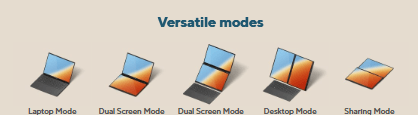
It’s not a new concept for ASUS. The company has shipped a ASUS Zenbook DUO every year since 2024, and each version of that had a different awkwardness, and each iteration made the difference to it. The 2026 model, sold as UX8407, is the first one where the compromises feel small enough to recommend without a long list of caveats.
ASUS Zenbook DUO specs
Here are the ASUS Zenbook DUO specs for the configuration most reviewers tested, the top-tier Core Ultra X9 388H build [Source: Tom’s Hardware, Jan 2026]:
| Component | Specification |
| Processor | Intel Core Ultra X9 388H (16 cores, 5.1 GHz max turbo) |
| Graphics | Intel Arc B390 (integrated, 12 Xe cores) |
| Memory | 32GB LPDDR5x-9600 |
| Storage | 1TB PCIe Gen 4 M.2 SSD (user-replaceable) |
| Displays | Dual 14-inch, 2880 x 1800, Lumina Pro OLED touch, 48–144 Hz, HDR True Black 1000 |
| Networking | Wi-Fi 7, Bluetooth 5.4 |
| Ports | 2x Thunderbolt 4, USB 3.2 Gen 2 Type-A, HDMI 2.1, 3.5mm audio |
| Camera | 1080p webcam with IR for Windows Hello |
| Battery | 99 WHr |
| Charging | 100W USB-C |
| Weight | 3.64 lb (1.65 kg) with keyboard, 2.98 lb (1.35 kg) without |
| Dimensions | 12.21 x 8.21 x 0.92 inches |
| OS | Windows 11 Home |
ASUS Zenbook DUO Design, Build, and Weight
Open the lid, and the 2026 redesign appears instantly. ASUS put the two OLED panels closer together and hid the hinge, so unfolding the machine feels closer to opening a book than prying apart two tablets. The gap between the screens shrank, which matters when you drag a window from the top display to the bottom.

The chassis is made with a material ASUS calls Ceraluminum, aluminum with a ceramic-like texture that resists smudges and light scratches. Reviewers say it is smooth and strong and no flex in the lid [Source: Club386, Feb 2026]. It looks like a premium object and holds up to daily handling.
Weight is where you pay for the second screen. With the keyboard attached, the ASUS Zenbook DUO tips the scales at 3.64 pounds. With the keyboard off, it is only 2.98 pounds. For a 14-inch machine, neither is light. A MacBook Air 13 weighs 2.7 pounds and doesn’t have a second display, so as soon as you lift it, you feel the difference.
The Kickstand Trade-Off
A kickstand folds out from the bottom to prop both screens up in portrait or landscape. It works, but it adds thickness to the base, and using the machine as a plain laptop means resting your palms on a chassis that is a little tall. In stacked landscape mode, the stand feels solid. Rotate to side-by-side portrait, and it gets tippy unless you set the angle with care.
The ASUS Zenbook DUO Dual OLED Display
The screens are the main reason to buy this laptop, and they work. Each 14-inch panel runs at 2880 x 1800 with a 144 Hz refresh rate, deep OLED black levels, and HDR True Black 1000 certification. Scrolling feels smooth, and the video looks rich thanks to per-pixel lighting that LCD panels do not.
Color coverage lands in creator territory. The top panel is 123% of sRGB and 87% of DCI-P3 by volume, while the bottom panel does not get close enough to that that the difference is invisible for normal use. Both screens have roughly 435 to 455 nits of brightness that can be used in office lighting and shaded outdoor use but won’t be exposed to direct sunlight.
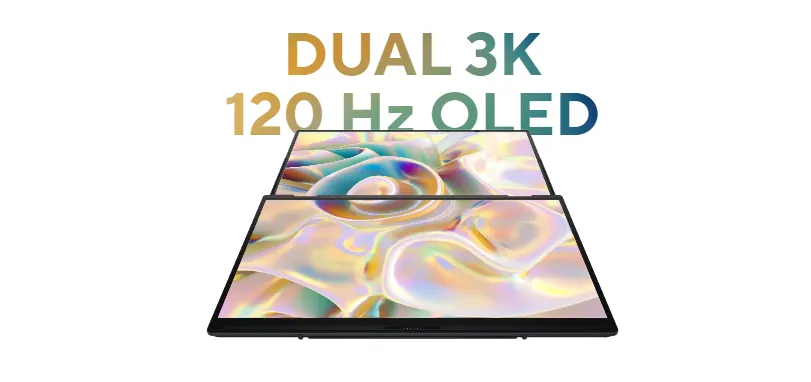
The 2026 coating cuts reflections better than past models without going completely matte. The one real complaint is the thick bezel above the top screen, which looks dated next to the slim borders on other ultrabooks.
Here is what most reviews miss: the two panels are color-matched from the factory. On the dual-screen laptops in the past, a subtle tint difference between displays made a continuous workspace out of sight for any colorist, and it frustrated anyone doing color work. ASUS solved that this year. And if you edit photos or grade video on both screens, that consistency does not leave you to second-guess colors for good or for bad.
ASUS Zenbook DUO Performance: Processor, RAM, and Storage
The ASUS Zenbook DUO 2026 is one of the first machines to ship with Intel’s Core Ultra series 3, which Intel designed under Panther Lake. The top chip, Core Ultra X9 388H, has 16 cores and a 5.1 GHz turbo, built on Intel’s 18A process.
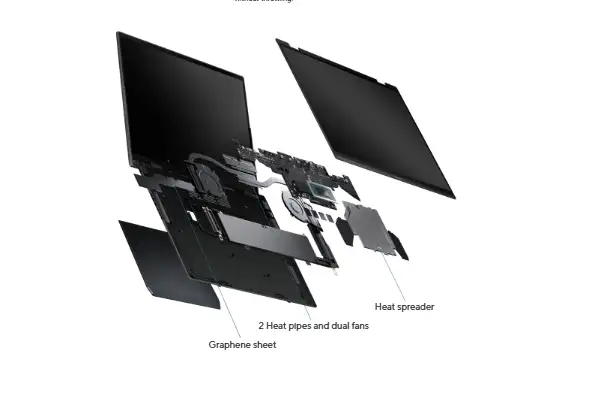
Raw Speed
The machine also did a single-core score of 3,031 and a multi-core score of 17,283 on Geekbench, beating the last-generation Intel H-series, Qualcomm’s Snapdragon X Elite, and AMD’s Ryzen AI 9 HX 375 [Tom’s Hardware, Jan 2026]. Apple’s M5 still leads in single-core work, so a MacBook is still faster for things that depend on one thread. For daily productivity on dozens of tabs and apps, the Zenbook is up to any high-end laptop.
The GPU Story
But the bigger leap is graphics. The X9 388H has an integrated Intel Arc B390 GPU with 12 Xe cores and scored 13,581 in 3DMark Fire Strike, better than the AMD-based competition (8,557 AMD). It even ran Microsoft Flight Simulator 2024 at playable frame rates on low settings and was able to run it even with Microsoft Flight Simulator 2024. That makes light gaming and video editing realistic on a system you’d never call a gaming machine.
RAM and Storage
The review unit shipped with 32GB of fast LPDDR5x-9600 memory and 1TB PCIe Gen 4 SSD. The memory is soldered, so choose your capacity at checkout and treat it as final. But the storage is situated in a single access panel on the kickstand that is held by two Torx screws. You can replace it and get yourself a bigger M.2 2280 drive and skip Asus’s upgrade markup. These are a few high-end laptops that can handle storage that is easy to service.
ASUS Zenbook DUO Battery Life: The Real Surprise
Two OLED screens should drain a battery fast. That’s the reasonable assumption, and it’s why the 2026 numbers caught reviewers off guard.
In Tom’s Hardware testing, with one screen active and the other covered by the keyboard, the ASUS Zenbook DUO lasted 14 hours and 23 minutes. With both screens mirrored and running, it still managed 11 hours and 5 minutes. Double-digit hours from a dual-screen laptop was not possible a couple of years ago.
The credit goes to a component buyers rarely check: the battery jumped from 75 Whr on the 2024 model to a massive 99 Whr this year, the kind of cell you usually find in gaming laptops. Combine that with the efficiency of Intel’s new chip, and the math works out. Charging tops up over USB-C at 100W, and a Stuff review clocked more than 60% in an hour from a standard power brick.
This is the quiet upgrade that transforms the sector. This is what the guides say is the best screen; they’re all about the screens, but the screens were already good last year. The 99 WHr battery is what transforms the ASUS Zenbook DUO from a desk toy to a machine you can run all day away from an outlet.
ASUS Zenbook DUO Keyboard and Touchpad
The detachable keyboard is clever and imperfect. It has 1.7 mm of key travel, which sounds generous, but reviewers found the keys mushy and slow to rebound compared to the best laptop keyboards [Source: CGMagazine, Apr 2026]. You can still type fast on it. One tester hit 102 words per minute with the keyboard docked on the chassis. Lift it off to a desk, and typing accuracy dropped, because the keys sit lower and further away than a standard desktop board.
The touchpad is approximately 5 inches wide with edge gestures for volume, brightness, and media scrubbing. The gestures work, but many people will ignore them and reach for the function row instead. One warning: leave the gesture controls on, and they can interfere with typing until you disable them in ASUS software.
A practical note for travel. When you load the machine without the keyboard docked, a small gap opens between the two screens where dust can sneak in. Keep the keyboard attached in a bag, or use a sleeve.
ASUS Zenbook DUO Ports, Audio, and Webcam
Connectivity is better than most thin laptops manage. You will have two Thunderbolt 4 ports, a full-size USB 3.2 Gen 2 Type-A, HDMI 2.1, and a 3.5mm headphone jack. You can plug in an external display, a fast SSD, and a legacy USB device without having to look for a dongle. Wi-Fi 7 and Bluetooth 5.4 are the wireless.
The 6-speaker array, with four woofers and two tweeters, gets loud enough to fill a small room and puts vocals at the front of the mix. Music is clear, but when a track is playing drums and bass with a strong emphasis on the low end, the low end is lost. It works for calls, podcasts, and casual listening. For serious music work, put on headphones.
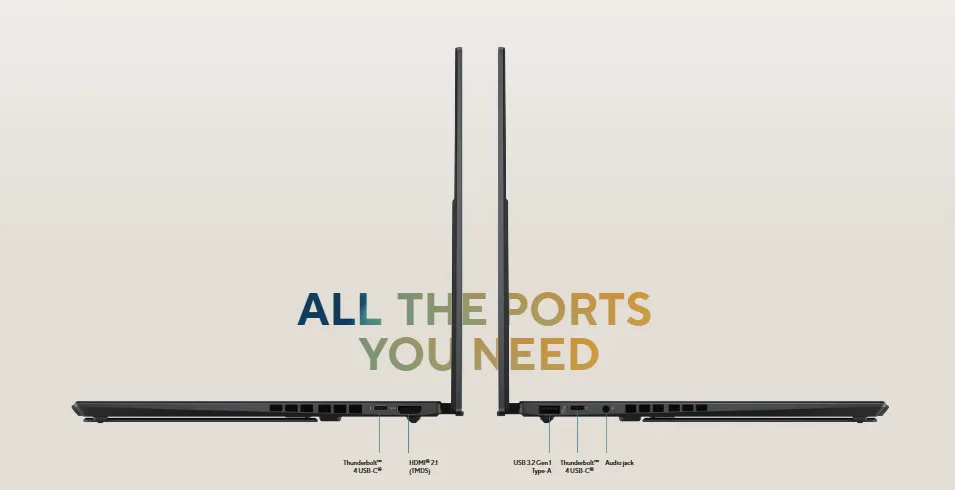
The 1080p webcam is the weak link. It supports Windows Hello face login through an IR sensor, which logs you in fast, but the image looks soft and struggles with fine details. A machine over $2,000 should ship a sharper camera. The only issue is if you’re in portrait screen mode, this webcam is on the left edge of the screen and does not rotate, so you have to switch to landscape for any video calls.
ASUS Zenbook DUO Price and Configurations
Price is the sticking point. In the US, the ASUS Zenbook DUO 2026 lineup looks like this:
- $2,099.99 for the Core Ultra 9 386H model with standard Intel graphics.
- $2,299.99 for the Core Ultra X9 388H model with 32GB RAM, 1TB storage, and Arc B390 GPU.
That top price runs about $500 over last year’s flagship. ASUS had pinned the rise on the ongoing RAM price crisis rather than pure margin, and UK pricing climbed the same way, landing around £2,099 to £2,499 depending on stock [Source: Club386, Feb 2026].
The two configurations should be looked at closely, since the difference is more significant than $200. The cheaper 386H model drops Arc B390 graphics, and the GPU is the most compelling reason to buy this generation. If you want gaming and video editing headroom, the X9 388H build is the one to buy. The 386H only requires two screens for documents and browsing and also works very well.
ASUS Zenbook DUO vs MacBook Air vs Lenovo Yoga
The ASUS Zenbook DUO cross-shopping is typically done with two competitors: the MacBook Air for pure portability and value and the Lenovo Yoga Book 9i as a dual-screen option.
| Feature | ASUS Zenbook DUO (2026) | MacBook Air 13 (M5) | Lenovo Yoga Book 9i |
| Screens | Dual 14″ OLED, 144 Hz | Single 13.6″ Liquid Retina | Dual 13.3″ OLED |
| Chip | Intel Core Ultra X9 388H | Apple M5 | Intel Core Ultra 7 255H |
| RAM (base) | 16GB (up to 32GB) | 16GB | 16GB |
| Weight | 3.64 lb with keyboard | 2.7 lb | 2.69 lb (no keyboard) |
| Battery (tested) | 11–14 hrs | Up to 18 hrs | 6 hrs 49 min |
| Starting price | $2,099 | $1,299 | Varies, often lower |
The MacBook Air wins on weight, battery, and price; it is $1,000 cheaper at the entry point, runs cooler, and lasts longer on a charge. And one screen. For most people who want a thin, fast, quiet laptop, the Air is the cheaper one.
The ASUS Zenbook DUO wins when a second screen changes how you work. The ASUS beats the Lenovo Yoga Book 9i in two ways in comparison: Its keyboard is a full-size slate that you can dock or detach, while Lenovo’s smaller keyboard covers less screen and pushes you towards a separate mouse. And the ASUS beat the Yoga on battery in our tests by 14 hours, with less than 7. If you are looking for two screens in a laptop, the ASUS Zenbook DUO is the one to buy.
Is the ASUS Zenbook DUO Worth It?
Worth is how you work.
If a second screen is the core of your day and you can’t travel enough, a portable monitor won’t cut it. Developers, video editors, financial analysts, and anyone who lives across multiple windows will get real value from bringing their dual-monitor setup in one bag. The battery now lasts long enough to make that setup usable on a train or in a coffee shop, and the graphics do creative work that used to require a heavier machine.
Skip it if you want a light laptop in your daily life, if your budget matters, or if you don’t use a second monitor in your office. One could get a MacBook Air or a single-screen Windows ultrabook that provides more speed and battery in the same dollar and less weight to carry.
One more piece of advice before you buy. You will spend the first hour of your day uninstalling promotional software ASUS bundles in and budget for a separate Bluetooth keyboard if you’re going to be using the laptop at a desk for hours at a time. Those two steps turn a good laptop into one that you are happy living with.
The Verdict
The ASUS Zenbook DUO 2026 is the first version of this laptop that stops feeling like an experiment. The color-matched OLED screens, the 99 WHr battery, and the Arc B390 graphics add up to a machine that does what earlier dual-screen laptops promised but couldn’t. The keyboard still lags the best in the class, the bloatware wastes your first hour, and the price will test your budget.
For the individual who works on two screens all day and won’t pack that setup when they go abroad, nothing else does that job this well. If that’s you, the top X9 388H configuration is the one worth buying, and it’s worth the money. For everyone else, a MacBook Air or a single-screen ultrabook will be better for less.
Your next step is to decide if you’re using a second monitor day to day. If so, check at the ASUS store and Amazon for pricing and stock at the moment, and if yes, then see how much or not it is price and stock is up and down because this generation has seen the supply move slowly through Q1 and prices change with it.
Frequently Asked Questions (FAQs)
Q. Is the ASUS Zenbook DUO good for gaming?
A. It handles light gaming, not AAA titles at high settings. The Arc B390 GPU on the top model ran Microsoft Flight Simulator 2024 on playable frame rates on low settings and achieved good 3DMark scores for an integrated chip. Treat it as a productivity laptop that can play games on the side, not a gaming laptop.
Q. How long does the ASUS Zenbook DUO battery last?
A. In testing, it lasted for about 14 hours with one screen active and 11 hours with both screens running. That is from a large 99 Whr battery, up from 75 Whr on the older model. Life in the real world depends on what brightness and workload to achieve.
Q. Does the ASUS Zenbook DUO come with a keyboard?
A. Yes. A detachable Bluetooth keyboard comes with the box. It magnetizes over the bottom screen for a normal laptop layout or lifts away so both displays face you. US units also include a stylus.
Q. Can you upgrade the RAM or storage on the ASUS Zenbook DUO?
A. The storage, yes. One SSD sits behind an access panel with two Torx screws so that you can add a larger M.2 2280 drive. The RAM is soldered to the board, so choose your memory size at purchase so you can’t change it later.
Q. Which laptop should I buy, the ASUS Zenbook DUO or the MacBook Air?
A. Choose the MacBook Air if you want the lightest, longest-lasting, most affordable on-the-go laptop with a single screen. Choose the ASUS Zenbook DUO if a second screen changes how you work and you need it while traveling. The Air costs about $1,000 less than the Zenbook, and you have a portable dual-monitor workstation.