
Let me be honest with you. When I first opened QuillBot a few years ago, I expected to get just another rewriting widget. The kind to paste text into and get back something that reads like a bad translation from another language.
What I was given instead was something that quietly became a part of my writing process every day.
The AI writing space is noisier than ever in 2026. ChatGPT, Gemini, Claude, Jasper— there is one new competitor for every day claiming to be the last tool you’ll need. And yet QuillBot is still standing out. With over 35 million writers worldwide trusting it, surely there is something very important to do here.
So, is QuillBot still worth it in 2026? Or is it getting overtaken by the generative AI wave?

This review covers everything: QuillBot pricing, all the key features, the latest updates 2026, how it compares to the competition, and exactly who should (and shouldn’t) pay for it.
So let’s break it down.
What Is QuillBot? A Quick Overview
QuillBot is an AI-powered writing enhancement platform based on one core idea: to make existing text better, faster.
As opposed to Jasper or ChatGPT, which make content from scratch, It is a tool for editing, rewriting and improving the text that already exists. Think of it as a co-pilot for your words. You have the ideas; QuillBot facilitates you in saying them more clearly, confidently, or academically when the situation demands it.
It’s used by:
- Students paraphrasing research without plagiarizing
- Content creators refreshing old copy or press releases
- Non-native English speakers polishing professional communications
- Businesses process high volumes of written content quickly
That has a freemium model and works on the web, iOS, Android, Windows, macOS, Chrome, even Microsoft Word and Google Docs.
QuillBot Features Breakdown (2026 Edition)
This is no longer just a paraphrasing tool. By 2026, it will be a whole writing suite with eight core tools packed into one dashboard.
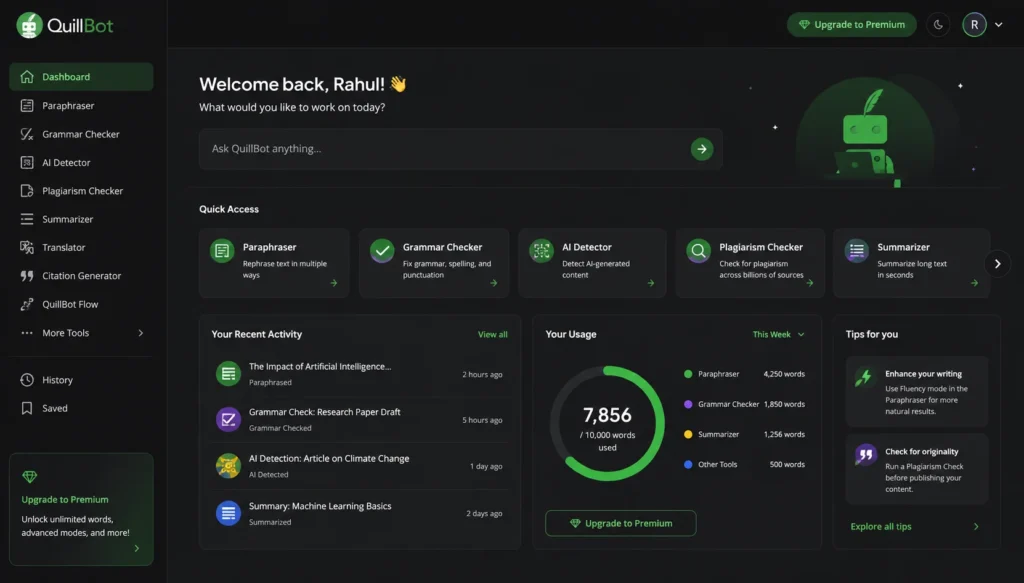
1. The QuillBot Paraphraser: The Core Engine
This is where QuillBot earns its reputation. The paraphraser offers seven different rewriting modes in the premium tier:
| Mode | Best For |
| Standard | Everyday paraphrasing |
| Fluency | Making text more natural |
| Formal | Professional and academic writing |
| Simple | Breaking down complex content |
| Creative | High-originality rewrites |
| Expand | Adding depth and detail |
| Shorten | Condensing verbose text |
| Academic (new) | Scholarly tone and structure |
The Creative mode, in particular, stands out; it doesn’t just swap synonyms, it restructures sentences entirely for maximum originality. Useful when you’re dealing with content that’s too close to a source.
Processing is fast. Genuinely fast. Even long paragraphs come back in seconds with no noticeable lag.
One major limitation: on complex or technically complicated text, QuillBot can sometimes smooth out nuances that you really wanted to keep. It doesn’t always understand domain-specific phrasing. Keep an eye on your output.
2. QuillBot Grammar Checker
The grammar checker works in real time and flags errors in punctuation, spelling, sentence construction, and clarity. This is good for general purposes.
But professional editorial teams already using robust CMS spell-checkers may find it redundant, as some G2 reviewers have noted in 2026.
3. QuillBot Plagiarism Checker
Only available on Premium and Team plans, the plagiarism checker scans up to 25,000 words per month and checks against an extensive database of online and academic sources. This alone can justify the subscription cost for students, researchers, and content managers.
4. QuillBot AI Detector
In a world where AI-generated content is increasingly being monitored, from academic institutions to search engines, QuillBot’s built-in AI Detector is quietly one of its most valuable features. It identifies whether the text is AI-generated and helps users verify content authenticity before publishing.
5. QuillBot AI Humanizer
Closely connected to the AI Detector, the AI Humanizer rewrites AI-generated content to sound more natural and human-paced. As more people draft with ChatGPT or similar tools and then need to finalize for publication, this feature addresses a real and growing need.
6. QuillBot Summarizer
Paste in a lengthy research paper, news article, or report and QuillBot distills it into a coherent summary, either bullet points or flowing paragraphs. The Custom Mode (2026) lets you decide what kind of summary you want, rather than simply accepting whatever the AI decides is important.
7. QuillBot Translator
The translation ability for several languages is present in this, which can be done in a language-rich system and is very useful in multilingual workflows, though not particularly impressive as compared to the features of more specialized translation tools.
8. QuillBot AI Chat & Image Generator
QuillBot has added conversational AI and basic image generation to the suite. These are more supplementary than central to the platform’s value, think of them as extras rather than reasons to subscribe.
QuillBot Pricing Plans Explained
And then, let us get to that which most people don’t know about: what does QuillBot cost, and is it worth paying for?
Free Plan: What You Actually Get
The free plan gives you a taste for QuillBot without spending a penny:
- Paraphraser: Up to 125 words per input
- Modes available: Standard and Fluency only
- Summarizer: Up to 1,200-word inputs
- Grammar Checker: Included
- Processing speed: Standard (slower than premium)
- Plagiarism Checker: Not included
The 125-word cap is the biggest friction point. Anyone working on longer documents will hit the wall quickly and find themselves splitting content into awkward chunks. It’s useful for testing the tool, but not a long-term solution for serious writers.
Premium Plan — Is It Worth the Upgrade?
The next step is to open QuillBot.
| Billing Period | Price |
| Monthly | ~$9.95/month |
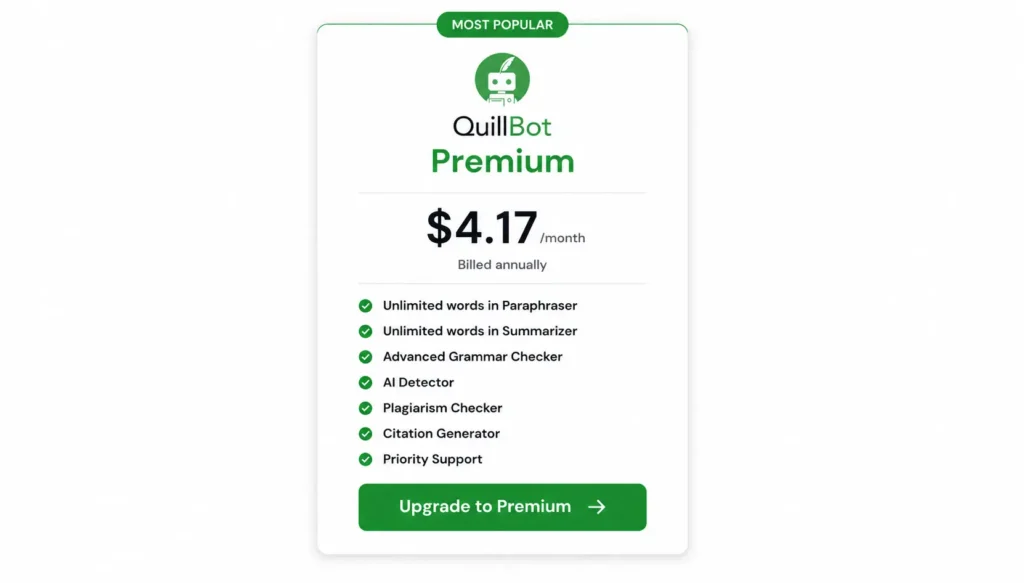
| Annual | ~$4.17/month (billed as ~$49.95/year) |
At the annual rate, QuillBot Premium comes out to roughly the cost of a couple of decent coffees a month. For what it delivers, that’s competitive.
Premium unlocks:
- Unlimited words in the Paraphraser
- All 7+ rewriting modes (including Creative, Formal, Academic, and Shorten)
- Full Summarizer access
- Plagiarism Checker (25,000 words/month)
- AI Detector
- AI Humanizer
- Faster processing
- Priority support
And for students, content freelancers, and editorial teams who need to process text quickly and at volume, the annual premium plan is almost certainly worth it. The break-even point comes down to how often you’d otherwise waste time manually rewriting or struggle with unclear prose.
Team Plan: Built for Groups
The Team Plan is suited for businesses, agencies and educational institutions. Pricing scales per user with the per-seat cost decreasing as team size increases – making it a genuinely cost-effective solution for larger groups.
Centralized billing, shared management tools, and the same premium-level access for every team member are team features.
QuillBot Updates 2026: What’s New?
QuillBot hasn’t been standing still. The 2026 update cycle had a number of interesting changes:
- Desktop App for macOS: This is now available for desktop (in comparison to browser-based version) and the Mac desktop app also allows for offline-like access and distraction-free writing.
- Academic Mode in the Paraphraser: designed for the writing of research papers with citation-appropriate language and tone.
- Custom Mode in the Summarizer: you can specify what type and focus of your summaries, rather than just rely on the AI to make the decisions for you.
- AI Humanizer for AI-generated written content is improved and provides a more natural writing style for different writing styles.
- AI models improved on QuillBot: QuillBot keeps improving the paraphrasing model to become better at contextually appropriate paraphrasing.
These updates indicate that QuillBot is actively serving its users in a market that moves very fast.
QuillBot Updates 2026: What’s New?
The writing tool market has never been more crowded. Here is how QuillBot compared to the biggest players in the industry as a whole:
Feature QuillBot Grammarly Jasper AI Wordtune Paraphrasing
| Feature | QuillBot | Grammarly | Jasper AI | Wordtune |
| Paraphrasing | Best-in-class, 7+ modes | Basic rewriting suggestions | Limited paraphrasing | Strong rewording, tone-focused |
| Grammar Checking | Good, covers most errors | Industry-leading, real-time | Minimal grammar tools | Moderate grammar support |
| Long-Form Content Generation | Not designed for this | Limited AI drafting | Purpose-built for long-form | Sentence/paragraph level only |
| AI Detection | Built-in detector included | Available on higher plans | Not available | Not available |
| Plagiarism Checker | Up to 25,000 words/month (Premium) | Available on Premium | Not available | Not available |
| Integrations | Chrome, Word, Google Docs, iOS, Android, macOS | Chrome, Word, Google Docs, iOS, Android | Web, API, Chrome | Chrome, Word, iOS, Android |
| Best For | Paraphrasing, editing & originality checks | Grammar correction & clarity | AI-generated long-form content | Rewording & tone adjustment |
| Annual Pricing | ~$4.17/month | ~$12/month | ~$39/month | ~$9.99/month |
| Free Plan | Yes (125-word limit) | Yes (limited) | No | Yes (limited) |
| Overall Verdict | Best value for rewriting & editing | Best for grammar-first writers | Best for content generation at scale | Best for quick tone rewrites |
The core takeaway:
- I choose QuillBot when I want fast, reliable paraphrasing, plagiarism detection, and AI content checking in one affordable package.
- I choose Grammarly when grammar, spelling, and clarity are my top few concerns.
- I selected Jasper AI for AI to produce long-form content from scratch.
QuillBot doesn’t intend to be Jasper; it’s doing a different job and it’s very specific, and so is it doing it well.
Who Should Use QuillBot? (And Who Shouldn’t)
QuillBot is a Good fit For:
- Students and academics: The plagiarism checker and Academic Mode paraphraser alone are worth the subscription cost for anyone writing essays, dissertations or research papers.
- Freelance content writers: Processing press releases, refreshing older content, and polishing client deliverables is much faster.
- Non-native English speakers: This is a fluency upgrade layer for non-native writers to get natural-sounding professional English.
- Newsrooms and editorial teams: reformatting wire content while maintaining editorial distinction and avoiding duplicate content penalties.
- Small businesses: polishing emails, proposals, and marketing copy without the budget for a dedicated editor.
QuillBot Is Not the Right Tool If:
- You need to generate original long-form content from a keyword or brief – for that, explore Jasper, ChatGPT or dedicated AI content platforms.
- You rely heavily on domain-specific technical language – QuillBot may smooth over precise terminology.
- You want advanced SEO writing workflows with keyword insertion and content briefs baked in.
Real User Reviews: What People Are Saying in 2026
The QuillBot user community feedback in 2026 paints a relatively consistent picture.
And positive sentiment is always in favor of the paraphrasing tool, particularly for high-volume editorial tasks. One product manager at a digital news site says the tool is key to editorial change in wire service content as quickly as possible and editorial difference is maintained.
Reviewers in HR and education management say it’s a good resource to get people to sharpen reports or communicate quickly, and with no training needed.
On the critical side, a common observation is that the grammar checker seems redundant for teams that already have strong editorial CMS tools. And the 125-word limit on the free tier is almost universally cited as the feature that pushes users towards upgrading, which, depending on your point of view, is either a bottleneck or a very effective conversion mechanism.
The overall rating for all major review platforms is around 4.4-4.5 out of 5, which is an excellent sign of the real satisfaction of users on a maturing SaaS product.
Is QuillBot Worth It? Our Honest Verdict
Here’s the straight answer: yes, for the right use case, QuillBot is absolutely worth it in 2026.
The annual Premium plan at about $4.17/month is one of the best value propositions in the AI writing tool space. You get unlimited paraphrasing, a multi-mode rewriting engine, plagiarism detection, AI detection and an AI humanizer all in one, clean interface.
The tool scores 8–8.5 out of 10 on independent review platforms in 2026. And that is not because it is perfect. It is because it does what it says it does and does it consistently and without friction.
Where QuillBot earns its price:
- The paraphraser is truly best in class for its specific function
- The all-in-one suite eliminates the need for multiple separate tools
- The pricing undercuts most comparable alternatives significantly
- The 2026 updates demonstrate ongoing development investment
Where you should manage expectations:
- It’s an editor, not a content generator
- Complex or highly technical text may lose nuance
- The free plan is quite limited, but the premium is priced accessibly
If you’re a student, content professional, or anyone who regularly handles large volumes of written text, This is one of the smartest per-dollar investments in your writing toolkit right now.
Conclusion
There is a reason that QuillBot has a strong base of 35+ million writers even as AI is increasingly competitive. It does one job better than almost anyone else: taking the words you already have and making them work harder, cleaner, and more effectively.
In 2026, with the addition of Academic Mode, the macOS desktop app, Custom Summarizer, and continued progress on its AI Humanizer, QuillBot is more complete and more capable than it ever has been.
Is it the right tool for every writer? No. If you are going to make original long-form content from scratch, then you are going to want something that was designed for that project.
But if you’re paraphrasing, editing, checking for plagiarism, or looking for an affordable all-in-one writing assistant that really does deliver on its promises, QuillBot is still one of the most valuable tools in your digital toolkit.
First, try the free plan. It’s enough to see if QuillBot fits your workflow. And if it does, the annual Premium plan is priced low enough that the decision becomes very easy.
This review was done based on current product data, verified user feedback from G2, independent review platforms, and hands-on testing. Autocram is editorially independent and is not sponsored by QuillBot.
Frequently Asked Questions FAQs
Q. What is QuillBot?
A. QuillBot is an AI-powered writing assistant that primarily works with paraphrasing, grammar checking, summarizing, and detection of plagiarism or AI-generated content. It’s particularly popular with students, freelance writers, content teams, and non-native English speakers needing to quickly polish and improve existing text without changing its meaning.
Q. How much does QuillBot cost in 2026?
A. QuillBot offers a free plan with basic features and a 125-word paraphrasing limit. The Premium plan is priced at around $9.95/month on a monthly basis, or around $4.17/month when billed annually (roughly $49.95/year). A Team plan is also available for businesses and educational institutions with a per-user price that decreases as team size increases.
Q. Does QuillBot have a plagiarism checker?
A. Yes, but only on Premium and Team plans. The QuillBot plagiarism checker allows users to scan up to 25,000 words per month against an extensive database of online and academic sources. It is not included in the free plan.
Q. How is QuillBot better than Grammarly?
A. QuillBot and Grammarly have different main purposes. QuillBot excels in paraphrasing, rewriting, and content originality tools (e.g., plagiarism and AI detection). Grammarly is more powerful for inline grammar correction and spelling and real-time clarity suggestions in the writing process. A lot of people use both, Grammarly for drafting and QuillBot for rewriting or paraphrasing final content.
Q. Is QuillBot safe to use for academic writing?
A. QuillBot is widely used in academic contexts and its 2026 Academic Mode is made for scholarly tone and structure. But whether using QuillBot to paraphrase academic content is acceptable depends entirely on your institution’s policies regarding AI writing assistance. Always check your academic integrity guidelines before submitting any AI-assisted work.