
 Shikha Kumari
Quick answer
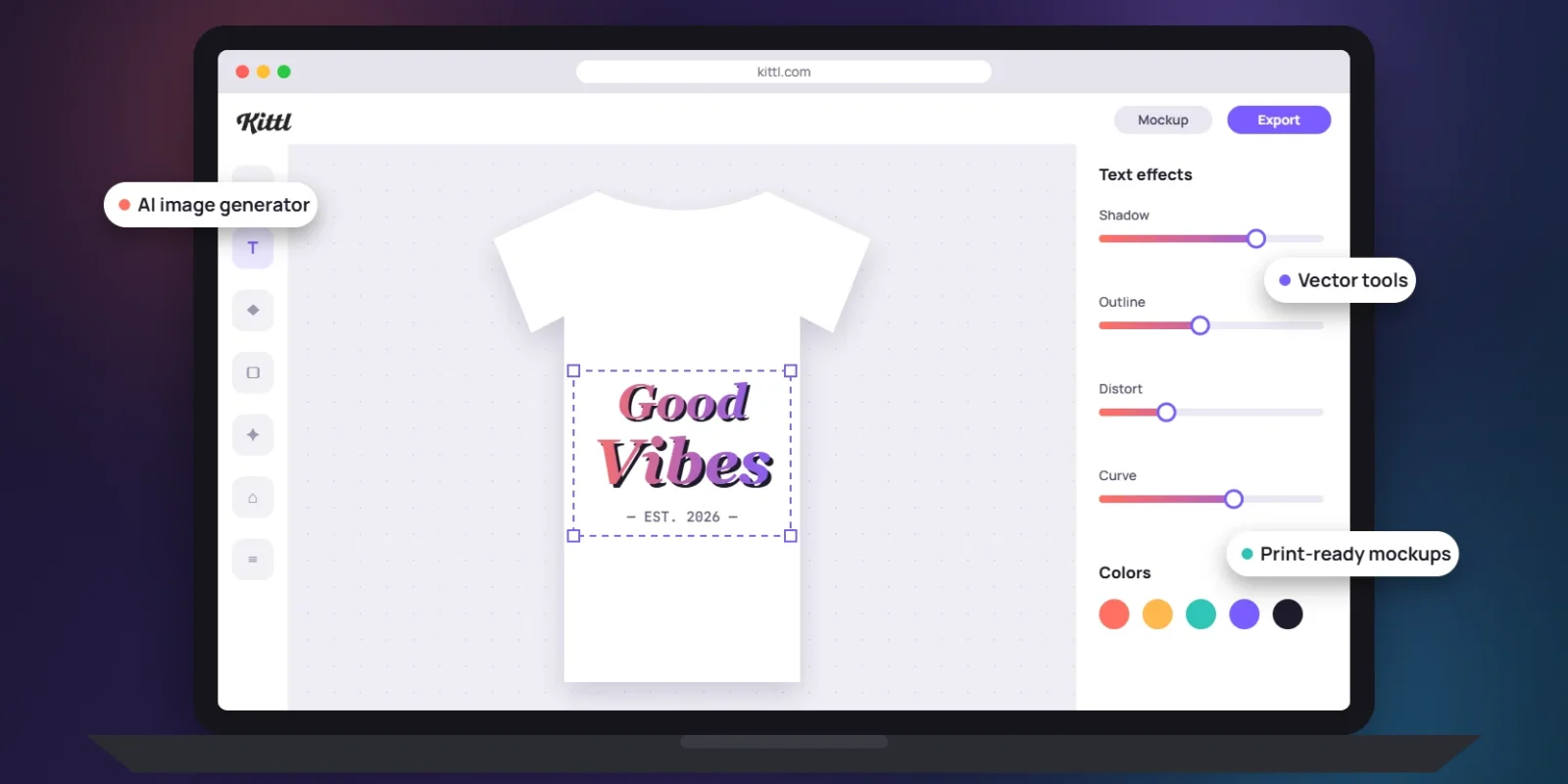
So, what is Kittl? Kittl is a browser-based graphic design tool built around typography, vector editing and AI image generation. It’s popular with print-on-demand sellers, small brands and logo designers. There’s a free plan for personal projects, and paid plans start at $12 a month billed yearly ($15 month to month). Buy Pro if you design mostly by hand and need a commercial license. Pick Expert if AI images are a big part of your workflow. Skip Kittl if you need a phone app, timeline video editing or the huge template library Canva offers.
Key info at a glance
| Detail | What to know |
| Platform | Kittl |
| What it is | Online design editor with text effects, vector tools, mockups, and AI tools |
| Price (US) | Free; Pro $15/mo ($12/mo yearly); Expert $35/mo ($26/mo yearly); Max $65/mo ($48/mo yearly) |
| Free plan | 100 one-time AI tokens, 5 projects, 10,000+ templates, personal use only |
| Platforms | Web browser on desktop, laptop, and tablet; no official phone app |
| Standout feature | Layered text effects and easy vector editing in the browser |
Kittl started life in 2020 as Heritage Type, a tool for vintage lettering, and rebranded as Kittl in 2022, according to Style Factory’s Kittl review. That history still shows. The editor feels like it was built by people who care about fonts first, and the AI features were added on top.
A quick note on sourcing: we haven’t run a paid Kittl account through a long hands-on test, so we won’t pretend we have. Plan details come from Kittl’s own pricing and help pages, and we’ve pulled user feedback from public reviews and design forums.
What stands out
Kittl’s strengths cluster around three jobs: styling text, building clean vector graphics, and turning those graphics into product listings.
Text effects and vector editing
Typography is Kittl’s home turf. You can stack shading, outlines, distortion and decoration effects on live text, so the words stay editable after you style them. Style Factory counts 1,400+ fonts, including 135 Monotype fonts, plus custom font uploads and access to glyphs and ligatures.
The vector tools are where Kittl earns its keep for logo and T-shirt work. You get a pen tool, node editing and a Shape Builder with union, subtract, intersect and exclude. Illustrator does all of this too, but it takes weeks to learn. Kittl puts the same basic moves in a cleaner panel with an infinite canvas, which suits people who have never opened Adobe software.
AI tokens, Flows and the AI toolbox
Every AI action in Kittl spends tokens. You can generate images and videos, remove backgrounds, upscale low-res files, and turn a flat image into an editable vector with the Vectorizer. Kittl Flows lets you chain AI steps into a repeatable workflow, so you don’t redo the same clicks for every product.
Paid plans also include unlimited basic images from the Flux Schnell model, which don’t touch your token balance, so quick drafts cost nothing extra.
Mockups and print-on-demand tools
Kittl is clearly aimed at Etsy-style sellers and print-on-demand shops. It ships with product mockups, a Mockups dashboard and presets for Printful and Printify. On paid plans, Style Factory reports PNG and JPEG exports up to 10,800 pixels at 300 DPI, plus SVG and PDF with CMYK color for print. Those numbers matter, because most print shops reject low-resolution files.
How much does Kittl cost?
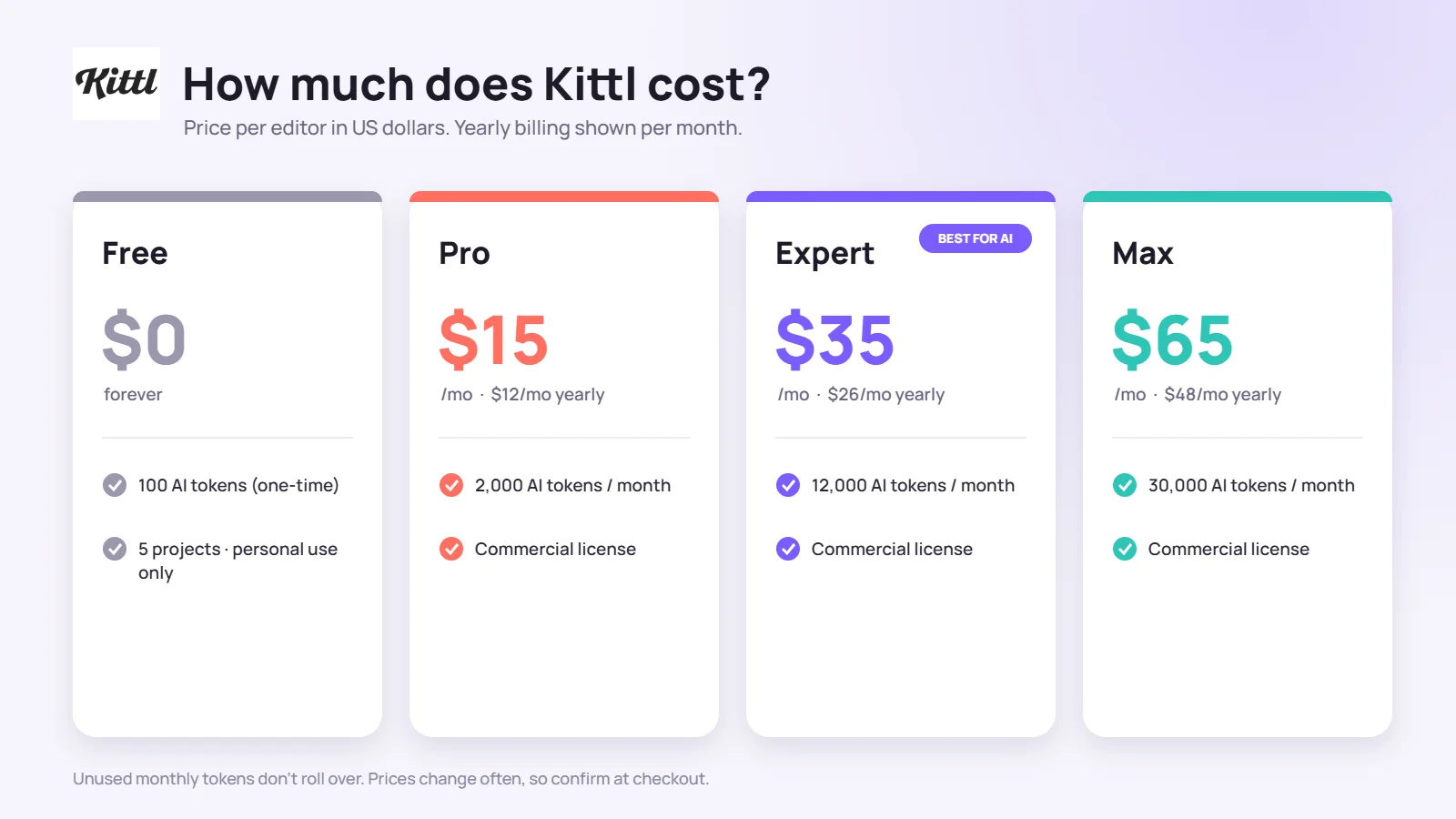
Kittl has four plans: Free, Pro, Expert and Max. So how much is Kittl in practice? All prices below are per editor, in US dollars. Yearly billing saves you 20% to 26%.
| Plan | Monthly billing | Billed yearly | AI tokens per month | Premium images | Commercial license |
| Free | $0 | $0 | 100 (one-time) | Up to 10 standard | No |
| Pro | $15 | $12/mo ($144/yr) | 2,000 | Up to 400 | Yes |
| Expert | $35 | $26/mo ($312/yr) | 12,000 | Up to 2,400 | Yes |
| Max | $65 | $48/mo ($576/yr) | 30,000 | Up to 6,000 | Yes |
Source: Kittl pricing page. Prices change often, so confirm at checkout.
The cost-per-token math
The plan names don’t tell you much, so we did the division. On yearly billing, Pro works out to about $0.006 per token. Expert drops to roughly $0.0022, and Max to about $0.0016. Put another way, Expert costs about 2.2 times as much as Pro but gives you six times the tokens.
There’s a catch the headline numbers hide. Kittl’s pricing page splits Expert’s 12,000 tokens into 6,000 monthly plus 200 daily, and Max’s 30,000 into 12,000 monthly plus 600 daily. Daily tokens reset every 24 hours, and Kittl says they’re “promotional and available for a limited time.” If you only open Kittl twice a week, you’ll lose most of the daily batch. A realistic Expert budget for a casual user is closer to 6,000 tokens a month.
Our read: Pro is the right plan if you design by hand and use AI now and then. Expert makes sense once you’re generating dozens of images a week for product listings. Max is for teams or heavy sellers who’d otherwise run dry mid-month. Unused monthly tokens don’t roll over on any plan.
Is Kittl free?
Yes, Kittl has a free-forever plan. It gives you 100 AI tokens once (they don’t refill), up to 10 standard AI images, 5 projects, 10,000+ templates and over a million photos, graphics and fonts. Style Factory lists 500 MB of storage on the free tier.
The big limit is licensing. Free designs are for personal use only, so you can’t sell a T-shirt or deliver client work made on the free plan. Kittl says free users can preview most Pro features with light usage limits, which makes the free tier a fair way to test the editor before paying.
How to use Kittl
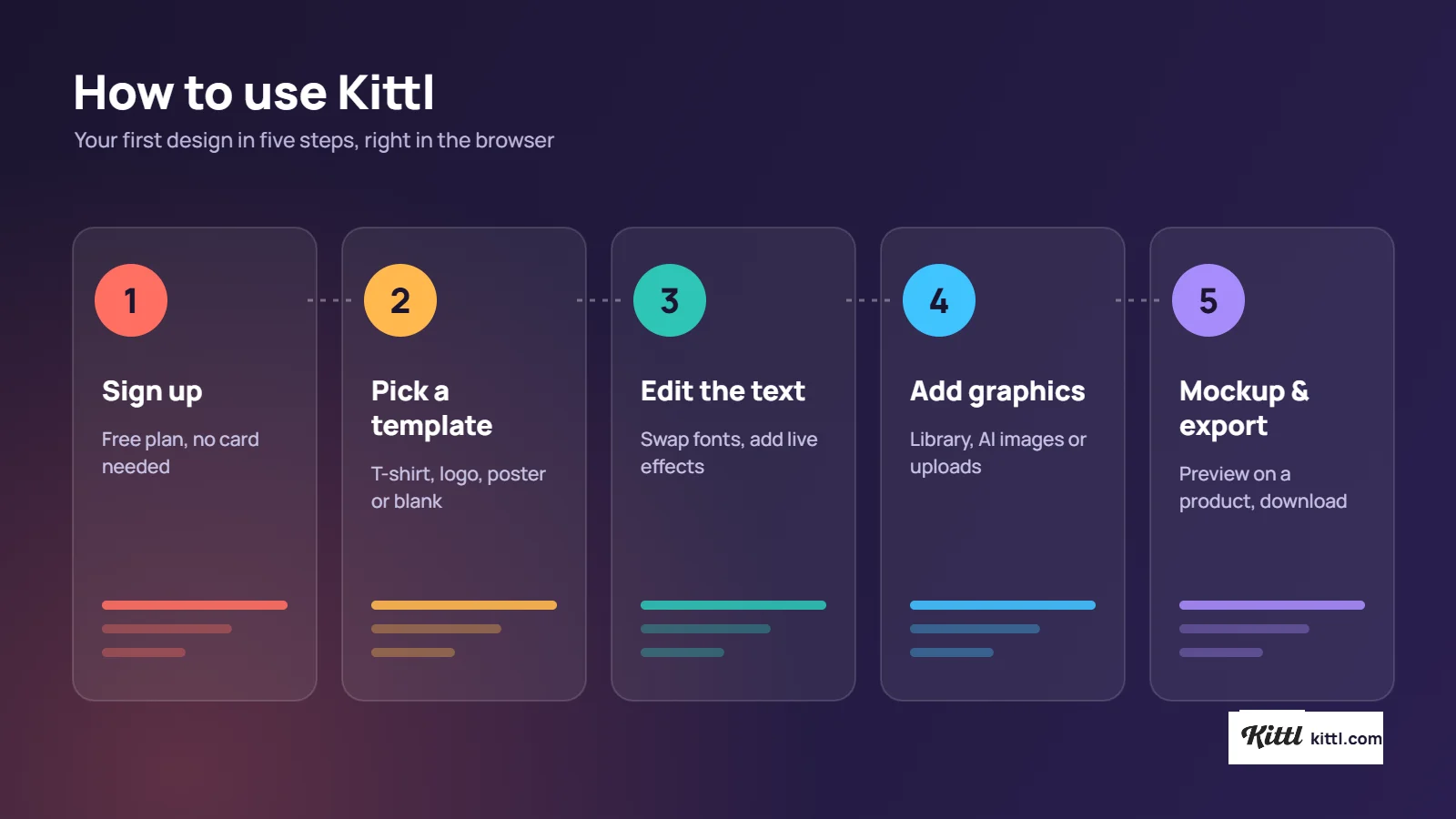
Kittl runs in your web browser, so there’s nothing to install. Here’s the basic workflow for a first design:
- Sign up at kittl.com. New accounts start on the free plan, so you don’t need a card to try it.
- Pick a starting point. Choose a template (T-shirt, logo, poster, social post) or open a blank artboard.
- Edit the text. Click any text layer, swap the font, then add effects from the text panel. The effects stay live, so you can change the words later.
- Add graphics. Drag in illustrations from the library, generate an AI image, or upload your own file. Use Background Remover or Vectorizer on uploaded photos.
- Preview and export. Drop the design onto a mockup to see it on a product, then export. Free accounts get standard exports; paid plans add high-resolution and vector files.
Our tip for first-timers: start from a template even if you plan to change everything. Pulling apart a finished design shows you how Kittl stacks its layers and text effects faster than any tutorial.
Where it falls short
Kittl does a few things very well and skips others. Here’s what owners and reviewers most often flag:
- No phone app. Kittl works in a browser on desktops and tablets, and Style Factory notes the interface isn’t built for small screens.
- Smaller template library. Kittl offers 10,000+ templates free and 100,000+ on paid plans. Style Factory puts Canva at 1.6 million+ free and 3.6 million+ paid.
- Limited export formats. You get JPEG, PNG, SVG, PDF and MP4. There’s no EPS, TIFF or PSD, which can be a problem for some print shops and agencies.
- AI video only. Kittl can generate video clips, but it has no timeline editor for trimming or arranging footage.
- Storage caps. Pro includes 10 GB, Expert 100 GB and Max 1 TB, per Style Factory. Heavy mockup users on Pro may hit the ceiling.
- No refunds. Kittl’s cancellation policy says refunds are “generally not provided,” so a forgotten yearly renewal costs you the full amount.
Public ratings are still strong. Style Factory’s roundup lists 4.7 out of 5 on G2 (41 reviews) and 4.7 on Trustpilot (1,262 reviews). Kittl’s own pricing page says it’s trusted by more than 10 million creatives.
Kittl vs Canva vs Adobe Express
Kittl’s closest rivals are Canva and Adobe Express. All three run in a browser and lean on templates.
| Kittl | Canva | Adobe Express | |
| Best at | Typography, vectors, print-on-demand | All-round design, presentations, social posts | Quick social graphics tied to Adobe apps |
| Templates | 10,000+ free / 100,000+ paid | 1.6M+ free / 3.6M+ paid | Large library backed by Adobe Stock |
| Vector editing | Pen tool, node editing, Shape Builder | Basic | Basic |
| Video | AI generation only | Timeline editor | Timeline editor |
| Mobile app | No | Yes | Yes |
Choose Kittl if your output is merch, logos or label art and you care how the lettering looks. Choose Canva if you make a bit of everything, from Instagram posts to pitch decks, and want to edit on your phone. Adobe Express fits people already paying for Creative Cloud who want quick social assets that link to Photoshop and Illustrator. If you’re weighing AI image quality across tools, our Gemini vs ChatGPT comparison covers how the big general-purpose models handle image prompts.
Who it’s for
Kittl is an easy recommendation for these groups:
- Print-on-demand and Etsy sellers who need high-res, print-ready files and quick mockups.
- Small business owners making their own logos, labels and packaging without learning Illustrator.
- Hobby designers who want polished type effects for posters, stickers and shirts.
- Freelancers producing vector artwork for clients, on a paid plan for the commercial license.
It’s a weaker fit for social media managers who live on their phones, video creators, and agencies that need EPS or PSD handoffs. If you’d rather pay someone to design for you, our guide on whether Fiverr is legit and safe walks through hiring a freelancer.
How to cancel a Kittl subscription
You can cancel Kittl anytime from your account settings, and you keep paid access until your billing period ends. Kittl’s help center lists these steps:
- Click your profile photo in the upper-right corner of the home page.
- Click Settings.
- Under your team’s name, click Plan & Billing.
- Click Manage subscription.
- Click Cancel subscription in the lower-left corner and confirm.
If you belong to more than one team, switch to the team that holds the subscription first, using the team switcher in the lower-left. Cancel before your renewal date to avoid the next charge. Your designs stay in your account after the plan ends, but premium features like vector exports lock until you resubscribe. Changed your mind? Go back to Plan & Billing and click Resubscribe before the period ends.
FAQs
Q. What is Kittl used for?
A. Kittl is used to design logos, T-shirts, stickers, posters, labels and social graphics. Its strongest tools cover text effects, vector editing and product mockups, which makes it popular with print-on-demand sellers and small brands. It also includes AI tools for image generation, background removal, upscaling and converting images into editable vectors.
Q. Is Kittl free to use?
A. Yes. Kittl’s free plan never expires and includes 100 one-time AI tokens, 5 projects, up to 10 standard AI images and 10,000+ templates. The catch is licensing: free designs are for personal use only. You need Pro or higher for a commercial license covering up to 500,000 copies of a design.
Q. How much is Kittl per month?
A. Kittl Pro costs $15 a month on monthly billing or $12 a month billed yearly ($144). Expert is $35 monthly or $26 a month yearly, and Max is $65 monthly or $48 a month yearly. Prices are per editor in US dollars, so check Kittl’s pricing page before you buy.
Q. Does Kittl have an app?
A. Kittl has no official mobile app. It runs in a web browser on desktops, laptops and tablets, including iPads. You’ll see App Store listings with “Kittl” in the name, but they come from third-party developers, so check the publisher before downloading anything.
Q. Is Kittl the same as Canva?
A. No. Both are browser-based design tools, but Kittl focuses on typography, vector editing and print-on-demand work, while Canva covers a wider range of formats like presentations, videos and documents. Canva has a far bigger template library and mobile apps. Kittl gives you finer control over lettering and vector shapes.
Q. Can I sell designs I make in Kittl?
A. Yes, on a paid plan. Pro, Expert and Max include a commercial license that covers up to 500,000 copies across print, packaging, marketing and digital use. Kittl’s business plans add an enhanced license for larger runs. Designs made on the free plan are for personal use only and can’t be sold.
Q. Do unused Kittl AI tokens roll over?
A. No. Monthly tokens arrive at the start of each billing cycle and expire when the cycle ends. Expert and Max also get daily tokens (200 and 600) that reset every 24 hours and are spent before your monthly balance. Expert and Max users can buy extra tokens if they run out early.
Q. Can I get a refund from Kittl?
A. Usually not. Kittl’s cancellation policy says refunds are generally not provided, including for unused time on a plan you’ve already paid for. Support will review billing errors and unusual cases one by one. Cancelling stops the next renewal, and you keep access until the current billing period ends.
Q. Is Kittl worth paying for?
A. Kittl is worth paying for if you sell physical products or design logos and need print-ready, commercially licensed files. Pro covers most solo sellers. It’s harder to justify if you mainly make social posts on your phone, since Canva handles that with a bigger library and native apps.