Shikha Kumari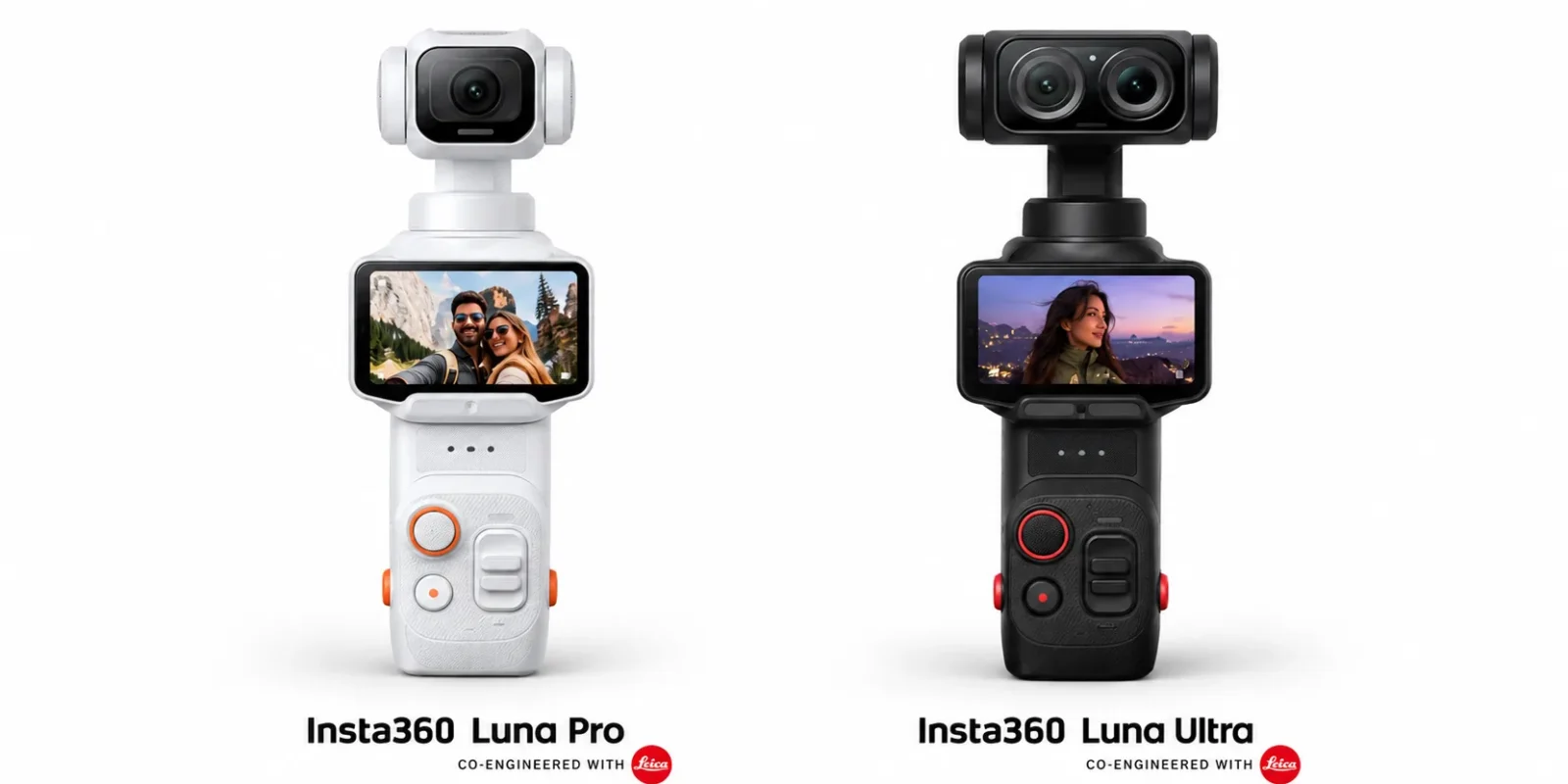
Quick answer: The Insta360 Luna Pro vs Luna Ultra use the same main camera. Each has a 1-inch sensor behind a 20mm f/1.8 Leica Summicron lens, and each shoots 8K30 video and 4K120 slow motion with 3-axis stabilization and a detachable 2-inch OLED touchscreen. The real difference is zoom. The Ultra adds a second 60mm (3x) telephoto camera that gives it 6x lossless zoom, while the Pro stops at 2x lossless. If you want to shoot people, wildlife, stages or street scenes from a distance, get the Ultra ($769.99). If you mostly vlog, film yourself and shoot wide travel clips, the Pro (599.99) gives you nearly everything for less money, and it’s a little smaller and lighter. .
Below is what actually differs between the two, what doesn’t, and how to tell which one suits the way you shoot.
Insta360 Luna Pro vs Luna Ultra: full spec comparison
This table has the key numbers for quick scanning. Sources: Insta360’s official Luna Ultra spec page and its Luna Pro vs Ultra comparison.
| Spec | Insta360 Luna Pro | Insta360 Luna Ultra |
| Starting price (US) | $599.99 | $769.99 |
| Main sensor | 1-inch | 1-inch |
| Main lens | 20mm, f/1.8 Leica Summicron | 20mm, f/1.8 Leica Summicron |
| Telephoto camera | No | 60mm, f/2.0, 1/1.3-inch sensor |
| Max video | 8K30 | 8K30 |
| Low light (PureVideo) | 4K60 | 4K60 |
| Slow motion | 4K120 / 1080p240 | 4K120 / 1080p240 |
| Vertical video | 4K30 | 4K30 |
| Lossless zoom | 2x | 6x |
| Max zoom | 4x | 15x |
| 200MP panorama | No | Yes |
| Log profile | 10-bit I-Log | 10-bit I-Log |
| Stabilization | 3-axis gimbal | 3-axis gimbal |
| Screen | Detachable 2″ OLED | Detachable 2″ OLED |
| AI tracking | Deep Track 5.0 | Deep Track 5.0 |
| Battery | 1,550mAh, up to 240 min | 1,550mAh, up to 240 min |
| Fast charge | 80% in 23 min (45W PD) | 80% in 23 min (45W PD) |
| Weight | 215g | 233g |
| Height | 155.7mm | 169.9mm |
Why this comparison is harder than it looks
On paper, these two cameras are almost the same product. The video modes, battery, charging speed, screen and stabilization all match. That makes it tempting to call the Pro the smart buy and move on. But the one thing the Ultra adds, a real telephoto lens, changes how you use the camera more than any figure on the spec sheet suggests. So the real question is “how often will you want to zoom?”
What’s the same on the Insta360 Luna Pro vs Luna Ultra?
Start here, because the shared specs cover most of the spec sheet. Below the camera head, the two models are built on the same platform.
Main camera and video quality
Both cameras use a 1-inch sensor with an f/1.8 Leica Summicron lens and a 20mm (35mm-equivalent) field of view. Insta360 quotes 14 stops of dynamic range for this main camera. The sensor is much larger than the main sensor in most phones. That’s the main reason either Luna handles dim restaurants, sunsets and indoor scenes better than a typical phone.
The video options are almost identical:
- 8K at 30fps for standard video
- 4K at 60fps in PureVideo, Insta360’s low-light mode that reduces noise
- 4K at 120fps and 1080p at 240fps for slow motion
- 4K30 vertical video for Reels, Shorts and TikTok, switched on by rotating the touchscreen
- 10-bit I-Log if you color-grade, plus Leica color profiles (Leica Vivid, Leica Natural, Leica Chrome and more) if you don’t
If you film the same wide shot on both cameras, don’t expect a visible difference in image quality. The gap only appears once you start zooming.
Gimbal, screen and tracking
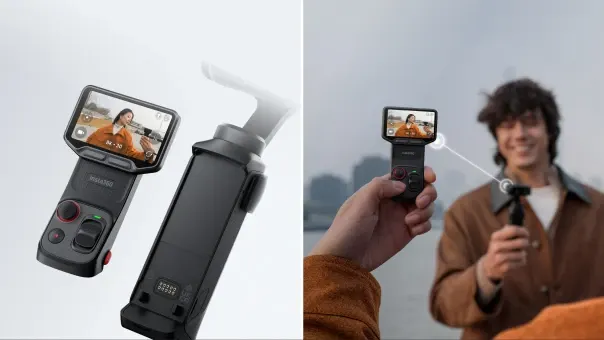
Both cameras have 3-axis mechanical stabilization and the same detachable 2-inch OLED touchscreen. That screen is the standout feature of the Luna line. You can pop it off, set the camera on a ledge or tripod, and frame the shot from your hand. Insta360 rates the wireless preview at up to 20 meters in open, interference-free conditions, so expect less range in a crowded place.
Both also run Deep Track 5.0, which handles auto tracking, group tracking and smart framing. Tap a subject on the screen, or press the joystick, and the gimbal keeps it centered.
Battery and charging
The battery is identical: 1,550mAh, rated for up to 240 minutes. Read the fine print on that figure, though. Insta360 measured it while recording 1080p at 24fps with the screen and Wi-Fi turned off. If you shoot 4K or 8K with the screen on, expect much less. Both cameras charge to 80% in about 23 minutes, but only with a 45W USB-C PD charger. An old phone charger won’t come close to that.
What’s actually different between the Insta360 Luna Pro vs Luna Ultra?
Zoom: the difference that matters
Zoom is the whole decision, so the numbers are worth getting right.
| Zoom | Luna Pro | Luna Ultra |
| Cameras | One (20mm main) | Two (20mm main + 60mm telephoto) |
| Telephoto sensor | None | 1/1.3-inch, f/2.0 |
| Lossless zoom | 2x | 6x (120mm equivalent) |
| Maximum zoom | 4x “HighRes Zoom” | 15x (300mm equivalent) |
| Optional add-on lens | No | Ultra Telephoto Lens (extra 1.5x) |
“Lossless” means the camera is still recording real detail. Beyond that point, both cameras crop the image and upscale it. CNET’s Geoffrey Morrison used both cameras for several weeks while traveling. He found the extended zoom on both usable for social media but noticeably softer than the lossless range. So treat the Pro’s 4x and the Ultra’s 15x as fallback numbers, and compare 2x against 6x when you decide.
The Ultra’s zoom range has also grown since launch. Insta360’s September 2026 comparison listed it at 12x, and the current spec page says 15x. Keep your firmware up to date.
Why a telephoto lens matters for more than distance
It’s easy to think of zoom as a way to reach things far away. That’s part of it, but the bigger benefit is framing. When you photograph someone from a few feet back with a longer lens, their face looks more natural. The background also looks bigger and less cluttered than in a wide-angle selfie. That’s why portrait photographers rarely use ultra-wide lenses.
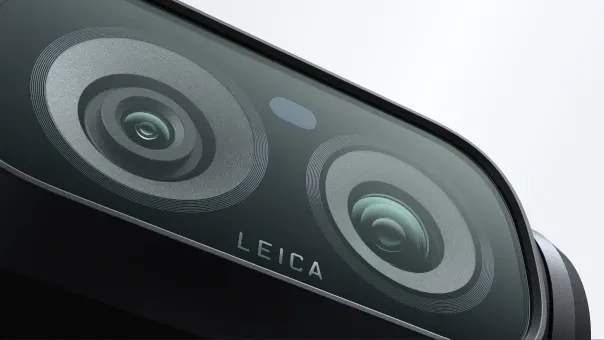
With the Pro, you mostly shoot at 20mm, which is wide. That works well for arm’s-length vlogging and landscapes. It’s less flattering for portraits of other people, and less useful for anything you can’t walk up to: a performer on stage, a child on a sports field, a bird, details on a building.
The Ultra also adds a few features that need its second camera:
- Stage Mode for concerts and live shows, with zoom tracking. With the optional Ultra Telephoto Lens attached, Insta360 says it reaches a 450mm-equivalent focal length.
- Telephoto macro, because the telephoto lens focuses as close as 15cm.
- 200MP Scenic Panorama, a very high-resolution wide panorama (20,224 × 10,112 pixels). The Pro doesn’t have it.
Both cameras can shoot 360-degree photospheres. As CNET points out, though, the camera has to capture and stitch 19 separate images. That makes it slow, and your arm will look distorted unless the camera is on a tripod or selfie stick.

Size and weight
The Ultra’s larger head holds the second camera, so it’s taller.
| Luna Pro | Luna Ultra | |
| Dimensions | 52.8 × 155.7 × 38.5mm | 52.4 × 169.9 × 38.5mm |
| Weight (Cosmic Black) | 215g (7.6oz) | 233g (8.2oz) |
| Weight (Stellar White) | 218g (7.7oz) | 235g (8.3oz) |
You won’t feel an 18-gram difference in your hand. You will notice the extra 14mm of height (about 0.6 inches), mostly when sliding the camera into a jeans or jacket pocket. If you carry a bag anyway, it doesn’t matter.
Price
The Luna Pro starts at US $ 769.99. That’s a $170 gap, or about 22%. Bundles cost more. The Pro’s Fill Light Bundle is $649.99. Ultra bundles run from $859.99 (Essential) to $969.99 (Creator), depending on whether you want extras like a battery handle, POV head tracker or Mic Pro transmitter.
Which Insta360 Luna is better for vlogging?
For simple vlogging, the Luna Pro. Most vlogging happens at arm’s length with the camera pointed at you, and at that distance you’ll nearly always use the 20mm main lens. That lens, the gimbal, the tracking and the 4K vertical mode are the same on both cameras. Spending $170 on a telephoto lens you’ll rarely point at yourself doesn’t make much sense.
The Ultra earns its price when your videos are about more than your face. Travel vloggers who cut to B-roll of street scenes, food stalls or distant landmarks will use the zoom all the time. CNET’s reviewer said he used the Ultra’s zoom on almost every outing, and he preferred it to the Pro despite the higher price.
Here’s a useful test: look through your phone’s camera roll. If your phone has a telephoto lens and you use it often, you’ll miss it on the Pro. If you never switch away from the main camera, the Pro is the better buy.
Who should buy the Luna Pro?
- First-time gimbal camera buyers who want the 1-inch sensor and detachable screen without paying for features they haven’t needed yet.
- Solo vloggers and talking-head creators who mostly shoot selfie-style or set the camera down and walk into frame.
- Short-form creators focused on vertical video for Reels, Shorts and TikTok.
- People who care most about pocketability. The Pro is the slightly smaller of the two.
- Anyone on a fixed budget. The $170 you save could buy a good wireless mic, a fill light or several large microSD cards.
One practical note from CNET’s hands-on review: the Pro comes with a silicone cover that slides off fairly easily in a bag. The Ultra ships with a harder plastic case that held up better. If you toss your camera into a backpack, plan on buying a more secure case.
Who should buy the Luna Ultra?
- Travel shooters who want one device for wide shots, portraits and distant details.
- Parents filming school plays, sports days and recitals from the stands.
- Concert-goers, since Stage Mode and the optional Ultra Telephoto Lens are designed for exactly that.
- Portrait and street photographers who want flattering framing without walking right up to their subject.
- People who’d like to leave their phone or a second camera at home. With 6x lossless zoom and a 1-inch main sensor, the Ultra covers most of what a modern phone camera can do, with better stabilization.
What should you check before buying either one?
A few details are easy to miss:
- Charger. The 23-minute fast charge needs a 45W USB-C PD charger, and one isn’t included.
- Storage. The Ultra has 47GB of built-in storage and takes microSD cards up to 2TB. 8K and 4K120 footage fills space quickly, so buy a fast V30 card.
- Phone compatibility. The AI editing features in the Insta360 app need a fairly recent phone. That means an iPhone with an A14 chip or newer, or an Android phone with a Snapdragon 855, Dimensity 9000, Tensor G1 or newer.
- Regional availability. The prices above are US prices. The Luna Pro launched in China first, and pricing and availability vary by region, so check your local Insta360 store or an authorized retailer.
The bottom line
The Luna Pro and Luna Ultra are the same camera until you zoom. The Pro is the better value for vloggers, beginners and anyone who mostly shoots wide. The Ultra is the more versatile tool. For travel, events and portraits, its 3x telephoto lens and 6x lossless zoom are worth the extra $170. If you can’t decide, think about how often you use the telephoto lens on your phone. That habit is the best sign of whether you’ll miss one on the Pro.
FAQs
Q. Is the Luna Ultra’s image quality better than the Luna Pro’s?
A. At the standard wide 20mm view, no. Both use the same 1-inch sensor and Leica lens. The Ultra only produces better images once you zoom past 2x, because it switches to a real telephoto camera instead of cropping.
Q. Does the Luna Pro have optical zoom?
A. No. It has a single lens. Its 2x lossless zoom comes from cropping the high-resolution 1-inch sensor, and its 4x HighRes Zoom adds upscaling on top of that. Only the Ultra has a dedicated telephoto lens.
Q. What is the battery life of the Luna Pro and Luna Ultra?
A. Both are rated for up to 240 minutes on a 1,550mAh battery. That figure was measured at 1080p/24fps with the screen and Wi-Fi off, so higher resolutions and using the screen will shorten it.
Q. Can both cameras shoot 8K?
A. Yes. Both record 8K at up to 30fps. They also shoot 4K at 120fps for slow motion and 4K60 in the low-light PureVideo mode.
Q. Is the Luna Ultra worth $170 more?
A. It is if you’ll use the zoom regularly: for travel, portraits, events or anything you can’t walk up to. If you mostly film yourself or shoot wide scenes, the Luna Pro gives you the same core camera for less.
Q. Which is better for vlogging, Luna Pro or Luna Ultra?
A. For selfie-style vlogging, the Luna Pro. It’s cheaper and slightly more pocketable, and the camera you point at yourself is identical on both. Choose the Ultra if your vlogs lean heavily on B-roll of distant subjects.