Walk into any laptop aisle in 2026 and you’ll notice something: the “premium 2-in-1” category has quietly split in two. There’s the $1,600 flagship tier with the latest chips and OLED and then there’s a smarter, less talked-about tier below it, the same year’s flagship silicon, but at a much friendlier price. That is exactly where the best Lenovo Yoga laptops under $1,000 are right now, and it’s an excellent time to be shopping in that bracket.
Lenovo Yoga line-up includes convertible 2-in-1s for sketching and note-taking and slim clamshells for people who just want a light bag and a full workday of battery. Both are available under $1,000 if you know which one to buy and which one to avoid. This guide goes over the actual models that should be purchased today, what you’re getting for $1,500 versus $1,000 at this price and how the specs are going to translate to everyday use and how to avoid the biggest mistake of most first-time Lenovo Yoga buyers.
Why the Sub-$1,000 Lenovo Yoga Tier Is Worth Your Attention
Here’s something most roundups don’t talk about: Lenovo doesn’t just sell one Yoga model per size. It sells the same chassis across several silicon generations at once, and older-generation ones get discounted hard when a refresh lands. A Lenovo Yoga 7 2-in-1 16-inch model with an AMD Ryzen 7 8840HS chip, for example, launched around $1,000+ and has since been seen on sale closer to $550–$790 at retailers like Best Buy and Newegg—while the newer Ryzen AI-powered refresh of the same chassis sells for $1,600 and up.

That gap is the opportunity. You’re not just buying a “budget” laptop under $1,000; you’re buying the most capable hardware of the last generation, and often faster than most of us need for anything short of serious video editing or 3D work and that is several hundred dollars less than the current flagship. It is a pattern that is worth understanding and not just a one-off deal: Lenovo refreshes its Lenovo Yoga chassis every year, but it’s sold (and discounted) the last generation for months after. If you are comfortable buying “last year” internals in a body that looks and feels the same as this year’s, this is where the best value is.


It also helps that 2026 has been an unusually competitive year for this segment. Intel’s Panther Lake (Core Ultra 3-series) chips and AMD’s Ryzen AI lineup have both propelled efficiency, which means that mid-tier chips in under-$1,000 configurations are even better than what a similar laptop would have been one or two years ago.
Best Lenovo Yoga Laptops Under $1,000: The Short List
If you can only remember three names, make them these:
- Lenovo Yoga 7 2-in-1 (16-inch): biggest screen, best value on raw specs.
- Lenovo Yoga 7i (14-inch, Intel Core Ultra): best balance of portability and touchscreen creativity.
- Lenovo Yoga Slim 7i: lightest build, longest battery life, best for travel
Each is aimed at a different type of buyer, so let’s talk about what actually separates them, not just on paper, but in how they’d feel in your bag and on your desk.
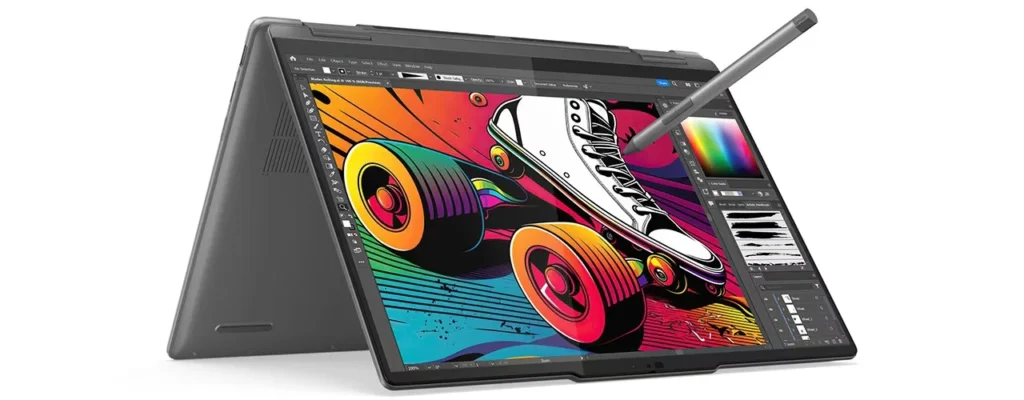
Lenovo Yoga 7 2-in-1 (16-inch): Best for Creative Work on a Budget
This is the one to look at if screen real estate matters more to you than portability—students annotating PDFs, hybrid workers who want a second-monitor replacement, or anyone who sketches or edits on a tablet-sized canvas, for example.
What you get: a 16-inch WUXGA (1920×1200) touchscreen at 300 nits, a 360-degree hinge and on the AMD configuration that typically comes under $1,000, a Ryzen 7 8840HS with soldered LPDDR5X-6400 memory and 512GB PCIe Gen4 SSD. It’s not the best processor of this year, but still a real 8-core, 16-thread processor that can handle multitasking, light photo editing and everyday productivity without being too challenging. It also has a fingerprint reader, backlit keyboard and Wi-Fi 6E with Bluetooth 5.3, which was once reserved for the higher end of machines.
Where the price cuts become apparent is the IPS panel, not OLED, and running at a standard 60Hz refresh rate. If you’ve been craving the ultra-vibrant OLED displays Lenovo is now offering on its pricey Lenovo Yoga 7 refresh, this isn’t that, colors are good for an IPS panel, but they won’t provide the inky blacks or the extra contrast OLED does. You also get a 300-nit brightness ceiling that’s fine inside but not great for working outside in direct sun.
Expert insight, and this is the part most guides gloss over, the 2026 version of this same chassis actually took a step back for some buyers. Users of the newer Ryzen AI 7 445 configuration reported it had a tendency to lag behind the previous Intel Lunar Lake-based option for more than $1,600. That is to say, newer is not necessarily better here. If you’re comparing a $600 last-gen model with a $1,600 current-gen one, you’re not choosing between “old and new.” You’re choosing between “proven and affordable” and “new but sometimes slower for more money.”
Who it is for: anyone who spends most of their laptop time at a desk or couch instead of commuting with it. At almost 4.4 pounds, it is the heaviest of the three picks here, so it’s a benefit to people who prefer a bigger canvas to a lighter bag.
Lenovo Yoga 7i (14-inch, Intel Core Ultra): Best Everyday Convertible
If 16 inches feels like more laptop than you want to carry, the 14-inch Lenovo Yoga 7i is the natural landing spot, and it’s arguably the most “current” laptop on this list that still fits under $1,000.
What you’re getting: A 14-inch 2K OLED touchscreen with Dolby Vision, an Intel Core Ultra processor combined with a 40+ TOPS neural processing unit (NPU), which qualifies it as a Copilot+ PC under Microsoft’s current classification. Core Ultra 5 322 chip configurations have started to be released around $999 at retail, showing real OLED image quality and AI acceleration at a budget level that was unheard of even a year earlier. It’s built with 16GB of memory and 512GB SSD, comparable to the larger Lenovo Yoga 7.
What the Copilot+ branding actually gives you: on-device features like Windows’ improved semantic search, Click to Do for quick actions on selected text or images, and the (still-preview) Recall feature that indexes your activity locally so you can search back through what you were working on. These are genuinely new capabilities compared to a non-Copilot+ laptop, though how useful they are day-to-day depends heavily on your workflow, some buyers will use them constantly, others will barely notice they exist.
Where the price cuts appear: the display refreshes at 60Hz instead of 120Hz panels for higher-end Lenovo Yoga 7i configurations, and you’re on the mid-tier Core Ultra 5 instead of the Ultra 7 or Ultra 9 options on higher-end SKUs. For writing, browsing, video calls, and light creative work, that’s not an issue in the least. For 4K footage editing with a lot of FPS or multi-threaded rendering, it’s worth taking a step up.
In a practical sense, the Yoga Pen support makes this genuinely useful for note-taking and markup – not just a marketing checkbox – which is the main reason to pick this over a clamshell at a similar price. At 3.1 pounds and well-balanced between the 16-inch Yoga 7 and the featherweight Lenovo Yoga Slim 7i, it is a good one laptop-does-everything choice if you don’t know which one you want.
Lenovo Yoga Slim 7i: Best for Portability and Battery Life
Not every buyer wants a convertible hinge. All that is on Lenovo’s list of laptop options in the Lenovo Yoga Slim 7i line is a laptop that disappears back into a backpack and lasts a full workday unplugged.
What you get is a chassis that is surprisingly light considering its size, the 14-inch Aura Edition model weighs about 2.15 pounds and measures about 12.31 x 8.42 x 0.55 inches, which is pretty much the same weight as much smaller ultraportables. The Dell XPS 14 is around 3 pounds while the HP OmniBook X Flip 14 is around 3.11 pounds. In fact, the Lenovo Yoga Slim 7i is lighter than both and even undercuts a 13-inch MacBook Air (M5) at around 2.7 pounds. It has Intel’s latest Core Ultra 3-series “Panther Lake” processors, optimized for efficiency and endurance rather than peak performance, and a POLED display and Intel’s “Aura Edition” branding, built around thin-and-light designs with strong battery life.
Where this fits the budget: Lenovo has set entry configurations of the Lenovo Yoga Slim 7i Aura Edition at $849.99, which leaves room for accessories or an extended warranty while still comfortably under $1,000. That’s genuinely competitive with competitors like the Dell XPS 14 and HP OmniBook X Flip 14, both of which run heavier and, in some configurations, pricier, and it undercuts even the entry MacBook Air on weight, if not always on price.
The honest tradeoff: This is not the case for a touchscreen 2-in-1 for sketching, thinness and battery life are first and foremost, not form factor. Think of it as the MacBook Air alternative in Lenovo’s lineup, not the iPad-Pro-with-a-keyboard alternative. If you don’t even try to fold your laptop into tablet mode, that’s not a real loss; if you do, look at the Lenovo Yoga 7i instead.
Comparison Table: Specs at a Glance
| Model | Yoga 7 2-in-1 (16″) AMD | Yoga 7i (14″) Intel Core Ultra 5 | Yoga Slim 7i Aura Edition (14″) |
| Screen | 16″ WUXGA IPS touch, 60Hz, 300 nits | 14″ 2K OLED touch, 60Hz, Dolby Vision | 14″ POLED, non-touch |
| Processor | Ryzen 7 8840HS | Core Ultra 5 322 | Core Ultra 3 (Panther Lake) |
| RAM / Storage | 16GB / 512GB | 16GB / 512GB | 16GB / 512GB |
| Weight | ~4.4 lbs | ~3.1 lbs | ~2.15 lbs |
| Form Factor | 2-in-1 convertible | 2-in-1 convertible | Clamshell |
| Typical Price | ~$550–$950 | ~$999 | ~$850 |
Prices vary with sales and retailers, so consider this as a directional guide, not a live quote, check the retailer’s page before you buy, since all three models have been seen both above and below these figures depending on the week.
What Most Buying Guides Get Wrong About This Price Bracket
Most of the “best laptops under $1,000” lists consider every Yoga model interchangeable and rank it only by processor generation. That’s backwards. The generational refresh that makes a chip “newer” doesn’t always make the laptop better, as the 2026 Yoga 7 2-in-1 16-inch refresh shows, a newer AMD chip option actually underperformed the previous year’s Intel silicon in some workloads, according to independent testing, while costing hundreds of dollars more.
The smarter thing to do is to decide what you are going to use a laptop for first, big-screen multitasking, touchscreen note-taking, ultralight travel, and shop through that category for the best-priced generation rather than looking for the best one. A chip that’s been stress tested by reviewers and discounted by retailers is usually more predictable than a brand-new SKU that hasn’t had time to show off its quirks.
Ports, Keyboards, and the Small Details That Actually Matter
Spec sheets tend to bury the details that shape daily use. On the Yoga 7 2-in-1 (16″), for instance, you get two USB-C 3.2 Gen 2 ports (supporting DisplayPort and 65W Power Delivery), two USB-A 3.2 Gen 1 ports, a full-size HDMI 2.1 output, and a headphone/mic jack that will run an external monitor and a few peripheral devices without a dongle. The backlit keyboard and fingerprint reader will also be worth mentioning, since not every laptop in this price range has both.

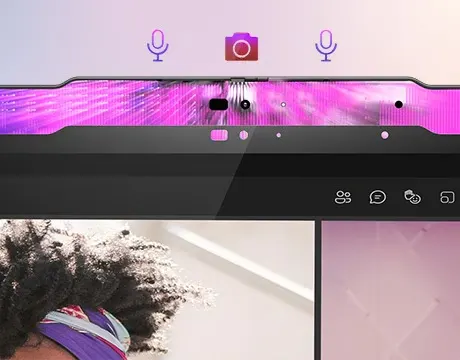
All of the Yoga 7i and Yoga Slim 7i lines will have similar modern connectivity — Wi-Fi 6E as a baseline, with some Aura Edition models supporting Wi-Fi 7 depending on configuration and a fingerprint reader or IR camera for Windows Hello sign-in as standard. All three models lack an Ethernet port for wired networking, so for a USB-C dongle you should budget for a few dollars.
Battery life is the other aspect that is easy to overstate from a spec sheet alone. The Panther Lake configuration of Yoga Slim 7i is specifically designed for endurance, and its lighter, thinner chassis can make for longer real-world battery life than the 16-inch Yoga 7, which pushes a larger, higher-resolution touch panel. If an all-day battery away from an outlet is a priority, lean toward the Slim 7i over the others.
Who Should Skip This Price Tier Entirely
This bracket is a nice value proposition, but it’s not right for all. If your work involves video editing in Premiere or DaVinci Resolve, 3D rendering, or gaming beyond casual titles, none of these three configurations have discrete graphics, and you’ll hit their ceiling quickly. In that case, it’s worth saving up for a Yoga model with a dedicated GPU or looking beyond the Yoga line entirely.
And similarly, if a 120Hz-or-higher display is non-negotiable for you (say, you do a lot of scrolling-heavy design work or just notice refresh rate differences), you’ll need to step up to the pricier Yoga 7i configurations or a different lineup since the sub-$1,000 tier tops out at 60Hz across all three picks here.
How to Choose Between These Three
- You want the biggest screen for the least money: Yoga 7 2-in-1 (16″).
- You want OLED color and a pen for notes, without spending $1,500: Yoga 7i (14″).
- You want the lightest bag and the longest battery life: Yoga Slim 7i.
If you are torn between two, weight and screen size are usually the deciding factor in daily use, and you should choose wisely based on how you will actually carry and hold the laptop and not the spec sheet. Someone who works from one desk for most of the week will barely notice the extra weight and a half on the 16-inch Yoga 7; someone who commutes with their laptop daily will feel that difference every single day.
Where and When to Buy for the Best Price
Because Lenovo sells directly from manufacturers on Lenovo.com and retailers like Best Buy and Newegg occasionally discount outgoing-generation stock, it is important to check both Lenovo’s own site and at least one major retailer before buying. Deal-tracking communities have flagged the AMD Yoga 7 2-in-1 (16″) as low as $549.99 during promotional windows, well below its typical shelf price, a reminder that patience can change which model is the best value in a given month.
If not in a rush, watching for back-to-school sales (typically July through September) and Black Friday/Cyber Monday windows tends to produce the deepest discounts on Yoga hardware specifically, because Lenovo uses those periods to clear outgoing-generation inventory ahead of new launches.
Conclusion
The best Lenovo Yoga laptop under $1,000 isn’t one model but whatever you’re going to use it for. Go big screen and value-focused with the Yoga 7 2-in-1 16-inch, creative and current with the Yoga 7i 14-inch, or go light and long-lasting with the Lenovo Yoga Slim 7i. All three show that Lenovo’s “flagship” experience, touchscreens, OLED options, AI-ready chips, doesn’t require flagship pricing anymore, as long as you’re willing to shop the tier just behind the newest release.
Prior to making a purchase, check current retailer pricing directly, since Lenovo and Best Buy both offer frequent discounts that can change which model is the best value week to week. If you can wait for a seasonal sale window, you’ll probably stretch your $1,000 further than any of the prices listed here.
Frequently Asked Questions (FAQs)
Which is better, the Lenovo Yoga 7 or Yoga 7i for the price?
The Yoga 7 (AMD) wins on raw specs per dollar, especially on sale, while the Yoga 7i (Intel) wins on display quality with its OLED panel and Copilot+ AI features. Choose the Yoga 7 for value, the Yoga 7i for creative work and note-taking.
Are Lenovo Yoga laptops good for students?
Yes, the 2-in-1 hinge and touchscreen support make Yoga models well-suited to note-taking and PDF annotation, and the 14-inch models keep weight manageable for daily carry between classes.
Does the Lenovo Yoga Slim 7i have a touchscreen?
Most Yoga Slim 7i configurations are clamshell-only without touch input; if a touchscreen is a must-have, look at the Yoga 7i or Yoga 7 2-in-1 lines instead.
How long does the battery last on a Lenovo Yoga laptop under $1,000?
It varies by model and chip, but the Yoga Slim 7i’s Panther Lake configuration is built specifically for efficiency and is among the longest-lasting in Lenovo’s lineup; the 2-in-1 models with larger, higher-resolution touch panels will typically see shorter runtime than the Slim 7i’s non-touch display.
Is it worth buying a previous-generation Lenovo Yoga model instead of the newest one?
Often, yes. Because Lenovo sells multiple silicon generations of the same chassis at once, last year’s model often drops in price once a refresh launches, and in some cases the older chip performs just as well or better than the new one for everyday tasks.
How well can these laptops handle gaming or video editing?
Not comfortably beyond casual, light workloads. All three rely on integrated graphics rather than a discrete GPU, so they are designed for productivity, browsing, and everyday creative work rather than demanding rendering or gaming.
What’s the difference between the Lenovo Yoga 7 and Lenovo Yoga Slim 7 naming?
“Lenovo Yoga 7” models are 2-in-1 convertibles with a 360-degree hinge and touchscreen, built for versatility. “Lenovo Yoga Slim 7” models are traditional clamshells prioritizing low weight and long battery life over convertible functionality.