As recently as spring of 2023, a friend with a six-person design studio called me in a panic. She had just missed a payroll tax deadline because her old spreadsheet system wasn’t flagging it as overdue and now she was staring down a penalty notice from the IRS. She asked me what she should change to. My answer took about two seconds: Gusto.
That’s not a paid opinion. And it’s what happens when you’ve spent years watching small business owners drown in W-2s, 1099s, and state tax filings they never signed up to understand. This is built its entire reputation on making that mess disappear, and in 2026, it’s still doing the job better than almost anyone else in the category.
This review outlines what Gusto actually does very well, where it doesn’t, how much it costs, and whether it’s worth a place in your business. No fluff, no recycled marketing copy. Just an honest look based on how real teams use it.
What Is Gusto?
Gusto is a cloud-based payroll, benefits, and HR platform specifically for small and mid-sized businesses. It was originally known as ZenPayroll in 2012 (just before the rebranding) and has become one of the most trusted names in small business payroll software.

At its basic level, It is handles the work of operating a company that nobody starts a business to do: calculating paychecks, filing payroll taxes, managing benefits enrollment, and keeping HR records straight. It provides services to over 400,000 businesses in the United States, from freelancers working alone to a few hundred employees.
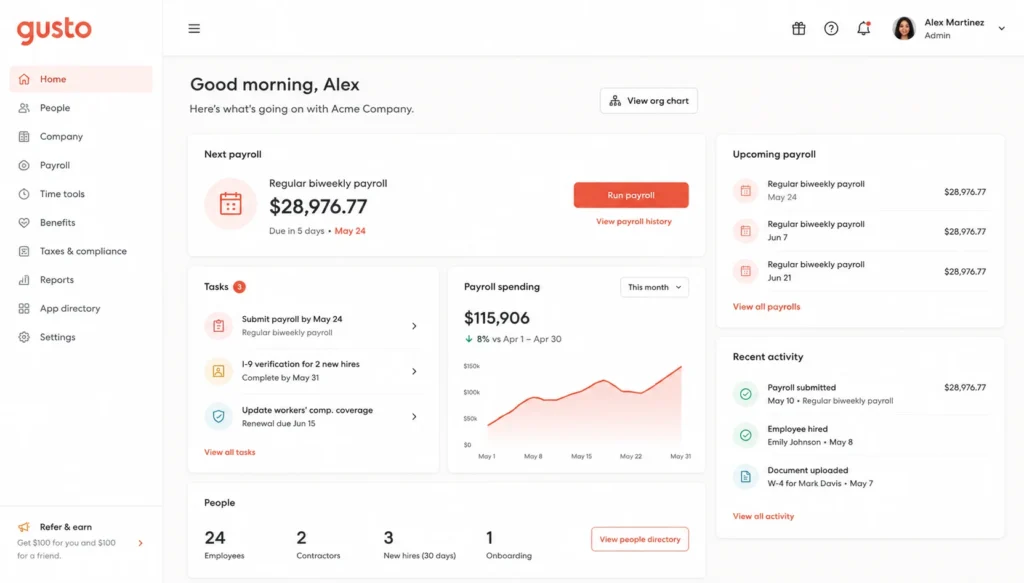
What separates Gusto from a lot of older payroll service providers is the experience. It’s very much the sort of accounting software from 2005, but it looks and feels like a modern app. You log in, see what needs your attention, and get through it in minutes rather than hours.
Gusto Pricing and Plans in 2026
Gusto pricing is based on a base fee plus a monthly cost per employee. Here is how the current plans work:
| Plan | Monthly Base Fee | Per-Employee Fee | Best For |
| Simple | $49 | $6/month | Solo founders, single-state payroll |
| Plus | $80 | $12/month | Growing teams needing HR tools |
| Premium | $180 | $22/month | Larger teams needing dedicated HR support |
Before you commit to a Gusto plan, a few things you should know before you start to do it:
The Simple plan only covers employees in one state. You’ll need Plus or more if you have remote workers scattered across state lines. Contractor-only businesses can use Gusto’s contractor payroll plan for a lower flat fee since there’s no tax withholding on 1099 workers. Pricing can change with promotions, so we’d recommend checking Gusto’s site directly before signing up.
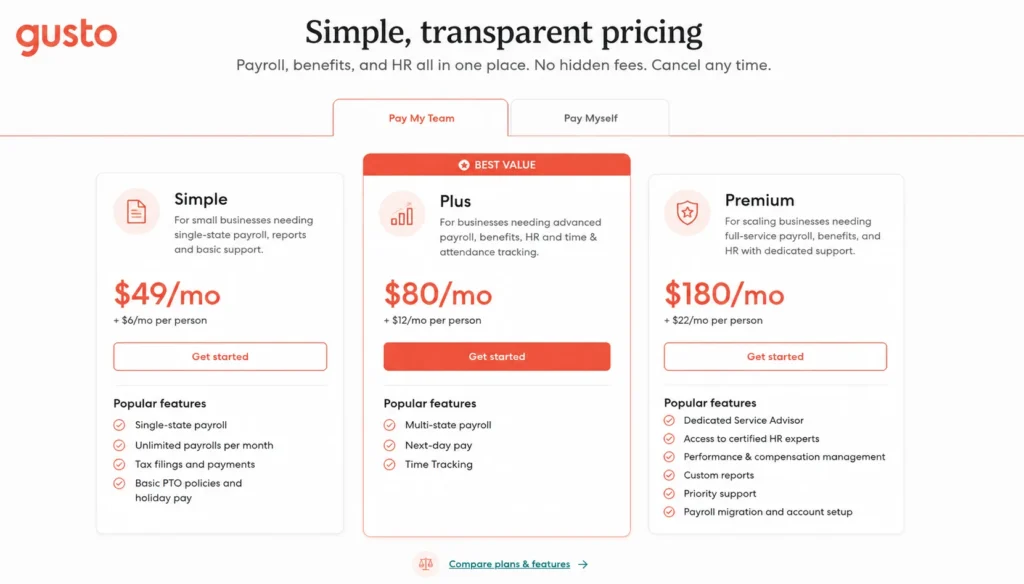
Gusto’s per-employee model is more predictable for small teams when compared to the older providers that charge based on payroll volume or bundle features you’ll never touch. And a five-person startup on the Plus plan makes around $140 a month, which is a fair trade for what you get.
Gusto Features Worth Knowing About
Gusto’s feature list has swollen since its early payroll-only days. What is unique in 2026?
Automatic Payroll Tax Filing
Gusto files and pays your federal, state, and local payroll taxes automatically. It also handles new-hire reporting to the state, which is one of those compliance steps business owners forget until they get a letter about it.
AutoPilot Mode
If your team is salaried and nothing changes month to month, AutoPilot will make payroll for you without you lifting a finger. You get a notification before it processes, so you can catch errors before money moves.
Employee Self-Service Portal
Workers can log in to see pay stubs, update banking information, adjust tax withholdings, and download W-2s at tax time. All that makes up a huge portion of HR email traffic.
Gusto Wallet App
This is a new addition that gives employees a way to see earnings, set savings goals, and access a portion of earned wages before payday. It’s a small feature, but it’s the kind of thing that breeds loyalty on a team.
Integrations
Gusto connects with QuickBooks, Xero, FreshBooks, Clover, and a wealth of accounting and point-of-sale tools. If your business already runs on one of these, the sync is close to seamless.
Gusto for Payroll: How It Actually Works
In practice, payroll using Gusto looks like this.
You log in, review the pay run Gusto has already prepared based on hours logged or salary defaults, and check for anything unusual, like a new hire or a bonus. You approve it. Gusto handles direct deposits, calculates and withholds the right taxes, and generates pay stubs automatically.
For a business with hourly employees, the process connects to time tracking data so hours flow into payroll without manual entry. For salaried teams, AutoPilot can skip the review step entirely once you trust the system.
For direct deposits, it typically takes two to four business days to turn around on the standard plans and on higher tier plans even faster. And the difference in stress level is huge in a bank portal or bare-bones spreadsheet you’ve ever done manually.
Gusto HR Software Capabilities
Payroll is the tool that brings Gusto in the door, but HR is where it has expanded the most. The platform now includes:
- Write letter templates and e-signatures for onboarding.
- Employee handbook creation tools.
- PTO tracking and approval workflows.
- Org charts that update automatically as your team grows.
- Compliance alerts for things like minimum wage changes in your state
On the Premium plan, you also have certified HR advisors on board that can provide real answers to real questions, like how to get through a tough termination and decide if a policy change is in compliance with state law. That’s an upgrade over software that just stores documents.
Gusto Employee Benefits
Gusto is a licensed insurance broker in most states, so you can shop for and manage employee benefits directly inside of the platform.
- Health, dental, and vision insurance.
- 401(k) retirement plans through partners like Guideline.
- Health Savings Accounts and Flexible Spending Accounts.
- Life and disability insurance.
- Commuter benefits in eligible cities
The benefit here is more than convenience. Since benefits deductions are directly related to payroll, it is easy not to worry about a benefits change not showing up properly in the payroll. That is, the sync alone prevents you from having a lot of awkward conversations with employees.
Gusto Time Tracking
Gusto’s time tracking tool allows hourly employees to clock in and out from a phone, tablet, or computer. Managers can approve timesheets before payroll, and the data flows straight into pay calculations without anyone re-entering numbers.
It supports overtime rules based on state law, PTO accrual tracking, and geofencing for businesses needing to verify employees are clocking in from the right location. For a restaurant, retail shop, or field service team, this feature alone can justify the upgrade to a higher plan.
Gusto Free Trial: What to Expect
Gusto has a free trial period, which is usually around a month, so you can do real payroll before you commit to a paid plan. During a free trial, you get the core features, so you can test whether the interface, tax filing, and employee onboarding flow actually fit how your business operates.
A practical note: take at least one full payroll cycle during the trial period rather than poking around the dashboard. That is the only way to be sure that the automation actually does save time or just adds a new tool to learn.
Gusto vs ADP: Which One Wins?
This is always something that comes up, and the answer depends on company size.
| Factor | Gusto | ADP |
| Best For | Small to mid-sized businesses | Businesses of all sizes, especially larger ones |
| Pricing Transparency | Published pricing on website | Custom quotes, less transparent |
| Interface | Modern, intuitive | Functional but dated on some plans |
| HR Support | Available on higher plans | Extensive, especially on enterprise tiers |
| Setup Speed | Fast, self-service | Often requires onboarding calls |
| International Payroll | Limited | Strong global capabilities |
ADP has been around since 1949 and has built infrastructure for large, complex organizations, including global payroll and deep compliance tools for regulated industries. If you’re running a company with thousands of employees throughout multiple countries, ADP’s scale advantage is real.
But for a business under 200 employees, Gusto wins almost every practical measure: setup time, pricing clarity, and day-to-day usability. Most small business owners I have spoken to who switched from ADP to Gusto say it was finally being able to see what they’re paying for.
Gusto Alternatives to Consider
Gusto is not the only option; it is worth knowing where it fits against the competition.
- QuickBooks Payroll is another good choice if you’re already connected to QuickBooks; its HR tools are thinner than Gusto’s.
- Rippling: For companies that need payroll, HR, and IT device management all in one platform. More expensive, more powerful.
- OnPay: A lower-cost solution with good payroll basics that’s good for small teams with tight budgets.
- Paychex: Like ADP in scale, but with good support for businesses who want a dedicated account rep.
- Justworks: A PEO model that can simplify benefits for very small companies but comes with a totally different pricing structure.
Hands down, if you are looking for ease of use and a modern interface, Gusto wins on that list. If you want heavier integrations with IT systems or you’re scaling fast into hundreds of employees, it is worth testing Rippling or ADP side by side.
Pros and Cons of Gusto
What works well:
- Clean, easy-to-navigate interface that doesn’t require training.
- Automatic tax filing across federal, state, and local levels.
- Transparent, published pricing.
- Strong benefits administration built into the same platform.
- Solid customer support with real people, not just chatbots.
Where it falls short:
- Multi-state payroll requires the Plus plan or higher, which adds cost quickly for distributed teams.
- No dedicated mobile app for admins, only for employees.
- International payroll support is limited compared to global providers.
- Advanced HR features and dedicated support are locked behind the Premium tier.
Who Should Use Gusto?
Gusto makes the most sense for:
- Small businesses with 1 to 100 employees.
- Startups that want payroll, benefits, and HR under one login.
- Teams with remote or hybrid employees who require simple multi-state support.
- Business owners who want automation without losing visibility into what’s happening.
It’s a weaker fit for large enterprises with international staff or companies that need deep customization in HR workflows that only enterprise-grade platforms like Workday can provide.
Final Verdict
Gusto earns its reputation. It takes a genuinely painful part of running a business, paying people properly and staying compliant, and turns it into something you can manage in twenty minutes a week instead of an entire afternoon.
It’s not perfect. Multi-state teams will pay more, and companies scaling past a few hundred employees will eventually outgrow it. But for the vast majority of small businesses trying to run payroll without hiring a full HR department, Gusto remains one of the smartest tools you can add to your stack in 2026.
If you are on the fence, go for the free trial. Run one real payroll cycle. You’ll know if it fits the way your business actually works within a week.
Frequently Asked Questions (FAQs)
Q. Is Gusto fit for small businesses?
A. Yes. Gusto was designed for small businesses, and pricing, interface, and support are tailored to people who don’t have an HR department.
Q. How much does Gusto cost per month?
A. Plans start at $49 a month plus $6 per employee on the Simple tier and work up to $180 a month plus $22 per employee on Premium, depending on features and HR support you need.
Q. Does Gusto have a free trial?
A. Yes, Gusto typically offers a free trial that covers all core payroll and HR features you are interested in, and you can test it with real data before paying.
Q. Is Gusto better than ADP for a small team?
A. Yes, for most businesses under 200 employees, yes. Gusto is price-driven, provides a quicker setup, and is a more modern experience, while ADP is more suited for companies with a larger or global scope.
Q. Can Gusto handle contractor payments?
A. Yes. Gusto supports 1099 contractor payments and files the necessary tax forms, and it offers a lower-cost contractor-only plan for businesses that don’t have W-2 employees.