

Six months ago, a decision that most engineering leads have been quietly pondering was to do away with the spreadsheets and internal scripts and open up a low-code system for building internal tools.
We chose Retool.
And now, after half a year of daily use, building admin dashboards, automating workflows, connecting to APIs, bumping into walls, and sometimes being really impressed by it, we’re ready to give you a full account of what it’s like to live inside Retool, not just on a demo call.
This isn’t a superficial review that marks every feature to be improved. This is the review that you would want to read before spending real money and real developer hours on a platform that could save your team or frustrate it into abandonment.

Let’s get into it.
What Is Retool, Really?
Before we can judge it fairly, we need to call out what Retool is and what it isn’t. Retool is a low-code development platform designed for building internal tools.
Think admin panels, customer support dashboards, data browsers, operations workflows, etc., all of which your engineering or ops team needs but probably hasn’t had the bandwidth to build from scratch.
It is not a no-code website builder. It is not Wix. It is not Webflow. If you’ve never written a SQL query or called a REST API in your life, Retool is like someone handed you a race car without a license.
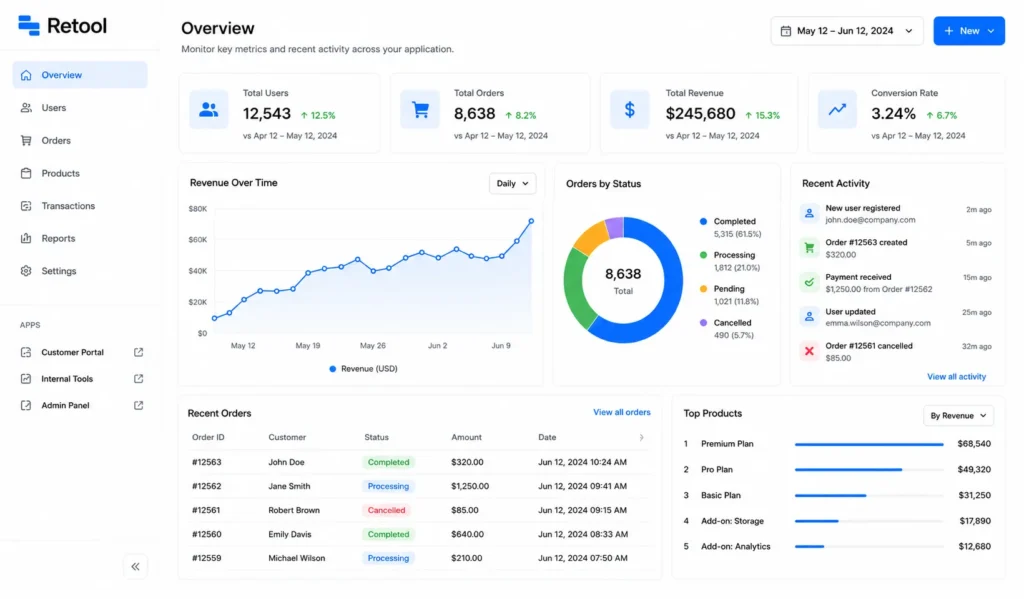
The platform assumes you are a developer, or at least developer-adjacent. You drag and drop pre-built UI components onto a canvas, connect them to your databases or APIs, and wire up the logic with JavaScript and SQL. Retool handles all the boilerplate UI plumbing so you’re not reinventing the wheel every time you need a data table with sorting and filtering.
Retool has evolved significantly in 2026. It’s no longer just a drag-and-drop IDE. It now supports AI-powered app generation (AppGen), native AI agents, and a full workflow automation engine. The pitch is no longer “build tools faster” but “let AI scaffold your tools, then customize them.”
Over 10,000 companies, including Amazon, DoorDash, Stripe, NVIDIA, and Boeing, already use Retool in production. This isn’t just a platform that is still finding its feet; it’s the one that everyone in the low-code space is trying to dethrone.
Who Actually Uses Retool?
This is a question that rarely gets answered honestly in reviews.
Retool’s sweet spot is engineering teams at mid-size to enterprise companies who need internal tooling but can’t justify building everything from scratch. Think:
- Customer support operations that need a unified view of customer records across five different systems
- Finance teams that need custom reporting dashboards pulling from multiple databases
- Logistics and operations that need real-time visibility into supply chain data
- Sales engineering building CRM extensions, pipeline managers, and trial managers
- Healthcare and fintech where bespoke internal tools can meaningfully improve compliance workflows
If you are a solo developer working on a side project, Retool’s free tier will serve you. If you’re a non-technical founder who wants to build a customer-facing app with no code, Retool is probably not your platform.
Retool Pricing: What You’ll Actually Pay in 2026
But let’s talk money because Retool’s pricing is one of the most discussed (and debated) topics in any honest Retool review.
The Plans at a Glance
| Plan | Standard Users | End Users |
| Free | Up to 5 | Up to 5 |
| Team | $10/user/mo | $5/user/mo |
| Business | $50/user/mo | $18/user/mo |
| Enterprise | Custom | Custom |
The Real Story Behind the Numbers
The Free tier is genuinely useful; you can build unlimited apps, connect to any data source, and test out the full builder. It works fine for small teams or proof-of-concept projects. The 500 monthly workflow run limit can sneak up on you if you’re actively automating processes, but for light use, it holds.
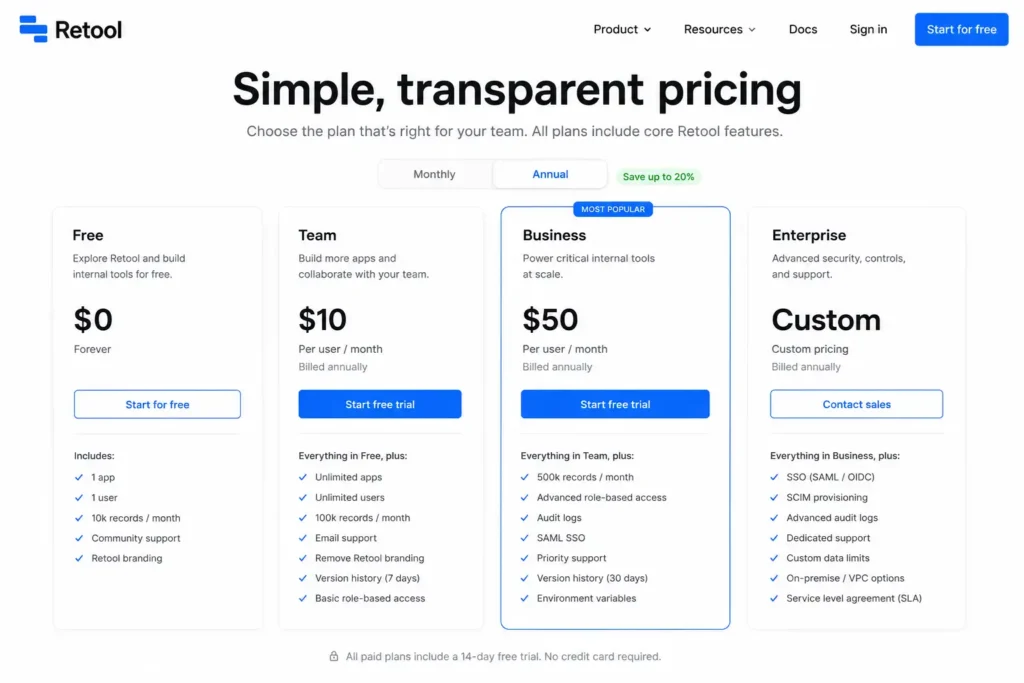
The Team plan at $10/user/month is where most growing teams land. It’s accessible, and the 5,000 workflow runs per month are enough for most internal tooling scenarios. The catch is that external users (clients, vendors, and contractors who need to access your apps) aren’t supported on Teams; you’ll need Business for that.
Here’s the pricing tension that trips up most buyers: the jump from Team to Business is a 5x price increase per user ($10 → $50). And the Business plan is where features like SSO (which mid-sized companies almost always require), audit logs, and Git integration live. If your company uses single sign-on, and most companies with 50+ employees do, you’re looking at Business pricing whether you want it or not.
The median Retool customer, based on verified purchase data, pays around $750/year in total contract value. But teams with 20+ developers building actively can easily spend several thousand dollars a month at Business tier pricing.
One more thing to factor in: if you’re self-hosting, add infrastructure costs and the DevOps time to manage upgrades. The sticker price isn’t the full story.
Core Retool Features Worth Knowing About
The Component Library
Retool has 90+ pre-built UI components: tables, forms, charts, maps, file uploaders, rich text editors, buttons, modals, and more. The table component alone is a major reason why many teams use it: sorting, filtering, inline editing, pagination, and row-level actions without any of it being done by you writing it yourself.
Database & API Integrations
One of Retool’s biggest selling points is the breadth of its native integrations. It offers access to 70+ data sources out of the box: PostgreSQL, MySQL, MongoDB, Snowflake, BigQuery, Google Sheets, REST APIs, GraphQL endpoints, and most major cloud services. For teams dealing with fragmented data in multiple backends, this is truly a productivity multiplier.
AI Assist & AppGen (New in 2026)
In fact, this is where Retool has made its biggest bet in 2026. AppGen lets you describe your app in natural language, and Retool will automatically generate pages, queries, components, and event handlers. It’s impressive in demos and useful in practice, but with limitations. We have more on this in the cons section.
AI Assist works like inline Copilot as you build, suggesting queries and component configurations as you go.
Retool Workflows
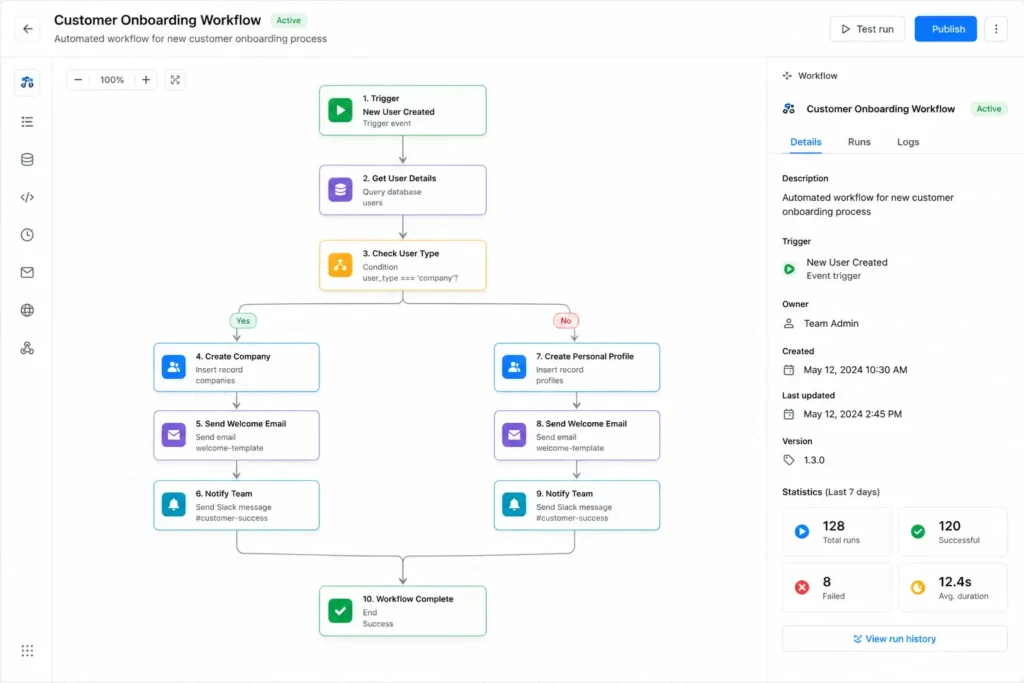
The built-in workflow engine handles scheduled jobs, conditional logic, retries, and background automation. It is not a full replacement for Zapier or Make for complex automations, but for internal processes that need to run on a schedule or be triggered by app events, it works well.
Retool Workflows + Mobile App
There’s also a native mobile app builder, a competitive differentiator that most alternatives lack. Teams with field technicians, warehouse staff, or anyone away from a desk can create mobile-optimized tools alongside their web interfaces.
Git Integration & Source Control
For serious development teams, Retool has an excellent Git integration feature. You can sync your apps to a GitHub or GitLab repository, enabling code reviews, pull request workflows, version control, and true staging/production deployment pipelines. Most competing platforms don’t offer this level of developer-friendly governance.
The Real Pros: What Retool Gets Right
After six months, here’s what truly struck me.
1. You Can Build Real Things, Fast
This may be obvious, but it’s worth saying up front: Retool delivers on its core promise. A good experienced developer can go from zero to a working real-world admin panel in a day. The combination of pre-built components with instant data source connections to JavaScript and the ability to drop in whenever you need custom logic means you’re never completely boxed in. In our case, we built a customer support dashboard that had previously spread across three Google Sheets, two legacy web apps, and a lot of tribal knowledge. It took four days in Retool. That same dashboard would have taken weeks to build from scratch.
2. The Table Component Is Elite
It might sound like a small thing, but the Retool table component is very special. Inline editing, column filtering, row actions, pagination, bulk operations, all of it has really worked on real-world data table use cases that would require extensive custom code in most frameworks. If your internal tools are heavily data-table oriented (and most are), it is a lot to have this.
3. 70+ Native Integrations
The wide range of data source support means you don’t necessarily get stuck with “how do I connect this.” PostgreSQL, MySQL, MongoDB, Snowflake, Salesforce, Stripe, Slack, Google Sheets — it all comes with authentication handling. For teams dealing with multiple systems of data, this is a real time saver.
4. Git Integration for Development Teams
The ability to sync your Retool apps to a Git repository and manage deployments through pull requests is something that most competing platforms simply don’t have. If your team has a code review workflow and wants staging/production environments to work as it does with the rest of your codebase, Retool makes that possible.
5. Real-Time Collaboration
Developers can be working on the same app at the same time like Figma for design. For teams building together, this is a great quality-of-life feature.
6. The AI Features Are Actually Useful (With Caveats)
AppGen, Retool’s natural language app generation system, can quickly scaffold a working app from a description faster than you’d expect. It’s not always right, and you’re usually going to spend more time refining what it produces, but it cuts startup time drastically for building a simple dashboard or CRUD app first.
The Honest Cons: Where Retool Falls Short
No platform is perfect. After six months, here’s where Retool really frustrated us.
1. The Learning Curve Is Real
Retool is not no-code, and “low code” does not describe the depth of developer knowledge required to get anything done beyond the basics. State management, JavaScript bindings, query chaining, and the debugging of complex interactions between components all require a solid technical base. Non-technical users will hit a wall very quickly.
2. Pricing Gets Painful at Scale
The Business plan’s per-user pricing is too much. A team of 10 developers at Business tier is $500/month, and that’s without considering end users, workflow, and any add-ons. The $10 → $50 change to unlock SSO is the single most common complaint you would find in real users’ reviews, and it’s a valid one.
3. UI Bugs and Saving Reliability
And we saw this a lot in our own experience and all over Capterra and G2 reviews: Retool’s editor has saving issues. Code in SQL queries can disappear after an update. The save button sometimes stays active after you’ve already saved. For a platform where you’re trusting your code to a cloud IDE, these reliability hiccups are actually stressful. And the fix for this is having your own backups, which shouldn’t be required on a paid platform.
4. AI Generation Still Requires Developer Cleanup
AppGen is impressive but not magical. So when you describe an app in natural language, what you come back with is a reasonable scaffold that still needs to be debugged and customized, and you need to be done with a lot of re-prompting or manual adjustment. It’s a time-saver, not an alternative for developer skills.
5. Not Suitable for External-Facing Apps
Retool is for internal tools. If you are trying to build a customer portal, a public-facing application, or anything your end users will directly interact with, you’re using the wrong tool. The Business plan provides “portals” with few external users, but that’s not Retool’s strength.
6. Vendor Lock-In Concerns
Retool’s proprietary format means your apps aren’t used to export to standard web code. If you leave the platform, you’re rebuilding and not migrating. It is something that companies that are building business-critical internal tooling should take seriously before committing.
Retool vs. Competition
Retool vs. Appsmith
Appsmith is open source, self-hostable, and free for teams who are comfortable managing their own infrastructure. It has the same drag-and-drop, and it has good JavaScript support. The key differences: Retool has a larger component library, a more professional UI, and native mobile support. Appsmith brings in more pricing flexibility and suits teams who want open source transparency and Git-native development without paying for Retool’s enterprise tier. Choose Retool if you need the broadest component library, enterprise polish, and native mobile support.
Choose Appsmith if you want open-source control and lower costs, and your team is JavaScript heavy.
Retool vs Budibase
Budibase is more accessible to non-technical teams. Its drag-and-drop interface is much easier and it supports simple dashboards and admin panels without JavaScript. It is also self-hostable and has a big free tier too. Where it fails: complex workflows, complex logic and anything beyond basic CRUD applications are all at their limit very soon.
Choose Retool if your use cases involve complex multi-step workflows and AI agent integrations.
Choose Budibase if you need a simple, low-friction tool for non-developers to build basic internal apps.
Retool vs. ToolJet
ToolJet is a popular open source alternative and has the ability to compete directly with AI-native tools. It supports Python, SQL and JavaScript; plugin flexibility; and is good for engineering teams that want to build future-proof tools. It lacks some of Retool’s enterprise polish but is closing the gap.
Quick Comparison Table
| Feature | Retool | Appsmith | Budibase |
| Open Source | – | ✓ | ✓ |
| Component Library | 90+ pre-built components | ~50 components | Moderate selection |
| AI Features | Strong AI capabilities (AppGen, AI-assisted development) | Good AI support | Good AI support |
| Native Mobile Apps | ✓ | Limited support | ✓ |
| Git Integration | Available on Business plan and above | ✓ | ✓ |
| Starting Price | Free plan available, paid plans from $10/user/month | Free (self-hosted) | Free (self-hosted) |
| SSO / Authentication | Business plan ($50/user/month) and above | Enterprise plan | Business tier |
| Deployment Options | Cloud, Self-hosted, On-premise | Cloud, Self-hosted | Cloud, Self-hosted |
| Ease of Use | Moderate | Developer-focused | Beginner-friendly |
| Customization | High | High | Moderate to High |
| Best For | Enterprise teams and large organizations | Development teams and engineers | Non-technical users and business teams |
Retool Updates in 2026: What’s New?
The 2026 version of Retool is not only truly different from what the platform was two or three years ago. Here is what matters:
AppGen is the headline feature; describe your app in simple terms, and Retool generates a working scaffold against your actual database schema. It is not perfect, but for simple internal tools it can dramatically cut down the build time.
Native AI Agents with observability and guardrails allow you to embed AI capabilities into your internal tools and not just build them. AI teams who are working on AI-powered support tools, data analysis dashboards, or workflow automation will be grateful.
Mobile App Builder has matured. Retool-built mobile apps that sync with the same backend as their web apps can now be used for field operations, warehouse management, and on-site teams. The platform now runs on a workflow engine that manages scheduled jobs, conditional branching, error handling, and retries, a whole lot better than dedicated automation tools like Zapier for internal use cases.
Conclusion
Six months of Retool taught us a very important thing: the platform is as good as you expect it to be. If you walk in expecting a no-code magic box, you’ll be disappointed. If you come in as a developer who is tired of reinventing basic UI patterns for every internal tool, you’ll probably love it.
Retool is fast, powerful, and truly well suited to the internal tooling problem it was designed to solve. And the AI features added in 2026 make early scaffolding faster than ever. The integrations are difficult to beat. And for development teams that work at scale, the Git integration and staging environments will be the kind of governance that you’d want in any production system.
The pricing is real, the learning curve is real, and editor reliability issues can happen. If we go in with a look at things from a different angle, take advantage of the free tier and test the Business plan pricing against your team’s headcount before committing.
If it works, and for many teams it does, Retool is really one of the best tools for developers today.
Frequently Asked Questions FAQs
Q. What is Retool used for?
A. Retool is a low-code platform that is implemented for building internal business tools such as admin panels, dashboards, workflows, and operational applications without coding everything from scratch.
Q. Is Retool free to use?
A. Yes. Retool offers a free plan for up to 5 standard users and 5 end users, including core features and 500 workflow runs per month.
Q. How does Retool pricing work?
A. Retool charges separately for builders (standard users) and app users (end users). Paid plans start at $10/user/month, and advanced features such as SSO and audit logs are available on the higher-tier plans.
Q. Can non-technical users use Retool?
A. Partially. Basic apps can be built with drag-and-drop tools, but advanced workflows and customizations often require JavaScript and SQL knowledge.
Q. How does Retool compare to Appsmith?
A. Retool has more components, enterprise features, and better mobile support. Appsmith is open-source, more affordable, and good for teams who want control and self-hosting.