
I spent 30 days testing n8n so that you don’t need to sit through the marketing fluff.
The short version: It replaced three paid tools in my stack, nearly broke me in week one, and became something I genuinely rely on by week four. The longer version is what the rest of this article is about: real pricing, real comparisons, real trade-offs, and no affiliate spin.
If you’ve been seeing n8n around and wondering if it’s worth your time, keep reading.
What Is n8n? A Quick Reality Check
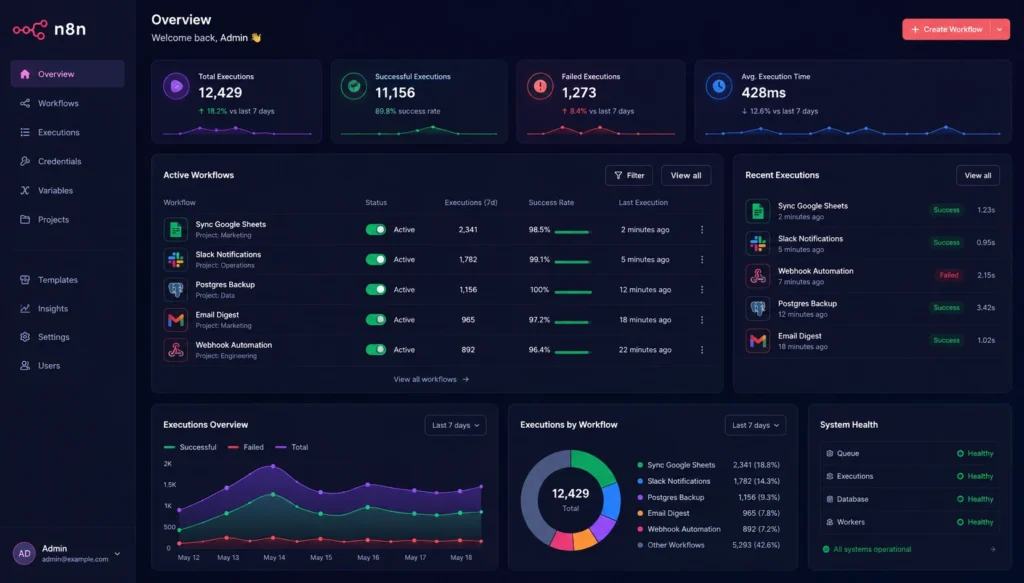
n8n (pronounced “nodemation”) is a workflow automation platform that connects apps, APIs, and services with a visual node-based canvas. Think of it as a flowchart that does things you actually need to do: triggers, conditions, loops, API calls, and data transforms, all in a drag-and-drop editor.

Founded in Berlin in 2019 by Jan Oberhauser, n8n has grown dramatically. The company raised a $240 million Series C in October 2025 and reached a $2.5 billion valuation. This is not a small indie project anymore; this is serious infrastructure that technical teams are betting their production workflows on.
What makes n8n different from Zapier or Make isn’t the integrations or the visual interface. It’s three things:
- You can self-host it for free. Completely free. No execution limits. No usage caps. You pay your server bill ($3 to $7/month) on platforms such as Hetzner or PikaPods, and n8n itself costs zero.
- You can write code inside a workflow. Real JavaScript or Python, directly inside a node. Not a workaround, a first-class feature.
- It’s genuinely AI-native in 2026. More on that later.
If you’ve been bouncing between Zapier and Make and wondering if there’s something more powerful, n8n is probably what you’re looking for. The catch is that “more powerful” comes with a steeper entry price in terms of time and learning.
n8n Pricing: The Full Breakdown
Pricing is where n8n gets interesting and where a lot of people get burned. Let’s break this down clearly.
The Self-Hosted Community Edition
Price: Free.
Unlimited executions. Unlimited workflows. All 500+ integrations. The only cost is your server infrastructure, which typically runs $3–7/month on managed platforms like PikaPods or InstaPods, or $4–5/month on a raw VPS like Hetzner.
For anyone technical enough to set up a Docker container (seriously, it’s about 20 minutes), this is an extraordinary deal.
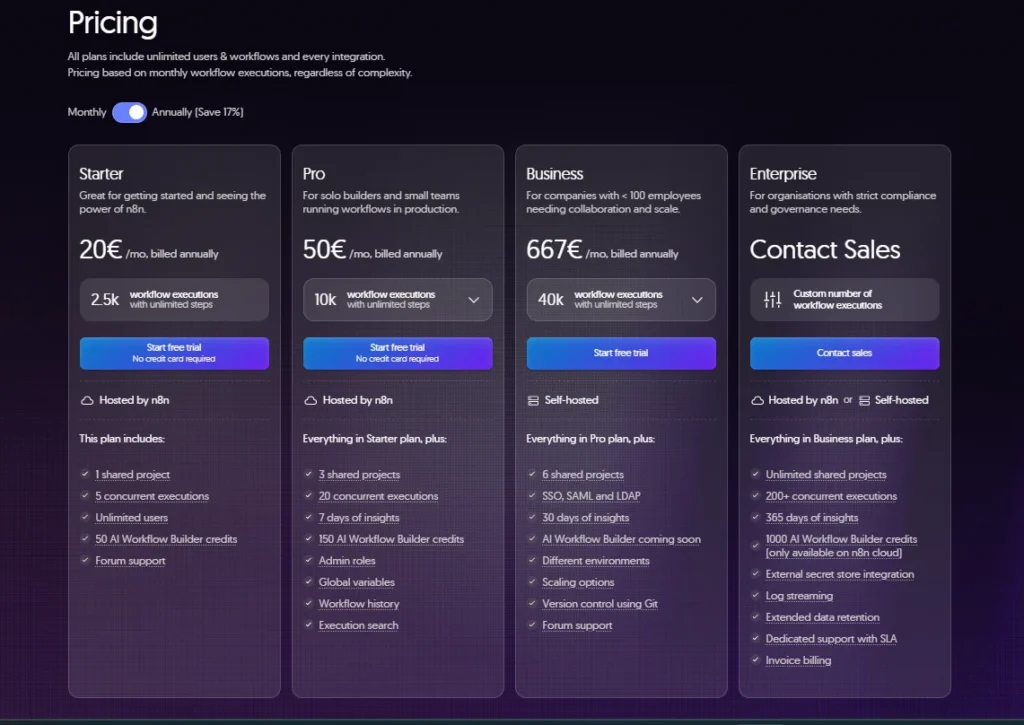
n8n Cloud Plans (as of 2026)
| Plan | Price | Executions/Month |
| Starter | ~€24/month (~$20/month billed annually) | 2,500 |
| Pro | ~€60/month (~$50/month billed annually) | 10,000 |
| Business | ~€667/month | 40,000–50,000+ |
| Enterprise | Custom Pricing | Custom Limits |
Annual billing saves approximately 17% across tiers.
The important pricing concept: n8n charges per execution, one complete workflow run, regardless of how many steps it contains. A 30-step workflow costs the same per run as a 3-step workflow. This is fundamentally different from Zapier, which charges per task (every individual action in a workflow). For complex automations, this makes n8n dramatically cheaper.
The pricing trap to watch: When you hit your monthly execution cap on n8n Cloud, workflows stop. Completely. If you’re running scheduling-heavy automations and miscalculate your monthly volume, this is a business continuity risk, not just a budget inconvenience.
The big pricing gap: The jump from Pro ($60/month) to Business ($667/month) is steep and catches teams who outgrow Pro but don’t need enterprise-tier features. If you’re in that middle ground, self-hosting is often the right answer.
April 2026 update: n8n removed active workflow limits across all plans. You can now run unlimited active workflows at every pricing tier, including Starter.
My 30-Day Setup: What I Actually Built
Here is what I did during my 30-day test period, which should give you some idea of what n8n can do in a real-world scenario:
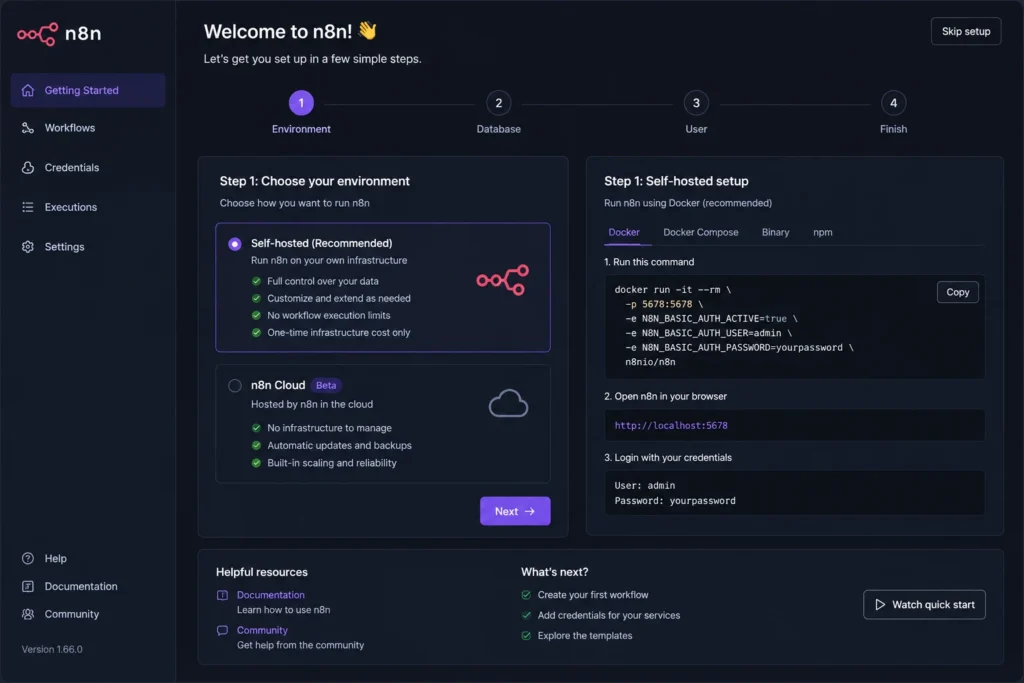
Week 1: Building the foundation: Set up a self-hosted instance on a $5/month VPS. Installed n8n via Docker (it took about 25 minutes). Started with a simple RSS-to-Notion pipeline that scraped five news sources daily and sorted articles according to category. Embarrassingly simple. Also embarrassingly satisfying.
Week 2: Going deeper: Built a webhook-driven lead routing workflow that pulled form submissions, enriched contact data through an API call, scored leads with a conditional logic node, and routed them to either Slack or HubSpot based on their score. This is where n8n’s Code node became my best friend; I wrote 12 lines of JavaScript to handle the scoring logic that would have required a paid third-party service in Zapier.
Week 3: AI integration: This is where things really started to get interesting. I wired up an AI agent workflow with n8n’s native LangChain nodes, connecting OpenAI’s GPT-4 to a vector memory store, and created a workflow that could summarize long-form content and write short-form social posts automatically. No separate infrastructure needed. All inside n8n.
Week 4: Stress testing: Made the workflows harder. Deliberately triggered edge cases. Tested error handling. Found two breaking points (more on those in the pros and cons section). Evaluated the community for support quality.
The result: I replaced three tools I was paying monthly subscriptions for— a content scheduling tool, a lead enrichment service, and a manual social posting workflow.
n8n Features: What Stands Out in 2026
The Visual Workflow Canvas
n8n’s editor is a node-based canvas. You start with a trigger (a webhook, a schedule, a chat message, or a database poll), wire it to action nodes, drop transforms in between, and build logic that actually mirrors how a real process works.
It’s not as polished as Zapier’s drag-and-drop simplicity. But it’s significantly more capable. The canvas handles branching logic, merge nodes, looping, and nested sub-workflows, things Zapier calls “premium features” and charges extra for.
The Code Node
This is n8n’s real superpower. You can drop a Code node anywhere in your workflow and write JavaScript or Python directly, accessing the full output of previous nodes, manipulating data structures, and calling third-party functions.
For anyone who’s ever hit the ceiling of what a no-code tool can do and resorted to writing a standalone script that somehow needs to plug into your automation, the Code node is the answer.
500+ Native Integrations
n8n supports over 500 native integrations across the usual suspects: Google Workspace, Slack, HubSpot, Salesforce, Airtable, GitHub, Stripe, Notion, and hundreds more. The integration depth varies; some are comprehensive, others are more limited, but the HTTP Request node covers anything that exposes a REST or GraphQL API, which is essentially everything.
AI & LangChain Nodes (2026 Standout Feature)
n8n’s AI subsystem has become its strongest competitive differentiator. The platform ships with 70+ LangChain-based nodes, covering AI agents, memory, vector stores, embeddings, and direct LLM calls to OpenAI, Anthropic, Google Gemini, and others.
The critical detail: n8n does not add a markup on AI costs. You connect your own API key, and LLM calls bill directly through OpenAI or Anthropic. n8n charges you for the workflow execution (one run = one execution), not for what happens inside it.
Error Handling & Retry Logic
n8n has built-in error handling with configurable retry logic, which matters enormously for production workflows. When a third-party API flakes out at 3am, n8n can retry with exponential backoff rather than silently failing. This is the kind of operational feature that separates a weekend project from a business-critical tool.
Sub-Workflows and Workflow Composition
Larger automations benefit from n8n’s ability to call other workflows, essentially treating workflows as reusable functions. This makes complex automation architectures maintainable in a way that Zapier’s linear Zap model simply can’t match.
n8n vs. Zapier vs. Make: The Real Comparison
I’ve taken all three seriously over the last year. Here is my honest read.
Pricing at Scale
The main reason that most technical teams take n8n is that Zapier charges per task, where the steps in a multi-step workflow are counted separately. For a 10-step workflow running 1,000 times a month, Zapier consumes 10,000 tasks. n8n counts that same scenario as 1,000 executions. At volume, this gap adds up to hundreds of dollars a month.
A self-hosted n8n instance on a $50/month server can handle what would cost over $1,500/month on Zapier, not an exaggeration for high-volume automation teams.
Complexity Ceiling
Zapier is so simple for linear automations. If your workflow is “when X happens, do Y,” Zapier is the fastest route. But conditional branching, loops, and complex data transforms feel bolted on and you’ll hit the ceiling as you grow.
Make (formerly Integromat) lies in the middle, more powerful than Zapier with a visual scenario builder that handles loops and conditional routing more naturally and with module-based pricing that’s more predictable than Zapier’s task model.
n8n handles the complex cases that break the other two. The trade-off is a steeper learning curve and, for non-technical users, a less user-friendly interface. Sub-workflows, inline code, vector memory for AI agents, granular API access.
Who Should Pick What
| Choose Zapier if… | Choose Make if… | Choose n8n if… |
| You’re non-technical and want the easiest setup | You want a balance of power and accessibility | You’re technical or have a developer-led team |
| You need access to 6,000+ app integrations | You want predictable pricing for automation workloads | You want to self-host your automation platform |
| You run simple, linear workflows | You need moderately complex workflows and visual automation | You’re building AI agents or workflows with advanced logic |
| Speed of setup and ease of use matter most | You prefer a European-based automation platform | Cost efficiency at scale is a top priority |
| You want minimal maintenance and administration | You need strong visual workflow design capabilities | You need maximum customization and flexibility |
| You prefer a fully managed cloud solution | You want advanced automation without coding expertise | You require full control over data, infrastructure, and integrations |
AI Capabilities Comparison
All three platforms have added AI in 2025–2026, but n8n’s native LangChain integration runs deepest. A multi-memory AI agent that can move between tools, access vector databases, and keep track of context across sessions is possible inside n8n’s canvas without external infrastructure. Zapier and Make’s AI features seem more like convenience wrappers around API calls by comparison.
n8n Self-Hosting vs. Cloud: Which Should You Pick?
This is the first real decision that every n8n user has to make, and it’s something you must consider wisely.
Self-Hosted: The Case For It
If you’re comfortable with Docker (or are happy to spend a weekend learning), self-hosting is usually the optimal financial option. For the price of a server, you get everything you need: executions, workflows, and active automations, all in one go.
And beyond cost, self-hosting gives you data sovereignty. Your workflow data, API credentials, and automation payloads never leave your infrastructure. And for a team that deals with sensitive customer data, financial records, or anything related to GDPR, it counts.
Infrastructure cost reality: most production n8n deployments run $20-150/month in server costs depending on workload. That’s still significantly cheaper than comparable execution volumes on cloud plans.
n8n Cloud: The Case For It
If you don’t want to manage servers, handle upgrades, or think about infrastructure, n8n Cloud is a clean, managed service. Automatic updates, EU-based servers, support included. For non-technical teams or solo operators who want to get moving fast, this is the right approach.
The honest caveat: if you are running more than 3–4 regular polling-based automations, then it’s worth taking a look at your execution volume before pursuing Starter or Pro plans. Polling workflows that operate on a schedule eat executions quickly.
n8n AI Agent Capabilities in 2026
This section deserves its own spotlight now, as AI is n8n’s most important feature. n8n’s AI subsystem is built on LangChain, so you can get the full AI architecture: tool-calling agents, conversational memory, vector stores, embedding models, retrieval-augmented generation (RAG), and multi-step reasoning chains.
What this means practically:
- You can build a customer support agent that queries your own documentation (stored in a vector database), maintains conversation context across sessions, and escalates to a human when confidence is low, all inside one n8n workflow.
- You can build a content pipeline agent that reads from an RSS feed, scores relevance with an LLM, rewrites in your brand voice, and posts to your CMS, without writing a single standalone script.
- You can chain AI calls with conditional logic, so an agent’s output determines which branch of a workflow runs next.
The AI cost model is clean: you supply your own API keys (OpenAI, Anthropic, Google). n8n charges you for the workflow execution. LLM costs go directly to the provider. No markup, no per-AI-call fee from n8n.
The Learning Curve: What Nobody Tells You
This is the part most n8n reviews skip: the onboarding experience is rough in places, and it’s good to be honest.
What’s harder than it should be:
The documentation has improved but still has gaps, especially for advanced node configurations and AI agent patterns. When you get an error, the error messages can be frustratingly vague, like “Problem executing node” with a stack trace that requires decent JavaScript knowledge to parse.
The community (most notably the n8n forum and Reddit community) is active and helpful, but for complex problems, you should expect to spend time debugging yourself. n8n’s flexibility is also its complexity, because you can do so much, there’s often more than one way to approach a problem, and figuring out the right pattern takes experience.
What gets easier fast:
Once you learn the data model (how data flows between nodes as items), the logic is straightforward. Most people reach a breakthrough around day 5–10 when things click, and building becomes genuinely fast. Visual debugging tools, like n8n, show you the exact data output of every node when you run a test, dramatically reducing debugging time once you know how to use them.
My honest time estimate:
- Basic workflows: functional within a few hours
- Intermediate workflows with branching logic: comfortable after 1–2 weeks
- Advanced AI agents and sub-workflow architectures: 3–4 weeks of regular use.
n8n Updates 2025–2026: What Changed
n8n has shipped significant changes over the past 18 months. Here is what is materially different from the product you might have evaluated before:
Unlimited active workflows (April 2026): Previously, cloud plans limited how many workflows could be active simultaneously. n8n removed that limit entirely across all tiers. This was a meaningful improvement to the value proposition of cloud plans.
Native AI agent canvas: The LangChain integration has matured significantly. Building multi-tool AI agents that can reason, use memory, and call external APIs is now a first-class workflow pattern, not a workaround.
Improved workflow execution visibility: Execution logs and debugging tools have gotten substantially better, which directly addresses one of the biggest historical complaints about troubleshooting production workflows.
Expanded integration library: Over 500 native integrations as of 2026, with consistent shipping of new connectors.
Series C funding ($240M, October 2025): This isn’t a feature, but it signals the product roadmap. n8n has resources to maintain competitive development velocity for the foreseeable future.
Who Should Use n8n? (And Who Shouldn’t)
n8n is an excellent fit for:
- Developers and engineers who want automation without sacrificing flexibility
- Automation agencies building workflows for clients who need production-grade reliability
- Technical founders and startups who want to automate operations without enterprise software bills
- Data-sensitive teams (healthcare, finance, legal) who need self-hosted infrastructure for compliance
- AI builders who want a native LangChain environment without managing separate infrastructure
- High-volume automation users for whom Zapier or Make’s per-task/per-operation pricing becomes expensive
n8n is probably not the right fit for:
- Non-technical teams without anyone comfortable in a terminal or reading a stack trace
- Simple, linear automation use cases where Zapier’s speed-of-setup advantage is genuinely valuable
- Teams without DevOps capacity who want self-hosting economics but don’t want server management: n8n Cloud’s Pro plan is reasonable, but the execution limits need careful management
- Teams needing the widest possible pre-built integration library, Zapier still leads with 6,000+ app connections.
Pros and Cons: The Unfiltered List
Pros
- Self-hosted Community Edition is completely free with no execution limits
- The per-execution pricing model is dramatically cheaper at scale compared to per-task competitors
- Native code nodes (JavaScript + Python) remove the ceiling on what’s possible
- Best-in-class native AI and LangChain integration in 2026
- Full data sovereignty when self-hosted and a strong GDPR compliance story
- Active development pace with significant improvements over 2025–2026
- Strong community and growing ecosystem
Cons
- Steeper learning curve than Zapier or Make, especially for non-developers
- Error messages can be unhelpfully vague; debugging requires patience
- Documentation quality is uneven, particularly for advanced patterns
- Cloud pricing gap between Pro ($60/month) and Business ($800/month) is awkward
- Execution caps on cloud plans stop workflows entirely when exceeded, no graceful degradation
- Self-hosting requires DevOps capacity that some teams don’t have
Final Verdict
Here’s where I stand after 30 days: n8n is probably the best automation platform for technical teams in 2026, but it’s not the best tool for everyone, and someone who says so is either an oversimplifier of the problem and/or has a referral tie.
The free self-hosted edition is truly great value, unlimited automation infrastructure for the cost of a server. The execution-based pricing model is well-suited for complex workflows. The AI agent capabilities are the real thing, not marketing window dressing. And the development pace since the Series C funding has been impressive.
But the learning curve is real. The documentation gaps are real. The execution cap trap on cloud plans is a real operational risk if you do not plan carefully. And the $740/month leap from Pro to Business will pick up teams that surpass Pro.
n8n isn’t perfect. But for the right user, it’s the most powerful automation tool available at any price, and for a large slice of that audience, it’s free.
Disclaimer: This review reflects hands-on testing and current pricing as of June 2026. Pricing and features may change; always verify on n8n.io before making purchasing decisions.
Frequently Asked Questions (FAQs)
Q. What exactly is n8n and how does it work?
A. N8n is a workflow automation platform that connects apps, APIs, and services with a visual editor. You create workflows using triggers and actions, and tasks automatically run. It supports no-code automation as well as custom JavaScript and Python code.
Q. How much does n8n cost in 2026?
A. N8n’s Community Edition is free as well, with server costs only to consider. Cloud plans start at about €24/month for 2,500 executions, €60/month for 10,000 executions, and €800/month for enterprise level. Unlike many competitors, n8n charges per workflow execution rather than per task.
Q. How does n8n compare to Zapier?
A. n8n is generally more cost-effective for complicated workflows because it charges per execution instead of per task. It also offers self-hosting, custom coding, and AI capabilities. Zapier is easier for beginners and provides a more intuitive onboarding process.
Q. Can n8n build AI agents in 2026?
A. Yes, n8n includes AI-enabled nodes that support AI agents, vector databases, memory, and integrations with OpenAI, Anthropic, and Google Gemini. You can build chatbots, RAG systems, and AI-driven workflows in n8n itself.
Q. Is n8n suitable for non-technical users?
A. N8n is intended for beginner automation, but for advanced workflows there are typically JSON, APIs, and basic programming concepts to learn. Zapier or Make could be easier for non-technical users, but technical teams can unlock a lot more flexibility with n8n.