 Shikha Kumari
When Apple flashed the starting price on the screen at its spring event, the room gasped. A brand-new Mac laptop for $599. No refurbished asterisk, no back-to-school gift card, no “starting from” trickery hiding a $1,200 real-world total. For years the cheapest way into macOS was hunting down a discounted MacBook Air or buying one two generations old. The MacBook Neo changed that math overnight.
Then reality nudged the price up. A global memory shortage pushed Apple to raise prices across its Mac line in June 2026, and the Neo now starts at $699. Still the most affordable Mac Apple has ever shipped, and by a wide margin.
This review covers what the MacBook Neo does well, where its 8GB of RAM starts to strain, how it stacks up against the M5 MacBook Air, and who should buy it. By the end you’ll know whether $699 buys you a real laptop or a compromise you’ll regret in a year.
What Is the MacBook Neo?
The MacBook Neo is Apple’s entry-level laptop, released in March 2026 and aimed squarely at students, teachers, and anyone who wants a Mac without paying Mac prices. It looks like a slightly shrunken MacBook Air and runs the same macOS, but one decision sets it apart from every Mac before it.
Instead of an M-series chip, the Neo runs an A18 Pro, the same processor family Apple first put in the iPhone 16 Pro back in 2024. This is the first consumer Mac built around a phone chip. That single choice explains almost everything about the machine: the low price, the modest 8 GB of RAM, the strong battery life, and the silent fanless body.
Apple’s pitch is that most people don’t push a laptop hard. They open a browser, write documents, join video calls, stream shows, and edit the occasional photo. For that person, the company argues, an A18 Pro is plenty. The market seemed to agree fast. The MacBook Neo outsold every other Mac in its debut quarter, according to MacRumors’ reporting, and Apple reportedly doubled production to keep up with demand that caught it off guard.
MacBook Neo Price: What It Actually Costs Now
Here is where you need current numbers, because the headline figure everyone repeats is out of date.
The MacBook Neo launched at $599 for the 256GB model. In June 2026 Apple raised prices across its Macs, blaming climbing memory and component costs, and the Neo’s starting price moved to $699. The old $599 tag survives in two places: education pricing (students and teachers still pay $100 less) and Apple’s refurbished store, where a 256GB unit runs $599 and a 512GB unit $679.
The MacBook Neo price in the USA breaks down like this:
| Configuration | Price (USD) | Notes |
| 256GB, 8GB RAM | $699 | Base model, no Touch ID |
| 512GB, 8GB RAM | $799 | Adds Touch ID, extra $100 |
| 256GB (education) | $599 | Students, teachers, staff |
| 512GB (education) | $699 | Students, teachers, staff |
| 256GB (refurbished) | $599 | Apple Certified Refurbished |
| 512GB (refurbished) | $679 | Apple Certified Refurbished |
There is no RAM upgrade. Every MacBook Neo ships with 8GB, whichever tier you pick. The only choice you make is storage, and that choice quietly decides whether you get a fingerprint reader.
For context, the cheapest M5 MacBook Air now starts at $1,299 after the same June price bump. The Neo undercuts it by $600. That gap is the entire reason this laptop exists.
Design, Colors, and Build
Pick up a MacBook Neo and it feels like a Mac. Apple did not cut corners on the enclosure. The body is aluminum, the corners are soft and rounded, and the whole thing weighs 2.7 pounds, the same as a 13-inch MacBook Air.

The footprint runs 11.71 inches wide, 8.12 inches deep, and 0.50 inches thick. The Air is a hair larger in width and depth but thinner at 0.44 inches. So the Neo is a touch smaller and a touch chunkier. In a bag you won’t notice the difference.
The Colors Are the Point
Apple sells the MacBook Neo in Silver, Blush (a soft pink), Citrus (yellow), and Indigo (deep blue). The company is not positioning this as its boring, cheap laptop. It’s marketing the Neo as its fun one, and the color-matched details carry that idea through. Each machine gets an embossed Apple logo in the same shade as the lid, and the keyboard matches too. Blush comes with a pink keyboard, Indigo with blue keys, Citrus with yellow.
Silent by Design
There is no fan inside the MacBook Neo. The A18 Pro sips so little power that Apple skipped active cooling entirely, so the machine runs dead silent no matter what you throw at it. No whirring during a video call, no ramp-up when you open twenty tabs.
One underrated touch: the Neo is easier to repair than other MacBooks. Apple designed the keyboard to be swapped without replacing the entire top case, which should make out-of-warranty fixes cheaper. On a budget laptop that people will keep for years, that matters more than it sounds.
The Display: Good, With Two Missing Pieces
The MacBook Neo has a 13-inch Liquid Retina display at 2408 by 1506 resolution, 219 pixels per inch, and 500 nits of brightness. Those numbers match the MacBook Air on sharpness and brightness. Text looks crisp, blacks look clean, and an anti-reflective coating keeps glare down.
Two things are gone, and whether you care depends on your work.
First, no P3 wide color. The Neo covers sRGB only. For browsing, writing, spreadsheets, and streaming, sRGB is fine and you’ll never think about it. For photo editing, video color grading, or graphic design where accurate color decides the job, the narrower gamut is a real limit.
Second, no True Tone. The display won’t shift its warmth to match the light in your room. You lose a small comfort feature, nothing more.

There’s also no ProMotion, so the screen runs at a standard 60Hz rather than the buttery 120Hz of a MacBook Pro. At this price, none of that is a surprise. The bezels are thicker than the Air’s, and Apple used that thicker top border instead of a notch, which some buyers will quietly prefer.
A18 Pro Performance: A Phone Chip in a Laptop
The A18 Pro in the MacBook Neo has a 6-core CPU (two performance cores, four efficiency cores) and a 5-core GPU. Apple used a binned version with one fewer GPU core than the iPhone 16 Pro’s chip, a common trick to keep costs down. A 16-core neural engine handles on-device AI.
So how fast is it in practice? Faster than the price suggests. The A18 Pro posts a single-core score in the same neighborhood as Apple’s M4, which is remarkable for a chip that started life in a phone. The Verge’s review said the Neo “zips through the light workloads it’s designed for,” beating the old M1 MacBook Air and most Windows laptops in its class. CNET described the feel as “bursty,” which fits how these chips work: quick sprints for the tasks most people run, rather than sustained heavy lifting.
Real-world, that translates to smooth web browsing, snappy document work, comfortable video calls, light photo edits in the Photos app, and even basic video trimming in iMovie. Apple Intelligence features run too, since 8GB clears the bar for its AI tools. Where the A18 Pro falls behind is anything sustained and demanding: exporting long 4K timelines, compiling large codebases, running heavy virtual machines, or gaming beyond casual titles. That’s not the workload this laptop is for, and reviewers who benchmark it against a MacBook Pro are answering a question no Neo buyer is asking.
The 8GB RAM Question (What Most Reviews Skip)
Every MacBook Neo has 8GB of RAM, soldered, with no upgrade path. Most reviews land on the same reassuring line: macOS manages memory well, and 8GB is fine for everyday use. That’s true. It’s also where most guides stop, and the more useful part comes next.
Here is the detail that gets glossed over. When you push past physical RAM, macOS offloads memory to the SSD as swap. The MacBook Neo’s SSD is slower than the ones in the MacBook Air and Pro, with tested read speeds around 1,735 MB/s and writes around 1,684 MB/s. On a Mac with a fast SSD, swapping is nearly invisible. On the Neo, the slower drive means that when you do hit the ceiling, the slowdown you feel is a little sharper than on a pricier Mac. The two limits compound each other.

For most people, that ceiling stays out of reach. A reviewer at 9to5Mac ran roughly 25 Safari tabs plus Music, Messages, Notes, a writing app, and a mail client at once and never hit a wall. That’s a normal day for most users, and the Neo handled it.
You start noticing the limit under a different pattern: dozens of heavy browser tabs, plus a big photo library open, plus a video call, plus several pro apps loaded together, held that way for hours. A CNET writer who spent a month with the Neo described feeling the edges of the 8GB budget under exactly that kind of extended, layered use. If your day looks like that, the Air’s 16GB is worth the extra money. If it doesn’t, you’ll rarely think about RAM at all.
One more thing worth planning for: Apple has already signaled that the next MacBook Neo will move to 12GB of RAM and an A19 Pro chip. If your workload sits right on the edge of 8GB today, waiting for that revision, or buying the Air now, is the smarter call.
Storage and Battery Life
Storage starts at 256GB and tops out at 512GB for an extra $100. That’s the whole menu. There’s no 1TB option, no external upgrade path beyond plugging in a drive. For a cloud-first student who keeps files in iCloud or Google Drive, 256GB is workable. If you store large photo libraries or local video, spend the $100 and take the 512GB model, which throws in Touch ID as a bonus.
MacBook Neo battery life is a genuine strength. The 36.5-watt-hour battery is small, yet the efficient A18 Pro stretches it to Apple’s rated 11 hours of web browsing and 16 hours of video playback. Tom’s Guide clocked 13 hours and 30 minutes in its own testing, beating a Microsoft Surface Go. That efficiency is the quiet payoff of using a phone chip: the Air has a battery nearly 50% larger and only pulls ahead by a couple of hours in video.
Charging is where Apple trimmed. The Neo charges over USB-C with no MagSafe port and no fast-charge feature. The U.S. box includes a 20W adapter, though the laptop accepts up to 30W and tops up faster with a higher-wattage charger. Buyers in the EU and UK don’t get an adapter in the box at all.
Ports, Keyboard, and What’s Missing
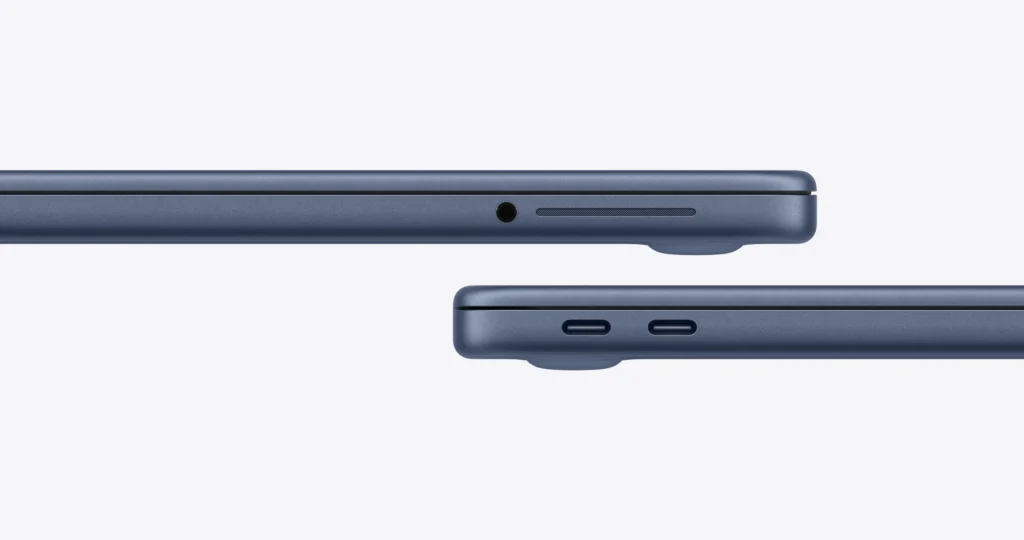
The MacBook Neo gives you two USB-C ports on the left and a headphone jack on the right. The two ports are not equal, and that catches people out. One is USB 3 (up to 10Gb/s, and the only port that drives an external display), and the other is USB 2, capped at 480 Mb/s. Plug a monitor into the wrong one, and the Neo warns you.
That USB 3 port supports a single 4K display at 60Hz over DisplayPort. You cannot run two external monitors, and there are no Thunderbolt ports, so high-bandwidth docks and fast external RAID setups are off the table.
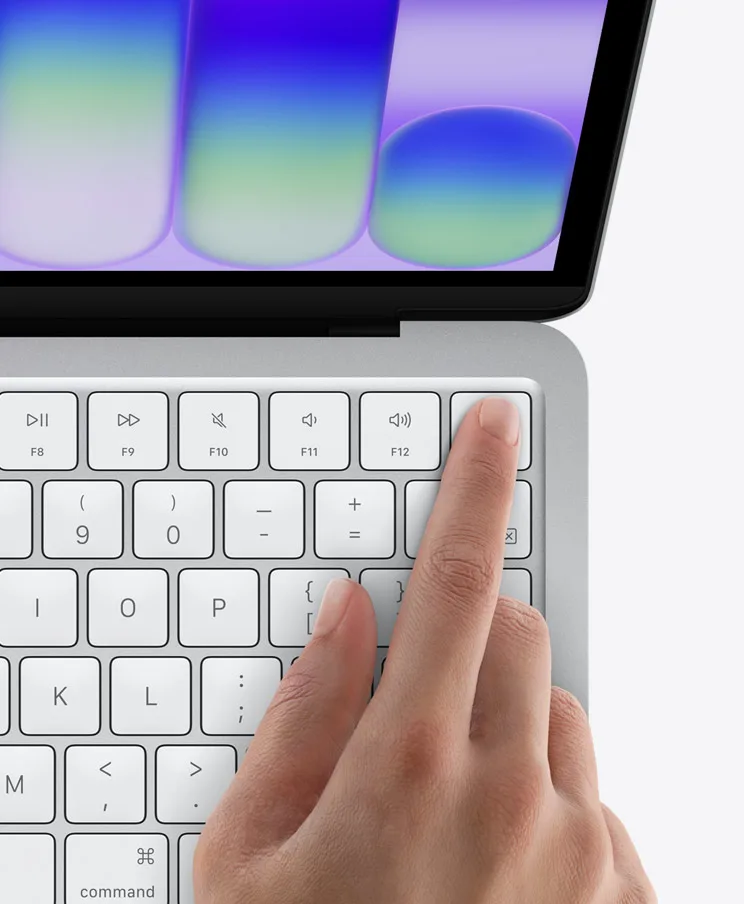
The keyboard is a full Magic Keyboard with proper key travel and a durable scissor mechanism. Apple dropped the backlight to save money, which stings if you type in the dark. The trackpad uses a physical click instead of the Air’s haptic Force Touch, so you lose pressure-sensitive input, though everyday clicking and gestures work the same.
Here’s the odd one: Touch ID depends on which storage tier you buy. The base 256GB model has no fingerprint reader. Step up to the 512GB model, and Apple adds a Touch ID power button. Tying a security feature to a storage upgrade is a strange line to draw, and it’s the Neo’s most annoying compromise.
Rounding out the package: dual side-firing speakers with spatial audio and Dolby Atmos that reviewers at Bloomberg praised as well balanced for the price, dual microphones with Voice Isolation, a 1080p FaceTime camera (not the sharper 12MP Center Stage camera on other Macs), Wi-Fi 6E, and Bluetooth 6.
MacBook Neo vs MacBook Air M5
This is the comparison most buyers actually face: save $600 with the Neo, or step up to the M5 MacBook Air. Here’s how the MacBook Neo specs line up against Apple’s next step up.
| Spec | MacBook Neo | MacBook Air (M5) |
| Starting price | $599 ($699 base configuration) | $1,299 |
| Chip | A18 Pro (6-core CPU, 5-core GPU) | M5 (10-core CPU, 8 or 10-core GPU) |
| RAM | 8GB (fixed) | 16GB (standard) |
| Storage | 256GB / 512GB | 512GB and up |
| Display | 13-inch, sRGB, 60Hz | 13.6 or 15.3-inch, P3 wide color |
| Camera | 1080p FaceTime | 12MP Center Stage |
| Ports | 2x USB-C (1x USB 3, 1x USB 2), no Thunderbolt | Thunderbolt 4 |
| Touch ID | Only on the 512GB model | Standard |
| Battery (video) | Up to 16 hours | Up to 18 hours |
| Keyboard backlight | No | Yes |
| Weight | 2.7 lb (1.23 kg) | 2.7 lb (13-inch) |
The Air wins on paper across the board: double the RAM, a far stronger M5 chip, P3 color, Thunderbolt, a sharper webcam, a backlit keyboard, and Touch ID on every model. If you edit photos or video seriously, juggle heavy multitasking, or want a machine that stays capable five years out, the Air earns its premium.
The Neo’s case is simpler: it does the core 80% of laptop tasks for 54% of the price. For a student writing papers, a kid doing homework, a parent managing email and video calls, or a second travel laptop, the extra $600 buys headroom most of those users will never touch. Both machines are right answers to different budgets.
Who Should Buy the MacBook Neo?
Buy the MacBook Neo if you want to get into the Mac world for the lowest price Apple has ever offered, and your day runs on a browser, a word processor, video calls, and streaming. Students and teachers get the strongest deal, since education pricing drops to $599 and the workload fits perfectly. It’s also a smart pick as a lightweight travel laptop or a shared family machine.
Skip it, and stretch to the M5 MacBook Air if you do color-accurate creative work, run heavy multitasking or pro apps for hours, want a backlit keyboard and Touch ID as standard, or plan to keep this laptop capable well into the 2030s. The 8GB RAM ceiling and slower SSD are the two limits that will decide it for you.
For most people who just need a good, affordable Mac, the MacBook Neo is the easiest recommendation Apple has made in years. It’s proof that “cheap Apple laptop” no longer has to be a contradiction.
The Verdict
The MacBook Neo does something Apple hasn’t managed in a long time: it makes a real Mac genuinely affordable. At $699, you get a silent, well-built aluminum laptop with a sharp display, all-day battery, and enough speed for the tasks most people actually do. The compromises are honest and easy to understand: 8GB of RAM with no upgrade, a slower SSD, sRGB-only color, and Touch ID locked behind the storage tier.
None of those matter for the browser-and-documents crowd this laptop was built for. They matter a lot for creative pros and heavy multitaskers, who should pay up for the M5 MacBook Air instead.
Your next step: decide honestly how hard you push a laptop. If your day is tabs, docs, calls, and video, the MacBook Neo is the best value Apple sells. Check the current price at Apple or Best Buy, confirm whether you qualify for education pricing, and if you want Touch ID, budget for the 512GB model.
Frequently Asked Questions (FAQs)
Q. How much does the MacBook Neo cost?
A. The MacBook Neo starts at $699 for the 256GB model and $799 for the 512GB model, which adds Touch ID. Students and teachers pay $100 less through Apple’s education store, bringing the base model to $599. Apple Certified Refurbished units also start at $599. It launched at $599 in March 2026 before a June 2026 price increase.
Q. Is 8GB of RAM enough for the MacBook Neo?
A. For everyday tasks like web browsing, documents, streaming, and video calls, 8GB is enough, and macOS manages memory efficiently. You’ll only feel the limit under heavy, sustained multitasking with many pro apps and dozens of tabs open at once. If that’s your workload, the 16GB MacBook Air is a better fit.
Q. Does the MacBook Neo have Touch ID?
A. Only on the 512GB model. The base 256GB MacBook Neo does not include a Touch ID fingerprint reader. Upgrading to 512GB storage for an extra $100 adds a Touch ID power button to the keyboard.
Q. MacBook Neo vs MacBook Air: Which Should I Buy?
A. Buy the MacBook Neo ($699) for everyday computing on a budget. Buy the M5 MacBook Air ($1,299) if you need more RAM, a faster chip, P3 wide color for creative work, Thunderbolt ports, and longer-term performance. The Neo covers most common tasks for $600 less.
Q. When was the MacBook Neo released?
A.
Apple released the MacBook Neo in March 2026. It’s the company’s first consumer Mac to use an A-series chip, the A18 Pro, rather than an M-series chip. A revised model with an A19 Pro chip and 12GB of RAM is expected next.