
There’s a moment every designer hits, typically around the third time they’ve gone back and forth with a developer over a pixel, where they think there has to be a better way. For a lot of people, Webflow is that better way.
For others, it’s a steep learning curve that ends in frustration. So which is it?
In this review, I’m not going to sugarcoat anything. This is not a paid promotion or a surface-level overview. I have heard the people’s feedback, conducted extensive testing of the platform, and gathered everything you need to know, from pricing and features to how it will compare to competitors in 2026.
It is for you if you’re a freelance designer, startup founder, or marketing team working faster without waiting for engineers.

What Is Webflow, Really?
At its core, Webflow is a visual web design platform that provides you with a way to build production-ready websites without writing code while generating clean, semantic HTML, CSS, and JavaScript from the backend.
This is the middle ground between Squarespace (dead simple, limited control) and hand-coded development (full control, slow). Webflow is in that space and offers designers visual control over layout, interactions, animations, and content, without handing things off to a developer.
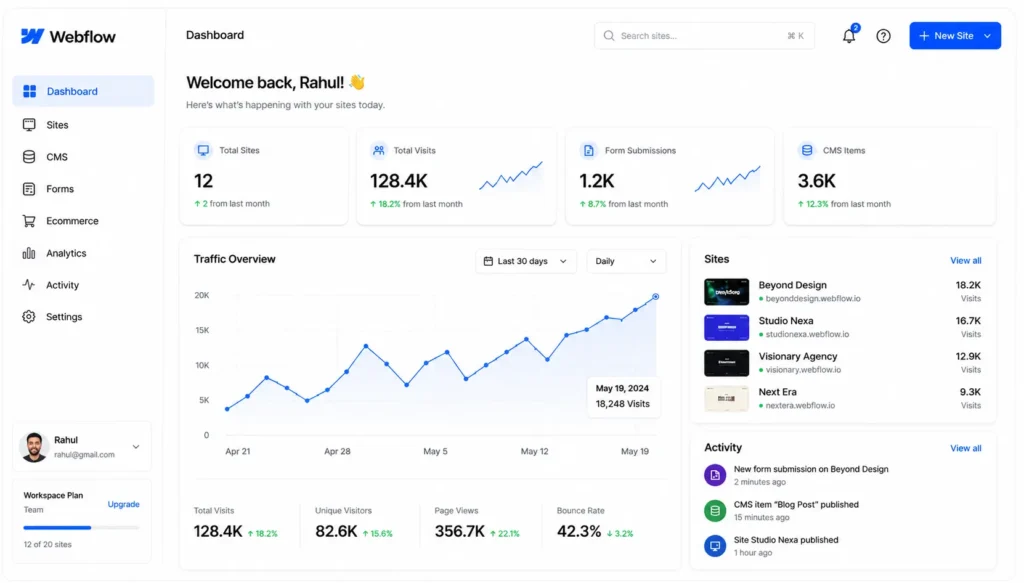
But here is the thing most reviews miss: This is more than a website builder. It’s also a CMS, a hosting platform, and increasingly, a whole no-code development environment. That distinction matters a lot when you’re trying to decide if it’s the right tool for your project.
Webflow Pricing: Is It Worth the Cost?
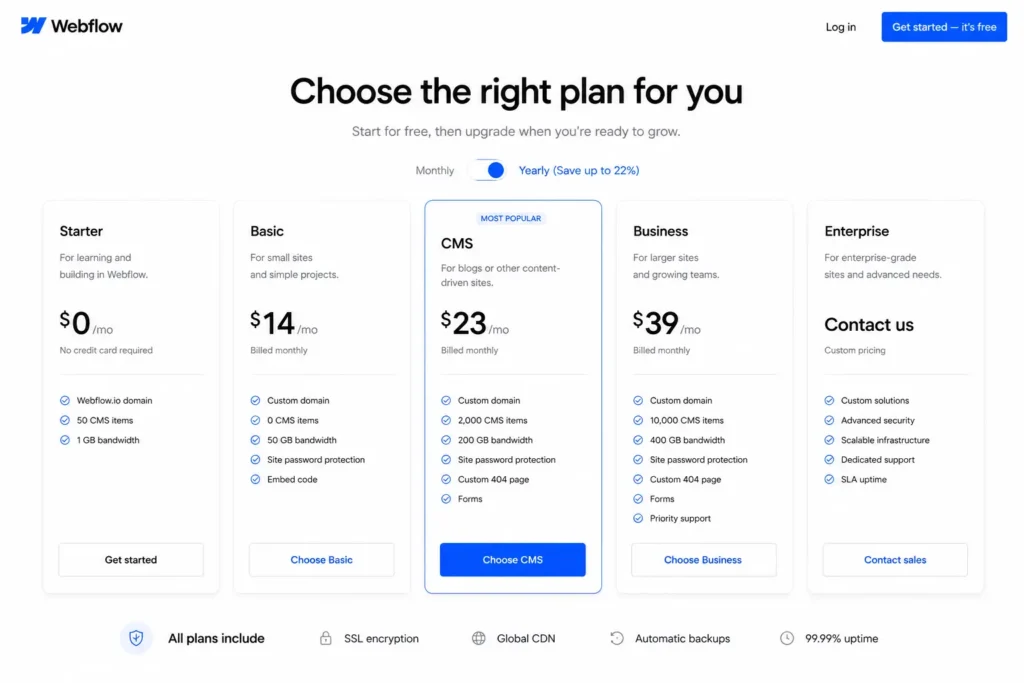
Webflow pricing has been a common source of frustration in the community, and it’s worth being transparent about. As of 2026, it offers the following plan tiers:
| Plan | Best For | Monthly Cost (Billed Annually) |
| Starter | Personal projects, learning, and hobby websites | Free |
| Basic | Simple static websites and landing pages | ~$14/month |
| CMS | Blogs, content-driven websites, and portfolios | ~$23/month |
| Business | High-traffic marketing websites and growing businesses | ~$39/month |
| Enterprise | Large organizations with advanced requirements | Custom Pricing |
For teams, This also offers Workspace plans that separate billing for design access from site hosting, which can be confusingly complex.
And the honest answer is Webflow isn’t cheap, especially if you add up hosting, CMS, and team seats. For a freelancer building client sites, it’s manageable. But for a growing agency with five team members and ten client sites, monthly costs can rise into the hundreds of dollars.
But if This is replaces your developer costs for ongoing landing page work, the ROI is quite large. The math of all of the above depends on your use case.
Who Actually Uses Webflow?
That has a surprisingly diverse user base. Based on community data and user reports in 2026, the platform is used primarily by:
- Freelance web designers who want to deliver polished sites without coding from scratch
- Marketing teams at SaaS companies who need to iterate quickly on landing pages
- Agencies building client sites at scale
- Startup founders who want a professional web presence without hiring a dev team
- Content-heavy brands using Webflow CMS to manage editorial workflows
It’s not a beginner-first platform. That matters. When you’re comparing Webflow to Wix or Squarespace, know that Webflow assumes you have at least some design sensibility and a willingness to learn how the web works.
Webflow Features: What You’re Actually Getting
Visual Designer
The heart of Webflow is its Designer interface, a canvas-based interface that lets you drag elements onto a page, style them with a CSS-like panel, and see changes in real time. It’s absolutely impressive. You can visually set flexbox and grid layouts, control responsive breakpoints, manage typography at scale, and even create custom animations without a line of code.
Webflow CMS
For content-driven sites, blogs, portfolios, directories, and news publications, Webflow’s CMS is a legitimate alternative to WordPress. You create custom content structures (called “Collections”) and the platform generates pages for each item. It is clean, flexible, and integrates tightly with the design layer.
Interactions & Animations
This is one of the most frequently talked about features in this, and for good reason. The Interactions panel allows you to create scroll-triggered animations, hover effects, page load sequences, and multi-step timelines all without writing JavaScript. This is a huge draw for agencies and designers who want sites that feel alive.
Webflow Hosting
This is hosts on AWS and Fastly’s CDN, so your website loads fast around the world. SSL is built in, automatic backups are there, and the infrastructure is enterprise-grade. You don’t manage servers or plugins; it just works.
Webflow Logic (No-Code Workflows)
Launched recently, Webflow Logic lets you build basic backend logic, form automations, conditional workflows, and integrations on the platform. It’s still in a developing stage, but that’s a clear sign that is moving beyond pure design to full-stack no-code territory.
Webflow Editor
Besides the Designer, the Editor is a simplified mode that is just as easy to use for clients or content managers to update text, images, and CMS content without touching the actual design aspect of the content on the site. This is an important component for agencies to hand off sites without breaking things.
Webflow Pros: Where It Genuinely Shines
1. Design Freedom Without Code. No other visual builder achieves this level of CSS control without requiring you to write CSS. If you know how the web works, Webflow feels like a superpower.
2. Clean Code Output. Unlike many drag-and-drop builders, Webflow produces semantic, well-structured HTML and CSS. Those who inherit Webflow projects generally respect the output.
3. Performance Out of the Box. Fast hosting, a global CDN, and automatic image optimization, This sites tend to score well on Core Web Vitals without any additional configuration.
4. CMS Flexibility. The CMS system is truly versatile. Reference fields, multi-image fields, and rich text, it handles complex content structures surprisingly well.
5. Interactions are genuinely Best-in-Class. Webflow is unrivaled in scroll animations and microinteractions. Award-winning agency sites are built on it.
6. Active ecosystem. There is a huge library of templates, a growing marketplace of third-party integrations, and one of the most active design communities online. Solving problems is often not so hard.
Webflow Cons: The Honest Downsides
1. The Learning Curve Is Real. Webflow isn’t plug-and-play. New users report spending days or even weeks before they feel comfortable with it. If you’re coming from WordPress or Squarespace, the mental model is totally different.
2. Pricing gets expensive at scale. As noted above, the cost structure can be a serious concern for agencies that have multiple client sites. The per-site hosting model adds up.
3. E-Commerce is Limited. That has an e-commerce offering but is not competitive with Shopify. Transaction fees, lack of payment gateways, and fewer native integrations make it not a good choice for serious online stores.
4. CMS has hard limits. Even on Business plans, there are caps on CMS items (2,000 on the CMS plan and 10,000 on Business). For large databases or content-heavy publications, this is a real constraint.
5. No Native Multilingual Support. For global brands who need multi-language sites, We needs third-party tools like Weglot or Localizely. It’s a major gap for international projects.
6. Logic is still maturing. The no-code backend features are promising but don’t yet come close to the kind of dedicated workflow tools like Make or Zapier integrations. Moreover, power users often need to go outside Webflow to build more complex automations.
Webflow vs. Competitors: How It Stacks Up
Webflow vs. WordPress: WordPress wins on flexibility, plugins, and e-commerce. Its wins on design control and hosting simplicity. When you don’t want to have to deal with plugin updates, security patches, and server management, Webflow is truly more peaceful to keep up with.
Webflow vs. Framer: Framer is the next, more recent, React-based competitor. Framer is rapidly gaining momentum with designers who want component-level control. But Webflow’s CMS and wider range of features still give it an edge for production business sites.
Webflow Updates 2026: What’s New
That has been delivering a lot in 2026. Key updates include AI-assisted design tools that can help create layout suggestions and style variations, Figma integration for importing designs more accurately, and Logic automation. The platform has also rolled out better accessibility tools and made WCAG-compliant sites easier to build. For enterprise users, new audit logging and role-based permissions have been great.
Real User Experiences: What People Are Saying
In forums, Reddit, and professional design communities, there’s a common sentiment: those who learn Webflow tend to be staunch advocates. And the most widespread attitude is that early frustration pays off.
Freelancers often say that the ability to deliver client sites faster and without having to hire a developer is the biggest benefit for them. Marketing teams at SaaS companies love to ship landing pages and run A/B tests without opening a JIRA ticket.
The complaints are also consistent: pricing surprises when scaling, e-commerce limitations, and that the platform is developing features faster than it’s polishing what’s already in place.
Final Verdict: Should You Use Webflow?
After all that, features, price points, user feedback, and competitor comparisons, we know the answer: There is no doubt.
Webflow is one of the best website building platforms in 2026, but it isn’t for everyone.
For a designer who doesn’t want to sacrifice visual output, a marketing team tired of waiting for developers, or an agency that wants to get premium sites up for the price list quickly, This is worth every dollar, every hour of the learning process. If you need to run a simple blog, a basic online store, or a site that the non-technical person can manage by themselves (which is what you all need), there are simpler, cheaper tools that are much better. The platform is evolving, and with ongoing development in AI-enabled design and workflow automation, Webflow seems to be investing in an era in which This will be the default choice for professional web projects.
The question is not whether It is good. It is. The question is whether it’s right for your situation, and now you have everything you need to answer that honestly.
Frequently Asked Questions (FAQs)
Q. Is Webflow good for beginners?
A. There is a learning curve, yes, but it has a learning curve too. Webflow University provides good free tutorials to help beginners get started.
Q. How much does Webflow cost per month?
A. Webflow offers a free plan. Paid plans start at about $14/month and go up to $39/month, and Enterprise plans are available on custom pricing.
Q. Can you use Webflow without coding?
A. This is a no-code platform, but basic HTML and CSS knowledge can be helpful.
Q. Is Webflow better than WordPress?
A. Webflow is great for design flexibility and hosting; WordPress provides more plugins and content management options.
Q. Does Webflow own my website?
A. No. You own your content and can export your site’s code on eligible paid plans.