If you sell software, an app, a digital course, or any kind of online subscription, you will likely meet the same hurdle every founder does, eventually: payments are messy. The country-specific sales tax laws differ by country. Card processors refuse transactions for no clear reason. Chargebacks eat into your margin. And VAT compliance in the EU alone can make a solo founder want to give up and get a “real job.”
This is exactly the void Paddle was designed to fill. We’re going to review in detail, what it actually does, what is the basic selling point, who it is best for, and how it compares with the more popular Paddle vs Dodo Payments competition. At the end of the day you’ll have a clear, practical answer to “what is Paddle” and whether you should use it for your own business.
What is Paddle?
Paddle is a payment platform for software and digital product companies. But calling it just a “payment processor” undersells what it actually does. Paddle is a Merchant of Record (MoR). And that is the most important thing to know about the company and the reason it’s so different from Stripe, Braintree, or any other payment gateway.
When you use a standard payment processor, you are the merchant. That means your business is legally responsible for:

Collecting and remitting sales tax, VAT, and GST across every country and state you sell into. Handling currency conversion and cross-border payment compliance. Managing chargebacks and fraud disputes. Keeping up with local regulations as tax laws change.
When you use Paddle, It is becomes the merchant of record on every transaction. The customer is technically buying from Paddle, not directly from you. This is collects the payment, calculates and remits the correct tax in over 200 countries and jurisdictions, processes currency conversion, absorbs a large portion of fraud and compliance risk, and then pays you your revenue (minus fees) on a regular payout schedule.
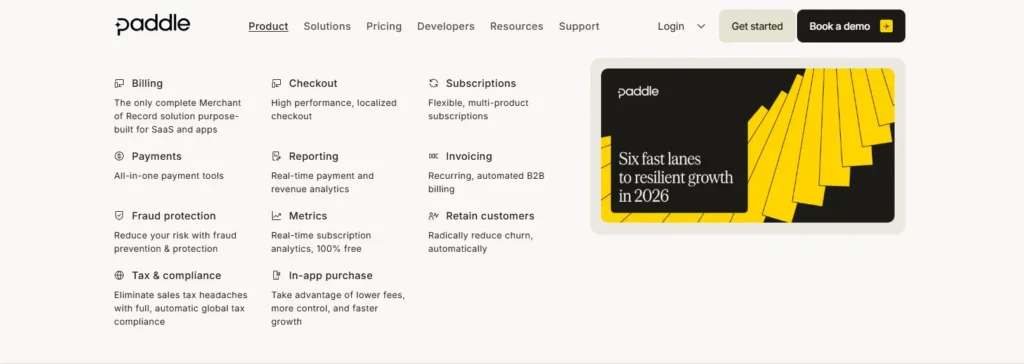
Paddle payment platform bundles billing, checkout, subscription management, tax compliance, invoicing, and revenue management into a single system, so software companies don’t need to stitch together five different tools (and five different vendor relationships) just to get paid.
How Does Paddle Work?
The workflow is rather straightforward once you have the Merchant of Record:
- You integrate Paddle into your website, app, or SaaS product using their checkout SDK, API, or pre-built pricing pages.
- A customer buys or subscribes to a plan through a Paddle-hosted or embedded checkout.
- Paddle processes that sale and applies the correct sales tax or VAT based on the buyer’s location.
- Paddle handles the subscription lifecycle: recurring payments, failed payment recovery (dunning), upgrades, downgrades, proration, and cancellations.
- Paddle gets taxes on your behalf and remits them to the relevant tax authorities, so you never have to file VAT/GST returns for these sales.
- You receive your payouts on a schedule (weekly or monthly, depending on your account and payout method), and your revenue is already net of fees and tax obligations.
Because Paddle is taking on this legal and financial responsibility, it removes an enormous amount of operational overhead for smaller teams that don’t have a finance or tax department.
Key Features of Paddle
Here’s a closer look at what you actually get with this.
1. Subscription Billing & Recurring Billing
Paddle’s recurring billing engine supports flexible pricing models: flat-rate subscriptions, usage-based billing, seat-based pricing, tiered plans, free trials, and one-time purchases. It handles the messy edge cases automatically; mid-cycle upgrades; downgrades; proration; pausing subscriptions; and coupon/discount logic, so engineering teams don’t have to build custom billing logic from scratch.
2. Global Tax Compliance (Merchant of Record)
This is Paddle’s headline feature. This calculates, collects, and remits sales tax, VAT, and GST across 200+ countries and regions. If you sell to customers in the EU, UK, Canada, Australia, or dozens of other tax jurisdictions, It is removes the need to register for tax in each one individually.
3. Checkout & Payment Methods
This offers a customizable, localized checkout experience that supports major credit and debit cards, PayPal, Apple Pay, Google Pay, and various regional payment methods. The checkout can be embedded directly into your site (overlay or inline) or hosted on a Paddle-branded page and automatically displays pricing in the buyer’s local currency.
4. Fraud Prevention & Chargeback Management
Because Paddle is the merchant of record, it bears a large part of fraud liability and chargeback management. It uses automated risk scoring and fraud detection tools to minimize any failed or fraudulent transactions before they become a problem for your business.
5. Invoicing & Revenue Management
It generates compliant invoices automatically for every transaction, which matters for B2B customers who need proper documentation for expense reporting. On the backend, Paddle’s revenue management dashboard allows founders to monitor MRR, churn, LTV, and other core subscription metrics without needing a separate analytics tool.
6. Dunning & Failed Payment Recovery
Failed payments are one of the biggest silent revenue killers for subscription businesses. Paddle automatically retries failed charges on an optimized schedule and sends customer-facing emails to recover otherwise-lost revenue.
7. Developer Tools & API
For teams who want more control, Paddle offers a full REST API, webhooks, and SDKs for popular frameworks, so the billing and checkout experience can be deeply customized and integrated into existing product infrastructure.
8. Reporting & Analytics
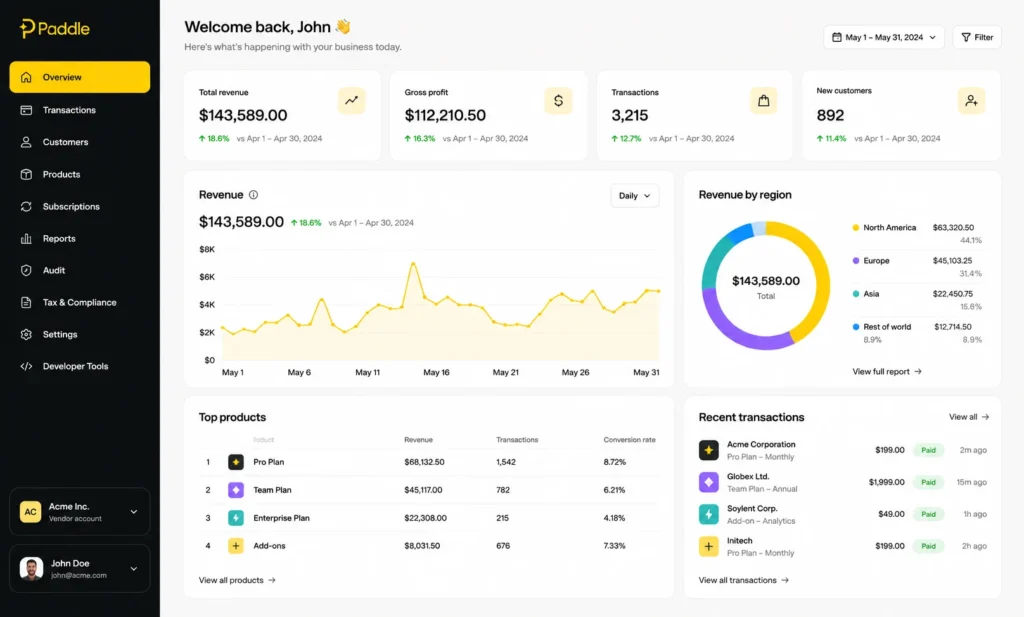
Paddle’s dashboard displays key business metrics, revenue, churn, active subscriptions, geographic breakdowns, so that founders can find one source of truth instead of piecing together spreadsheets from multiple systems.
Paddle Pricing & Plans
The most commonly searched question on Paddle is about how much does its cost? Here is the general structure, but because pricing pages change over time, it is worth checking Paddle’s official pricing page for the exact current numbers before you commit.
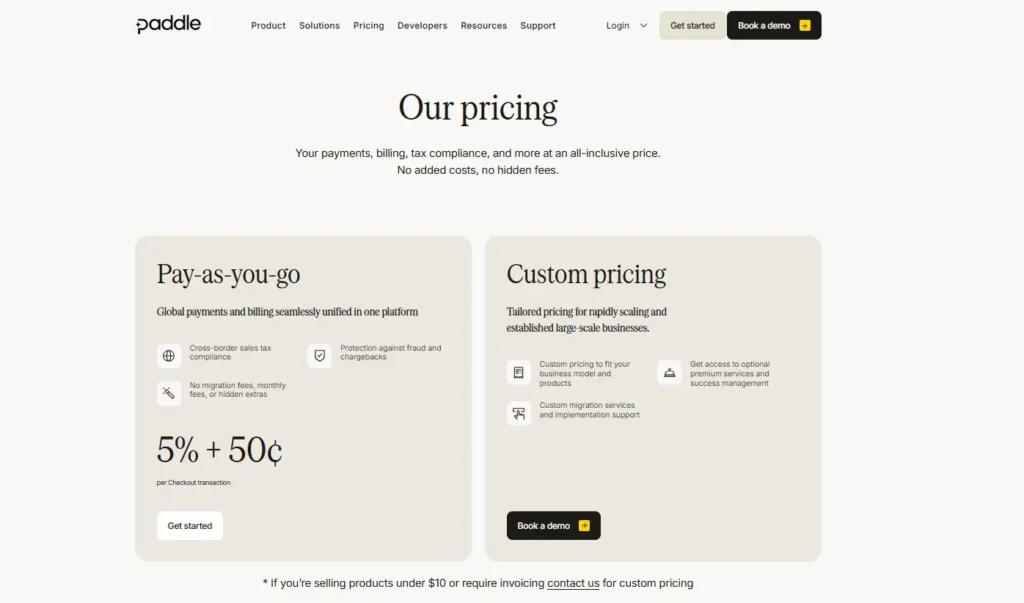
Paddle typically charges a flat, all-inclusive transaction fee rather than a monthly subscription cost. That fee is designed to cover:
- Payment processing
- Tax calculation and remittance
- Fraud protection and chargeback handling
- Checkout hosting
- Customer support for billing issues
This is different from the typical Stripe-style model where you pay a base processing fee and then separately pay for tax tools, fraud tools, invoicing, and billing infrastructure on top. Paddle’s argument is that its single fee is often comparable to, or much cheaper than, stacking multiple point solutions together once you account for the tax compliance work it removes from your plate.
There is not typically a separate tier of “Paddle plans” for SaaS products as with Basic/Pro/Enterprise tiers. Instead, pricing scales based on transaction volume, and large businesses with significant revenue can usually negotiate custom enterprise pricing with more account management and more tailored contract terms.
| Plan / Tier | Who It’s For | Transaction Fee | Monthly Platform Fee | What’s Included |
| Standard | Solo founders, indie developers, early-stage SaaS | ~5% + $0.50 per transaction | $0 | Checkout, subscription billing, global tax calculation & remittance, invoicing, basic fraud protection, standard support |
| Scale / Growth | Growing SaaS companies with higher monthly volume | Custom, typically lower blended rate than Standard | $0 (volume-based negotiation) | Everything in Standard, plus higher payout flexibility, deeper reporting, priority support |
| Enterprise | High-volume software businesses, larger SaaS companies | Custom negotiated rate | Custom (may include account minimums) | Dedicated account manager, custom contract terms, advanced fraud/risk tooling, SLA-backed support |
| Add-on: Currency Conversion | Businesses selling in multiple currencies | Small additional FX margin may apply | — | Automatic local currency display and conversion at checkout |
| Add-on: Chargebacks | All merchants | Per-chargeback fee (varies) | — | Chargeback handling and dispute management |
Note: Paddle’s pricing page has changed over time, and this table reflects Paddle’s most recently publicized standard fee structure. Rates, thresholds, and add-ons can shift, so confirm exact current numbers on Paddle’s official pricing page before making a decision.
Does Paddle Have a Free Trial?
It is doesn’t charge a monthly platform fee, so in a sense there’s no traditional “free trial” to sign up for the way you’d trial a SaaS tool. You can create an account and go through onboarding at no upfront cost, you only pay the transaction fee once you’re actually processing live sales. That makes it low-risk for early-stage founders who want to test the platform before generating meaningful revenue.
Benefits of Using Paddle
- You can skip global tax registration entirely. That alone can save weeks of legal and accounting work, particularly for solo founders and small teams.
- One vendor instead of five. Billing, checkout, tax, invoicing, and fraud protection are bundled, reducing integration complexity and vendor management overhead.
- Lower risk of compliance. With Paddle as the merchant of record, the legal burden of tax and payment compliance falls mostly on it and not you.
- It is specifically for software and digital products. Unlike general-purpose payment processors, Paddle’s features (subscription logic, SaaS metrics, digital delivery) are tailored to this exact business model.
- Faster time-to-market. You can launch worldwide sales without first solving tax nexus questions in a dozen countries.
- Predictable, all-in pricing. A single transaction fee is often easier to forecast than multiple stacked vendor costs.
Who Should Use Paddle?
Paddle tends to be the strongest fit for:
- SaaS companies selling subscriptions to customers across multiple countries.
- Indie developers and solo founders who don’t have the resources for a dedicated finance/tax team.
- Digital product sellers (courses, software licenses, digital downloads) who need compliant invoicing and global tax handling.
- Early-stage startups that want to move fast internationally without hiring a tax specialist on day one.
It may be less ideal for businesses that need extremely granular control over the checkout experience, have very high transaction volumes where a lower base-rate processor plus in-house tax handling becomes cheaper, or sell physical goods where merchant-of-record billing infrastructure isn’t the primary need.
Paddle Alternatives
If you are comparing your options, here are the platforms that are most commonly mentioned alongside Paddle:
- Stripe: A more flexible general-purpose payment processor with an enormous ecosystem, but you handle tax compliance yourself (or bolt on Stripe Tax separately).
- Lemon Squeezy: Another merchant of record option, targeted at smaller indie developers and simpler product catalogs.
- FastSpring: Another MoR competitor often used by well-established software companies.
- Chargebee: A good subscription management service provider but not a merchant of record by default; it needs a separate payment processor, and you have to deal with tax compliance.
- Dodo Payments: A startup that wants to be leaner and more reasonably priced than it.
Paddle vs Dodo Payments
This comparison comes up a lot for founders evaluating newer MoR players. Broadly speaking:
| Factor | Paddle | Dodo Payments |
| Market Maturity | Established, widely used by mid-size and enterprise SaaS companies | Newer platform, growing rapidly, often marketed toward smaller and indie builders |
| Merchant of Record (MoR) | Yes | Yes |
| Pricing Model | Flat transaction fee with volume-based negotiation for larger accounts | Positioned as a lower-cost alternative for early-stage teams |
| Feature Depth | Mature billing, analytics, and reporting suite | Growing feature set; may lack some of Paddle’s more advanced tooling |
| Best For | Growing SaaS businesses that need proven infrastructure at scale | Cost-conscious founders and smaller product catalogs looking for a simpler Merchant of Record setup |
If your business is early and cost-sensitive, both in terms of your actual sales volume and geography, it is good to evaluate it with your financial background and geography and fee structure with support from supporting countries; it can really change the math significantly if it is the case.
Pros and Cons of Paddle
Pros:
- Removes the burden of global tax compliance.
- All-in-one platform for billing, checkout, and invoicing.
- Made for software and digital subscription companies.
- Reduces fraud and chargeback exposure.
- No separate monthly platform fee.
Cons:
- Less checkout customization flexibility than that of Stripe.
- Transaction fees can sometimes exceed a bare-bones processor when you’re at very high volume.
- Being the merchant of record means It is shows up on customer statements and invoices, something some brands don’t want to do.
- Less appropriate for non-digital or physical product businesses.
Is Paddle worth it?
For most SaaS founders, indie developers and digital product creators selling internationally, Paddle solves a genuinely painful problem: global tax and billing compliance. The tradeoff is a bit less control over branding and checkout customization, plus a transaction fee that bundles in more than a typical processor charges. If your business is growing across borders and you don’t want to hire a tax team just to sell software legally in 30 countries, This is payment platform is one of the most practical solutions on the market in 2026.
If you are in the evaluation stage, the best thing to do is to run the numbers on your actual sales volume and geographic spread against a couple of alternatives (Stripe + Stripe Tax, Lemon Squeezy, and Dodo Payments) before committing, as the “best” choice really does depend on your specific revenue stage and customer base.
Frequently Asked Questions (FAQs)
Q. What is Paddle used for?
A. Paddle is used by software and digital product businesses to handle payments, subscription billing, global tax compliance, invoicing, and fraud prevention through a single Merchant of Record platform, instead of stitching together separate tools for each function.
Q. How does Paddle pricing work?
A. Paddle usually charges a single, all-inclusive transaction fee per sale instead of a monthly subscription cost. That fee covers payment processing, tax calculation and remittance, checkout hosting, and fraud protection. Large businesses may be able to negotiate custom enterprise pricing based on volume, so it is best to check Paddle’s current pricing page for exact rates.
Q. Does Paddle offer a free trial?
A. There is no monthly free trial, because Paddle does not charge platform fees on a monthly basis. You can set up an account and get into the platform for free and pay no upfront cost, and only if you start the live transactions are there any fees.
Q. What is the difference between Paddle and Stripe?
A. The core difference is the Merchant of Record model. Stripe is a payment processor where your business is legally responsible for tax compliance in every jurisdiction you sell into. Paddle is the merchant of record, which means it calculates, collects, and remits your taxes on your behalf and assumes more of the chargeback and fraud liability.
Q. How does Paddle compare to Dodo Payments?
A. Both are Merchant of Record platforms, but Paddle is more established with a broader, more mature feature set, while Dodo Payments is a newer platform that’s marketed as a lower-cost solution for smaller or earlier-stage businesses. The right choice depends on transaction volume, target markets, and how much you value platform maturity versus lower fees.