Shikha Kumari
I still remember the first time that a workflow I built inside HubSpot quietly closed a deal while I was asleep. At 11:47 p.m., a visitor downloaded a guide, got tagged, scored, and dropped into a nurture sequence, and by the time I checked my phone the next morning, a sales rep already had a meeting booked. No one touched a spreadsheet. No one sent a manual follow-up. That is the moment HubSpot stopped being “just another CRM” to me and started to feel like a second team member.
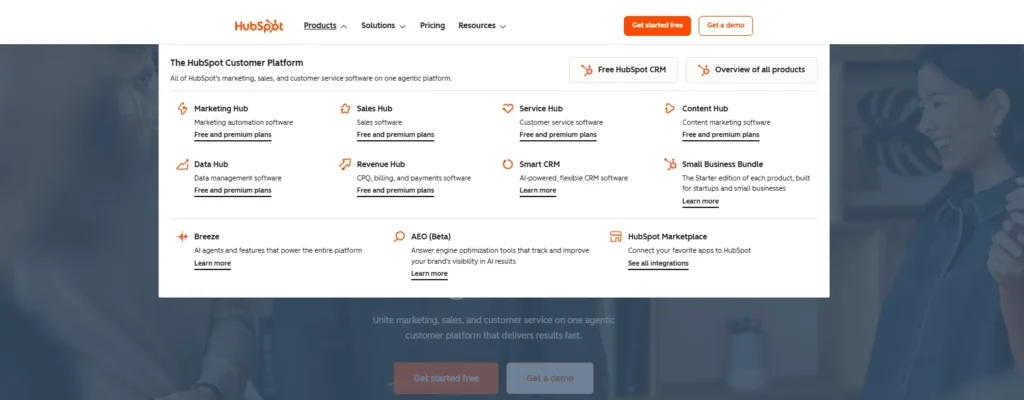
If you are reading this now, you are probably trying to figure out the same thing I was back then: which HubSpot features really move the needle, and which ones are just nice-to-have extras buried in a pricing page. This guide explains the best HubSpot marketing automation features in plain English: what they do, who they’re built for, and how they compare with the other options in 2026.
What Is HubSpot, Really?
At its core, HubSpot is a CRM that grew into a full marketing, sales, and service operating system. The free Smart CRM is at the center, and everything else, Marketing Hub, Sales Hub, Service Hub, Content Hub, Operations Hub, and Commerce Hub, connects back to the same contact record.
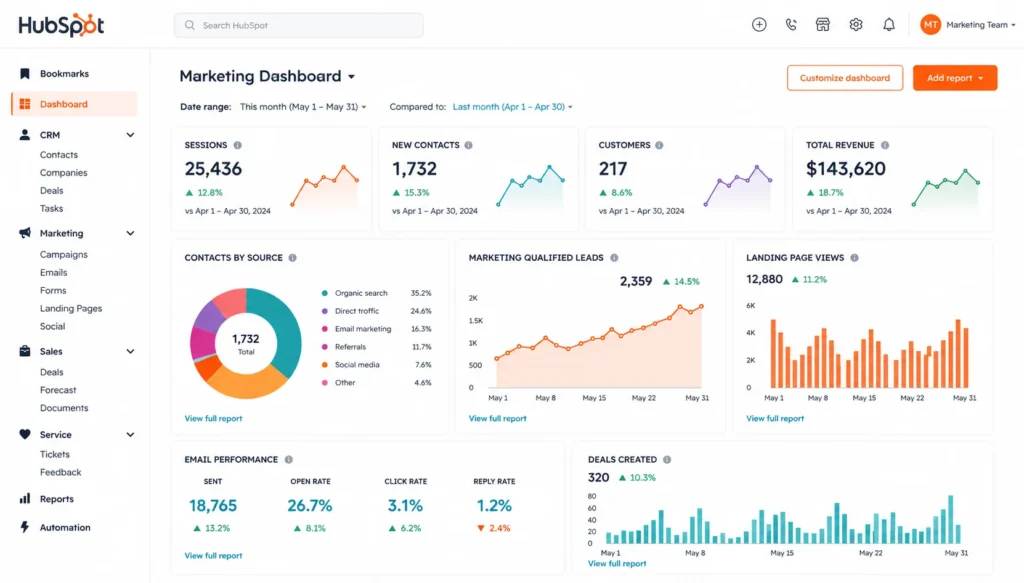
That is the thing most comparisons miss. And when people ask “what is HubSpot?” and expect a one-line answer, the honest answer is it’s the one place in the world where your email automation, your sales pipeline, and your support tickets all come from the same source of truth. A marketer can build a nurture sequence, a salesperson can see exactly what emails a lead opened, and a support rep can see the entire history without changing tools. And that connective tissue is why HubSpot has been placed on almost every shortlist for serious marketing automation in 2026.
Workflows: The Engine Behind HubSpot Automation
If HubSpot has one feature that defines its reputation, it’s Workflows. This is the visual, if/then automation builder that quietly runs in the background of thousands of businesses— sending emails, updating properties, assigning tasks, and rerouting leads without anyone lifting a finger.
A simple workflow might look like:
Trigger: A contact fills out an ebook download form.
Action 1: Send the resource delivery email immediately.
Wait 3 days, then send a related follow-up.
Wait 4 days, send a case study, or send a testimonial.
Branch: If the contact engaged, move them to a sales-ready list; if not, drop them into a longer nurture track.
What makes Workflows truly useful, not just automated but smart, is branching logic. A contact’s industry, lead score, job title, or even their last page visit can send them down a completely different path. Marketing teams use Workflows for lead nurturing and re-engagement campaigns; sales teams use the Sequences tool for one-to-one outreach that automatically stops the moment a prospect replies or books a meeting.
This is also where HubSpot earns its reputation for handling longer, more considered buying cycles better than lighter email tools, something worth keeping in mind if your sales process takes weeks or months rather than a single checkout.
Lead Scoring: Knowing Who’s Actually Ready to Buy
Lead scoring is the feature that turns “we have 4,000 contacts” into “we have 40 contacts worth calling today.” HubSpot’s scoring tool has two main pillars:
- Fit scores: who someone is: job title, company size, industry, and seniority.
- Engagement scores: what someone does: page visits, email opens, form fills, ad clicks, content downloads.
You can run them separately or combine them into a combined score, which is particularly useful for sales-led businesses that want one number reps can trust at a glance. HubSpot also supports score decay, so a lead who went quiet for two months doesn’t keep sitting at the top of the list looking falsely “hot.”
The newer layer here is AI-powered predictive scoring, which analyzes your historical customer data and surfaces patterns a manual point system would never catch, things like a specific combination of pricing-page visits and company size that have quietly predicted your best customers all along. It is a significant step up for teams with a lot of historical data to study and learn upon, yet smaller teams may still be able to get more reliable data based on manual learning and then train with them as they go along and refine it over time.
When a score gets above your threshold, it can automatically trigger a workflow: notify the rep, create a task, or move the contact into a sales sequence, closing the gap between “interested” and “contacted.”
Smart CRM Segmentation and Lifecycle Stages
Automation is only as good as the audience it’s aimed at, and this is where HubSpot’s segmentation tools quietly do a lot of heavy lifting. You can build active lists that update in real time based on:
- Demographic or firmographic data (title, industry, revenue)
- Behavioral signals (opens, clicks, page visits, form submissions)
- Lifecycle stage (Subscriber → Lead → MQL → SQL → Opportunity → Customer).
Lifecycle stages matter more than most people realize. They give marketing and sales a common language, a Marketing Qualified Lead means the same thing in a report as it does in a workflow trigger, which is exactly the kind of alignment that prevents leads from quietly falling through the cracks between teams.
A good rule of thumb: never let the lifecycle stage go backward automatically. If a customer fills out a random form, that shouldn’t reset them to “Lead.” If you put that guardrail into your workflows, you can run your reporting clean and your sales team will be able to trust you.
Email Marketing and Content Automation
Email is still the backbone of most HubSpot marketing automation strategies, and the tools here have matured well past basic newsletters. You get:
- A drag-and-drop email builder with personalization tokens pulled straight from CRM fields
- A/B testing for subject lines and content
- Smart content that shows different messaging based on lifecycle stage, location, or device
- AI-assisted drafting for subject lines, body copy, and even full email outlines.
The advantage over a standalone email tool is contextual targeting. Each email is connected to the same contact record used in sales and service, and you are able to personalize it beyond “Hi {{First “Name}}”, referencing a specific product interest, deal stage, or past support interaction without manually pulling that data yourself.
Landing Pages, Forms, and Conversion Tools
Workflows and lead scoring need something to act on, and that is where HubSpot’s landing pages and forms come in. The landing page builder also includes conversion-focused templates, and the platform nudges you towards the best practices that consistently work: a single, focused offer; no navigation menu pulling attention away; a headline that mirrors whatever ad or email got someone there in the first place.
Forms are directly integrated into Workflows so that a single submission can be made simultaneously:
- Deliver the requested content
- Update the contact’s lifecycle stage
- Add points to their lead score
- Notify the right team member
Live chat and conversational bots also contribute to lead capture with no monitoring of the inbox.
Breeze AI: HubSpot’s AI Layer in 2026
This is the part of the platform that’s changed the fastest. Breeze is HubSpot’s umbrella brand for everything AI-related, and by 2026 it’s grown into three distinct layers:
Breeze Assistant: a conversational AI sidebar available in HubSpot. It drafts emails, summarizes CRM records, helps plan campaigns, and answers questions about your own data without you digging through reports manually.
Breeze Agents: autonomous AI “teammates” that run entire workflows on their own, inside clear guardrails you set. Some of the best-known agents are:
- Prospecting Agent: monitors accounts for buying signals and drafts personalized outreach.
- Customer Agent: automatically answers common support questions using your knowledge base.
- Data Agent: conducts and enhances CRM data so reps stop manually Googling companies.
- A growing number of beta marketplace agents for specialized tasks such as content research and deal-loss analysis.
Breeze Intelligence: the data enrichment layer that automatically fills gaps in contact and company records (industry, size, revenue) by drawing on a large external database, with standard field enrichment now included at no extra cost.
First and foremost, there are a few caveats to be taken into account on this: most Breeze Agents require a Professional or Enterprise subscription plus a credit-based usage system, and AI agents are only as good as the CRM data they are fed; a cluttered database just means the automation is faster and messier. But for teams already invested in HubSpot, Breeze does bring real automation depth without the need to go to a different AI tool.
Reporting, Attribution, and Dashboards
The best automation in the world doesn’t matter if you can’t prove it worked, and HubSpot’s reporting tools are designed to close that loop. You can create your own dashboards that draw from any object: contacts, deals, tickets, campaigns, and filter by date range, source, or team.
Multi-touch attribution is the big deal here for marketing teams: rather than having to credit the last email someone clicked on, you can see every contact’s journey and give credit proportionally. That’s the difference between “this campaign drove the sale” and “this campaign was one of six things that actually mattered,” which is a much more honest (and useful) way to assess ROI.
HubSpot Pricing in 2026: Where Automation Actually Lives
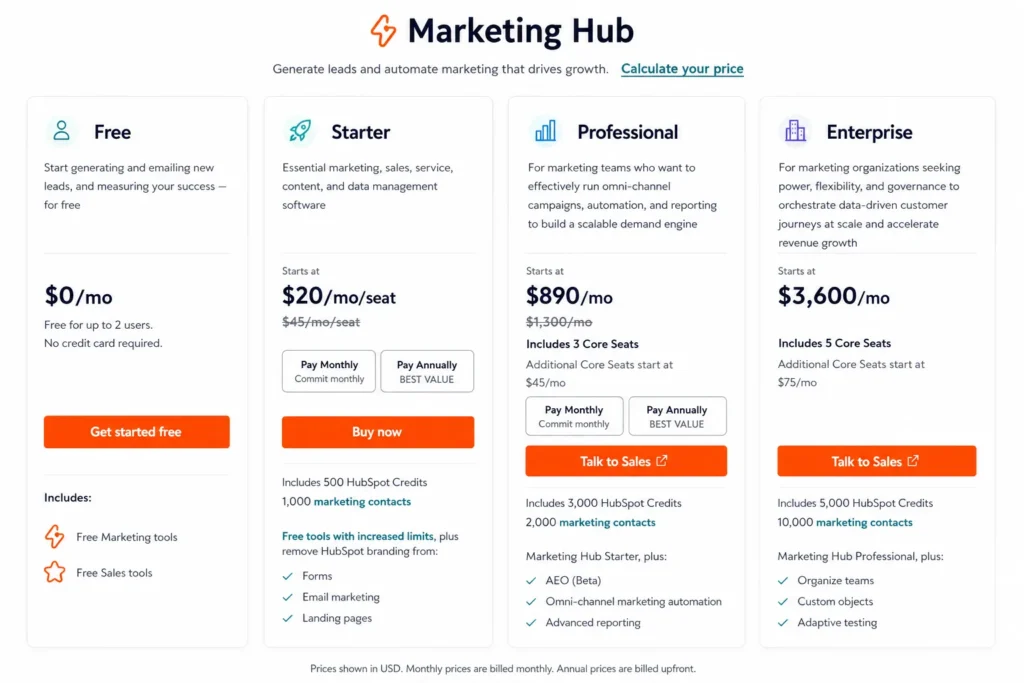
HubSpot pricing often confuses people because the headline number is rarely what you will pay once seats, contacts, and onboarding fees are factored in. Here is the general shape as of 2026; always confirm exact figures on HubSpot’s own pricing page, since they update periodically:
| HubSpot Tier | Typical Starting Price | What You Get |
| Free | $0 | Basic CRM, email marketing with HubSpot branding, simple forms, contact management, limited automation. |
| Starter | ~$15–$20 per seat/month | Full HubSpot CRM suite, removal of HubSpot branding, basic automation tools, email marketing, and reporting features. |
| Professional | ~$800–$890/month | Advanced workflow automation, lead scoring, A/B testing, smart content personalization, custom reporting, and enhanced marketing tools. |
| Enterprise | ~$3,600+/month | Predictive AI lead scoring, advanced analytics, custom objects, multi-team governance, enhanced security, and enterprise-grade automation. |
There are a couple of things that are worthwhile budgeting for besides the sticker price: onboarding fees (usually $1,500–$7,000 depending on tier), marketing contact overages as your list grows, and per-seat cost for sales and service Hub users, which is separate from Marketing Hub. The best advice most experienced HubSpot users have is the same: don’t set your contact growth at an entry-level level and make onboarding a line item and not an afterthought.
HubSpot vs. Competitors: Mailchimp, ActiveCampaign, and Beyond
No one platform wins every category, and HubSpot is not the right fit for everyone. Here is how it stacks up to the tools most often considered alongside it:
| Platform | Best For | Automation Depth | CRM Included | Starting Price |
| HubSpot | Businesses that want marketing, sales, and service unified in one system | Deep, especially at Professional and Enterprise levels | Yes, full Smart CRM | Free plan available / ~$15–$20 per seat |
| Mailchimp | Small businesses sending newsletters and basic email campaigns | Light to moderate | Limited CRM functionality | Free tier available |
| ActiveCampaign | SMBs that need advanced automation without enterprise pricing | Very deep, with strong behavioral triggers | Add-on CRM | ~$19/month |
| Constant Contact | Teams looking for simplicity and dedicated customer support | Light | No | Paid plans available |
Who Should Actually Use HubSpot?
Based on how the platform is actually used in practice, HubSpot tends to make the most sense if:
- You want marketing, sales, and customer service data consolidated in one CRM instead of three broken tools.
- Your buying cycle is longer than a single email campaign: think B2B, SaaS, or even considered purchases.
- You’re going to grow your team and want a platform that expands with seats and automation depth rather than a flat per contact fee.
- You want built-in AI (Breeze) more than a separate AI tool integrated into your stack.
It’s probably less feasible if you’re an early-stage business with a small list and simple one-off email needs; a lighter tool will get you sending faster and cost a fraction of the price while you validate your business.
Final Thoughts
HubSpot’s marketing automation features earn their reputation for a very simple reason: they rely on the same contact record your sales and service teams already use, so the automation doesn’t happen in isolation; it’s happening in the same system that closes deals and resolves support tickets. Workflows, lead scoring, lifecycle stages, and the newer Breeze AI layer all play together rather than being separate, disconnected tools.
But for your business size, buying cycle, and budget, the best is relative to your business size, buying cycle, and budget. When you’re weighing HubSpot with lighter alternatives, the honest approach is to plot out your actual contact growth and automation needs before you commit, the platform rewards businesses that plan ahead and can become an expensive afterthought for those that don’t.
Frequently Asked Questions (FAQs)
Q. What is HubSpot used for?
A. HubSpot is used to manage customer relationships, automate marketing campaigns, capture and score leads, and connect marketing, sales, and customer service teams in one set of contact data.
Q. Is HubSpot good for small businesses?
A. Yes, particularly with the free CRM and Starter tier, which gives small teams email marketing, basic automation, and lead capture without the branding restrictions of some free competitors. But the trade-off is that the most powerful automation and AI agents are locked behind Professional and Enterprise pricing.
Q. How much does HubSpot cost in 2026?
A. Pricing ranges from $0 on the free plan to several thousand dollars per month at Enterprise level, depending on which Hubs you need, how many paid seats you require, and how many marketing contacts you manage. Onboarding fees and contact overages are common extra costs to budget for.
Q. What is HubSpot Breeze AI?
A. Breeze is HubSpot’s AI suite, which is comprised of a conversational Assistant, autonomous Agents who do things like prospecting and customer support, and an Intelligence layer that automatically enhances CRM data.
Q. Why is HubSpot better than Mailchimp or ActiveCampaign?
A. When it comes to the end result, it depends on what you need, which is better: HubSpot or Mailchimp or ActiveCampaign. HubSpot wins when you need the marketing, sales, and service data to have all of your sales, marketing, and service data in one CRM. ActiveCampaign usually wins with automation depth per dollar for SMBs. Mailchimp wins on simplicity and low cost for small lists with basic needs.