If you’ve spent any real time on technical SEO, you already know the name. Screaming Frog isn’t flashy. It doesn’t have a slick onboarding flow or a dashboard full of gradient charts. What it has is a reputation, earned over more than a decade, for finding exactly what’s broken on a website before Google does.
But 2026 has been a genuinely big year for the tool. A major version update arrived in May, an AI integration nobody saw coming shipped a few weeks later, and the competitive landscape around it (Sitebulb, Ahrefs, and Semrush) has shifted too. So the real question isn’t “what is Screaming Frog?” anymore; most SEOs already know that. The question is whether it still deserves to be in your stack now that cloud-based, AI-assisted audit tools are everywhere to be found.
The Screaming Frog review describes what the tool actually does, what’s changed in the latest updates, what it costs in 2026, and how it stacks up against the alternatives, so you can decide if it deserves a spot on your machine.
What Is Screaming Frog?
Screaming Frog is a desktop website crawler built by a UK-based SEO agency of the same name, founded back in 2010 in Henley-on-Thames. The flagship product, Screaming Frog SEO Spider, crawls a website in the same way as Googlebot does: following links, reading HTML and cataloging every technical detail along the way.

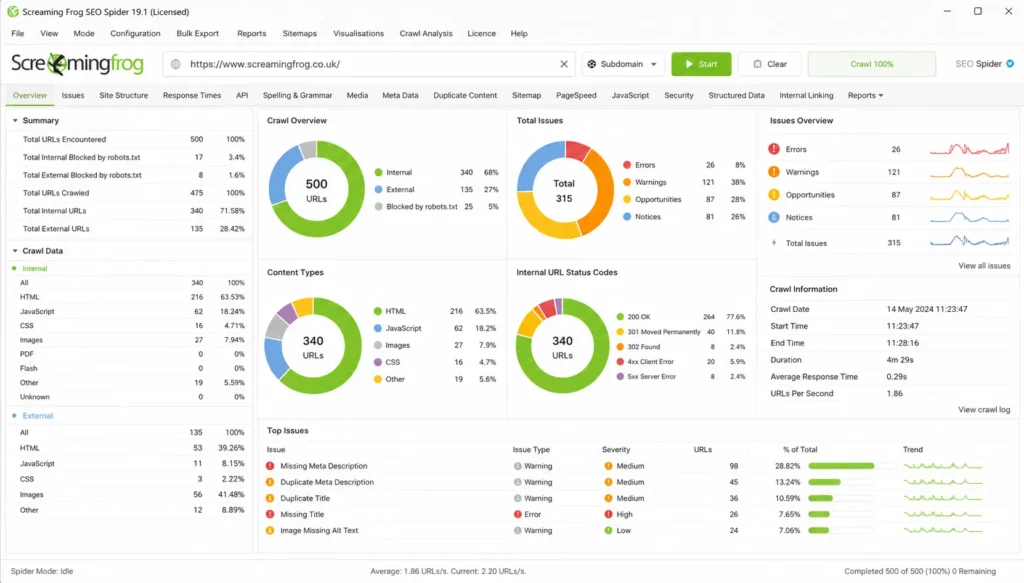
In simple terms: you point it at a domain, hit start, and within minutes you have a spreadsheet-like view of every URL, status code, title tag, meta description, redirect, canonical tag, and structured data block on the site. It’s the tool most technical SEOs target first when something feels “off” with a client’s organic performance.
The company also makes a companion product, the Log File Analyzer, which examines raw server logs to show exactly how search engine bots are crawling your site in the real world, not just what’s theoretically crawlable.
What separates Screaming Frog from most of the SEO platforms you’ve heard of is that it’s not a suite. It doesn’t try to do keyword research, rank tracking, or backlink analysis as its core job. It does one thing, crawling and auditing, and it does it at a level cloud-based “all-in-one” platforms still can’t compete with.
Key Features of the Screaming Frog SEO Spider
The feature list has grown substantially over the years, but these are the capabilities that actually matter day to day:
- Broken links and error detection: finds 404s, server errors, and timeout issues across an entire site in one crawl.
- Title tag and meta description auditing: flags pages with missing, duplicate, or poorly sized titles and descriptions.
- Redirect chain mapping: it gets the disconnect between sites and the link equity hidden in the redirect loops and multi-hop chains.
- Duplicate content detection: uses an MD5 hash check to detect exact duplicates and an almost identical algorithm to find content that is “close enough” to cause cannibalization.
- JavaScript rendering: crawls with headless Chromium to see how a JS-heavy site is actually rendering, not just the raw HTML.
- Structured data validation: checking schema markup against Google’s guidelines directly inside the crawl.
- Custom extraction: pulls specific data (prices, SKUs, author names, or anything in the HTML) using XPath, CSS Path, or regex.
- Crawl scheduling and comparison: runs audits automatically on a recurring basis and compares results crawl-over-crawl.
- Integrations: It is directly connected to Google Analytics, Google Search Console, PageSpeed Insights, and third-party data sources such as Ahrefs.
- Accessibility auditing and mobile usability checks are becoming more critical as Core Web Vitals and UX signals are increasingly of top-rank importance.
All of this is done in a tool designed to flag more than 300 different SEO problems, each with type and estimated priority, so you’re not just staring at raw data; you’re seeing what really needs to be fixed first.
Screaming Frog News: What’s New in 2026
If you haven’t updated in a while, this is the part to read. Screaming Frog released version 24.0 in May 2026 (codenamed “bolus”), followed by a smaller 24.1 bug-fix release in early June. It’s one of the most significant Screaming Frog updates in recent memory, for one reason: AI integration via MCP.
Screaming Frog SEO Spider MCP: the headline update
The SEO Spider is now equipped with an MCP (Model Context Protocol) server, meaning you can use it to directly connect to AI assistants like Claude and run crawls, pull data and generate visualizations in plain language instead of manually clicking through menus. You can ask an assistant to summarize a crawl’s problems, build a link-equity visualization, export a specific report, and have them do the legwork for you.
It is a completely new way of working with the tool, but Screaming Frog has been clear that this isn’t a substitute for an experienced technical SEO; it’s an efficiency layer on top of one.
Other notable additions in version 24.0
- Auto Compare Crawls: scheduled and command-line crawls now automatically compare against the previous run so you can see what’s changed immediately.
- Crawl change summaries in email notifications: completion emails now have a full issues table and a comparison view if auto-compare is enabled.
- Advanced export attachments by email: you can now send a weekly broken-links report or issues summary directly to a developer or stakeholder’s inbox.
- Uncrawlable link detection: a new filter identifies link markup that technically won’t be crawled by following best practices, but some of it will get picked up by Googlebot anyway.
- The Usage Stats dashboard is a simple and locally stored view of how much you actually use the tool.
- Smaller but significant changes: new Arm64 builds for Linux, Ahrefs integration with country-level metrics, filterable content cluster visualizations (see Figure), and a move to Java 25 under the hood.
The Log File Analyzer also got a refresh and landed at version 7.0 around the same time, continuing the theme of tighter integration between crawl data and real-world bot behavior.
If you are reading “Screaming Frog updates 2026” specifically because you are deciding whether you should upgrade, the answer is yes – especially if you are already working with AI assistants. The MCP integration alone changes how repetitive audit tasks get handled.
Screaming Frog Pricing in 2026
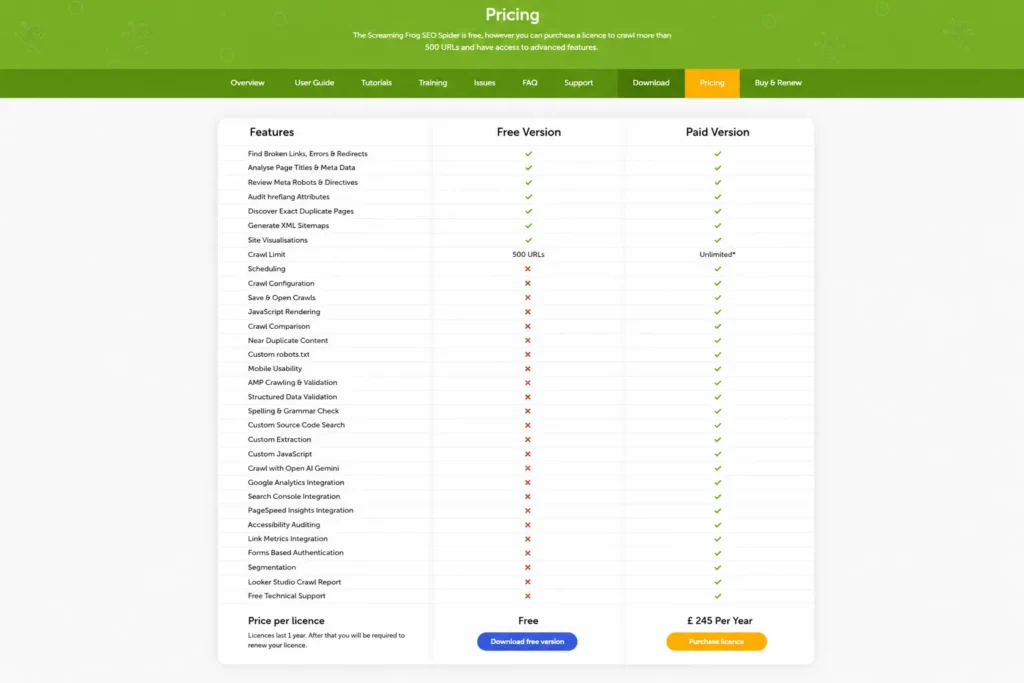
Screaming Frog pricing hasn’t changed in spirit since the early days: there’s a generous free version and a single, fairly inexpensive paid license that unlocks everything else.
| Plan | Crawl Limit | Price | Best For |
| Free Version | 500 URLs | $0 | Small websites, quick audits, students, hobby blogs |
| Paid License (1–4 Users) | Unlimited* | ~$245 / £245 / €245 per year, per user | Freelancers, in-house SEO professionals, small agencies |
| 5–9 Licenses | Unlimited* | ~$235 per license/year | Small to mid-sized agency teams |
| 10–19 Licenses | Unlimited* | ~$219 per license/year | Growing and larger SEO agencies |
| 20+ Licenses | Unlimited* | ~$209 per license/year | Enterprise SEO teams and large organizations |
And the realistic crawl ceiling is dependent on your machine’s memory and storage capacity as well as the license itself.
One thing to know about Screaming Frog pricing before you buy:
- Licenses are annual and per user. You renew every 12 months.
- The free version is surprisingly capable. Unlike many “freemium” SEO tools, Screaming Frog isn’t crippled; it has JavaScript rendering, custom extraction, and all the usual features. The 500-URL cap is the only real wall, and it’s the one thing that pushes most professionals to go for paid once they’re working on anything more than a small brochure site.
- There are no setup fees and no per-seat cloud costs. Because it’s a desktop application, there’s no recurring infrastructure cost layered on top of that; what you see is what you pay.
- Pricing is truly low relative to category. Compared with the $130–$500+ per month that cloud platforms like Ahrefs or Semrush charge for their entire suites, a Screaming Frog license is about $20 a month, which is what many agencies consider essential, daily-use software for.
If you want to verify the current exact figure, it’s always worth a quick check on Screaming Frog’s official pricing page directly, as per-region currency display can shift slightly and prices are reviewed periodically.
How to Use Screaming Frog for an SEO Audit
If you are totally new to the tool, you can see the realistic, no-fluff version of a first audit:
- Download and install the SEO Spider for Windows, macOS, or Linux from the official site.
- Select the domain you want to crawl in the address bar and start. For a quick look at the free version, the 500-URL limit is enough for a quick start.
- Let the crawl finish and sort by the tabs on the top: Internal, Response Codes, Page Titles, Meta Descriptions, Images, and so on.
- Start with Response Codes. Anything in the 4xx or 5xx range is a fix-it-now item; broken links and server errors hurt users and crawl efficiency.
- List Page Titles and Meta Description for anything missing, duplicated, or out of the recommended length.
- Review Directives to confirm nothing is accidentally blocked by robots.txt or a stray noindex tag.
- Export what you need. Bulk export broken links and source URLs and save them to a spreadsheet for a developer to work from, and also create a Looker Studio (formerly Data Studio) crawl report for a client-friendly summary.
- Set up scheduling, if this is a client or in-house site ongoing, so Screaming Frog SEO audits will run automatically and flag new issues before they snowball.
For larger or JavaScript-rendered sites, switch on rendering mode in the crawl configuration before you start; otherwise, you risk auditing a stripped-down version of pages that doesn’t reflect what users (or Googlebot) actually see.
Screaming Frog vs. Competitors
This is usually the deciding factor for anyone comparing Screaming Frog with competitors like Sitebulb, Ahrefs, or Semrush. None of these tools are necessarily “better”; they’re just built for different jobs.
| Tool | Type | Starting Price | Strongest At | Weakest At |
| Screaming Frog | Desktop Crawler | Free / ~$245 per year | Raw crawl depth, advanced customization, excellent value for money | Dated interface and a steeper learning curve for beginners |
| Sitebulb | Desktop + Cloud | ~$13.50–$34 per month | Visual reports, actionable hints, beginner-friendly experience, client reporting | Higher long-term cost compared to a single Screaming Frog license |
| Ahrefs Site Audit | Cloud-Based (Part of Ahrefs Suite) | ~$129+ per month | Integration with backlink analysis and keyword data, easy-to-understand health scores | Less customizable and not as deep as dedicated crawling tools |
| Semrush Site Audit | Cloud-Based (Part of Semrush Suite) | ~$140+ per month | All-in-one SEO workflow, useful for agencies managing SEO and PPC together | Prioritizes breadth over technical crawl depth compared to specialized crawlers |
A pattern is apparent across nearly every independent comparison: Screaming Frog wins on raw technical depth and price; Sitebulb wins on usability and presentation; and the cloud suites (Ahrefs, Semrush) win when you need crawl data next to keyword and backlink research in one place.
That’s why most working SEOs and agencies don’t choose just one. The most common setup is Screaming Frog (or Sitebulb) for the technical crawl, paired with Ahrefs or Semrush for keyword research and competitive intelligence, using each tool for what it’s genuinely best at instead of forcing one platform to do everything.
Pros and Cons
Pros
- Extremely affordable, the depth of data it provides
- Free version is fully featured, not a stripped-down trial
- Unmatched flexibility for custom extraction and large-scale crawling
- Now integrated with AI assistants for faster workflows with MCP
- No cloud dependency; the crawl data stays local
Cons
- Interface seems dated compared to new tools like Sitebulb
- Real learning curve for SEOs who are new to technical audits
- Desktop-only, no native cloud collaboration feature
- Large crawls can be memory- and storage-intensive on low-end machines
- No built-in keyword research or backlink data; it’s a crawler, not a suite
Who Should Actually Use Screaming Frog
- In-house SEOs at small-to-mid businesses: the free version often covers everything you need.
- Freelance and agency SEOs doing technical audits for multiple clients: the per-license cost pays for itself almost immediately.
- Web developers managing migrations: crawl comparison and redirect mapping are essential during a site move.
- Anyone already using Claude or another AI assistant for SEO workflows: the new MCP integration makes Screaming Frog noticeably more useful here in 2026
Where it makes less sense: if you’re a solo content creator who only wants keyword ideas and ranking checks, a lighter all-in-one tool will probably serve you better, Screaming Frog is built for diagnosing what’s broken, not for ideation.
Final Verdict: Is Screaming Frog Worth It in 2026?
Yes, and the 2026 updates make the case stronger, not weaker. And the core value proposition doesn’t have to come to an end: it still provides the cheapest way to get really deep technical SEO data, and the free tier is generous enough that there’s no reason not to try it before deciding whether to upgrade.
What’s changed is the ceiling. With MCP support, Screaming Frog now plugs into AI-assisted workflows in a way that closes some of the usability gap that has historically pushed people toward Sitebulb. It’s not a redesign; the interface is still the interface, but it’s a significant step toward making a notoriously dense tool faster to work with.
If your SEO process leans technical at all, Screaming Frog gets it. Put it with a cloud suite for keyword and backlink work, and you cover the two halves of SEO that no one platform has fully solved on its own.
Frequently Asked Questions (FAQs)
Q. What is Screaming Frog used for?
A. Screaming Frog crawls websites like a search engine bot would, finding technical SEO issues like broken links, duplicate content, missing metadata, redirect chains, and indexability problems for an entire site.
Q. Is Screaming Frog free?
A. Yes. The free version of Screaming Frog allows you to crawl up to 500 URLs with all the basic features (e.g., JavaScript rendering). A paid license removes the URL cap and allows for scheduling, saved crawls, and a handful of advanced integrations.
Q. How many URLs can Screaming Frog crawl for free?
A. The free version is limited to 500 URLs per crawl. The realistic ceiling depends on your computer’s memory and storage once you have purchased a license.
Q. Is Screaming Frog better than Ahrefs or Semrush for technical SEO?
A. For pure crawl depth and customization, most technical SEOs prefer Screaming Frog over Ahrefs or Semrush for site audits, and it’s a bigger deal for them; the fact that they have more features in the way they can get into keyword and backlink data is better for SEO and website auditing.
Q. Can I use Screaming Frog with AI tools like Claude in 2026?
A. Yes. With version 24.0, Screaming Frog has an MCP server that allows you to run crawls, pull reports, and create visualizations using AI assistants like Claude with natural language prompts instead of having to manually navigate the interface.
Q. Can Screaming Frog audit ecommerce websites?
A. Yes. Screaming Frog is commonly used to audit ecommerce websites by checking product pages, category pages, pagination, canonical tags, duplicate content, broken links, and structured data issues.