

Imagine your team has just written thousands of lines of code. Someone pushes a change. Another developer accidentally overwrites it. The codebase breaks, and nobody can say exactly who did what or when.
That nightmare scenario is precisely what Bitbucket was built to prevent.
What Is Bitbucket?
Bitbucket is a Git-based source code repository hosting service developed by Atlassian. At its core, it also offers developers a central, cloud-based platform to store, manage and collaborate on code. It acts as Google Drive but for software developers who need version control, code review, and CI/CD automation in the background.
Bitbucket is not just a file storage system, but a tool to track every change to your codebase, lets your team review each other’s code with pull requests, makes sure you’re following branch permissions, and even runs automated tests before any code is even in production. It is used by more than 10 million registered developers every day, including 60 Fortune 100 companies, according to UpGuard.

When you’re a solo developer designing your first app or working in a 500-person engineering team, Bitbucket is something that is going to change the way you ship software.
A Brief History: How Bitbucket Became an Atlassian Powerhouse
Bitbucket wasn’t originally an Atlassian product. It was founded by Jesper Nøhr in 2008 as an independent hosting service (and was initially focused on Mercurial repositories). When it was launched, it was one of the few sites that had free private repositories and had an early edge over the competition.
Atlassian acquired Bitbucket in 2010 for an undisclosed price. This acquisition turned out to be strategic gold. Bitbucket grew from a relatively lightweight code host to an enterprise DevOps platform integrated directly into Atlassian’s portfolio of products and services.
In 2020, Atlassian switched off all Mercurial support and put Bitbucket on Git. It was a controversial decision at the time, but in the end it was a good call. Git had won the version control war, and Bitbucket went back to making the Git experience as seamless as possible for professional teams.
Bitbucket Cloud is today Atlassian’s flagship developer platform, alongside Jira Software, Confluence, and Bamboo in what the company calls its Open DevOps solution.
bitbucket Pricing: Plans Explained for 2026
Bitbucket’s pricing structure is one of its most competitive advantages. Here’s a clear breakdown as of 2026:
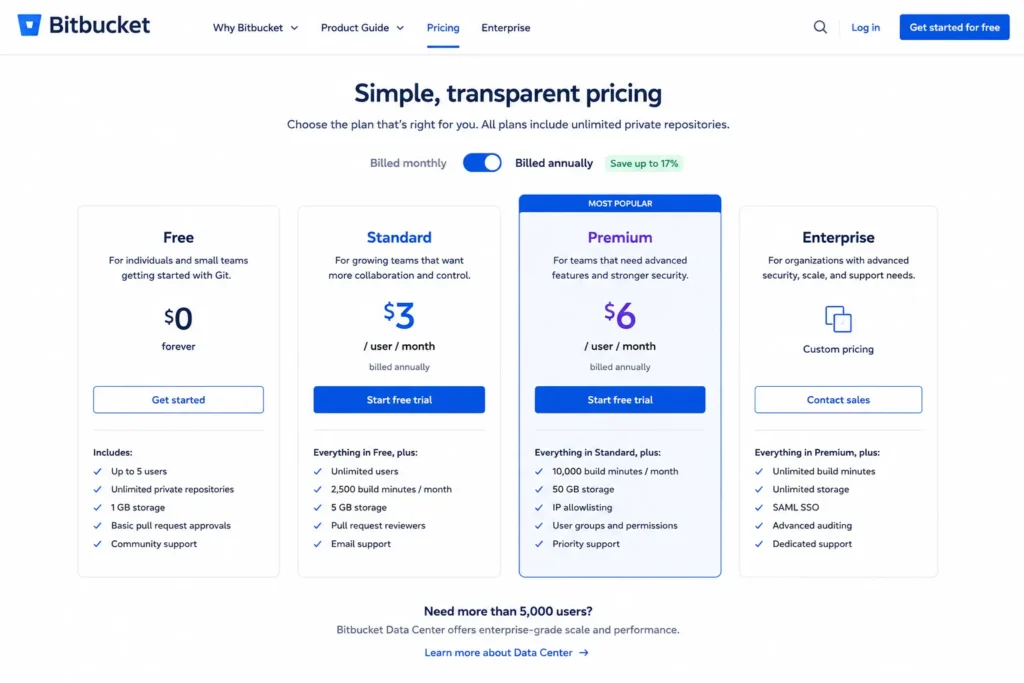
| Plan | Price |
| Free | $0/month |
| Standard | $3/user/month |
| Premium | $6/user/month |
| Data Center | Custom Pricing |
A few things worth knowing before you sign up:
The Free plan is genuinely useful: if you are a small team of five or fewer developers, you get unlimited private repositories, Git LFS support, and 50 build minutes a month. For startups in early development that can last months before you need to upgrade.
Watch the 5-user minimum on paid plans: Bitbucket requires you to purchase at least 5 user licenses on the Standard and Premium levels. That means a solo developer paying for Standard is actually paying $15/month, not $3. It’s a price that comes as a surprise to so many people.
Standard is the sweet spot for most teams: For $3/user/month you get unlimited users, pipeline access, and good Jira integration, so that’s almost 33% cheaper than comparable entry-level plans at similar platforms.
Premium unlocks enterprise-grade controls. IP allowlisting, merge checks, CI/CD workflow and advanced deployment permissions are all locked in the $6/user/month tier. For regulated industries or very big engineering companies, these features aren’t optional— they’re required.
Pro tip: Pay annually to save 20% on Standard and Premium plans. That’s $180/year back in your budget for a team of 25 on Standard.
Bitbucket Features
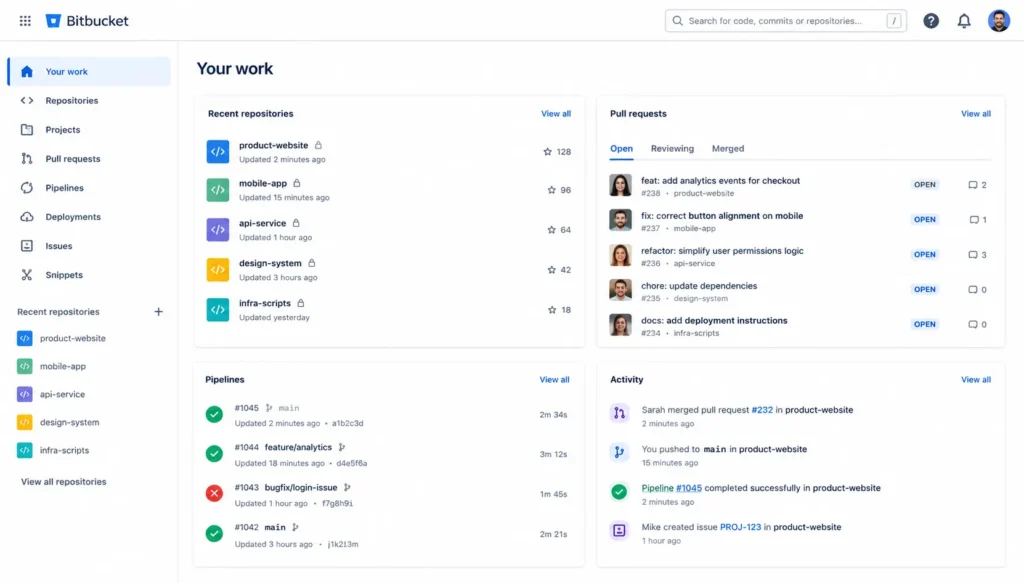
What features distinguish Bitbucket from a simple code host? A lot, actually. Here is a breakdown of the features that matter most:
Git Repository Hosting
The foundation. Bitbucket lets you create unlimited public and private repositories, clone them locally and push changes, and manage branches as you would expect from a Git client, all in an enterprise-ready interface with fine-grained access controls.
Pull Requests and Code Review
Bitbucket’s pull request is probably one of its best features. The side-by-side diff view is preferred by many enterprise developers to review complex code changes. You can comment inline, ask for changes with your code, then get approval before merging and assign reviewers to your code, all without leaving the platform.
Branch Permissions
That is where Bitbucket starts to feel like a serious system for real teams. You can lock down branches so that junior developers can’t just push to main or production if they don’t get a code review and are explicitly approved. Premium users also get project-level branch permissions and merge checks in place to keep engineering managers in total control of who touches what and where.
Bitbucket Pipelines (Built-in CI/CD)
No Jenkins setup needed. Bitbucket Pipelines is a built-in continuous integration and deployment tool that can be set up directly in your repository with a bitbucket-pipelines.yml file. Once you have built your pipeline, each push or pull request automatically triggers your build, test, and deployment steps. More on this in its own section below.
Deep Jira Integration
This is Bitbucket’s strongest difference. Bitbucket’s Jira integration is native, not bolted on. The Jira integration is built in for the project manager to see what they want to do with the pull request in one click. If you create a branch named after a Jira issue (feature/PROJ-123, for example), it will automatically link that branch to the corresponding Jira ticket and all commits on that branch. Project managers can track development progress without ever leaving Jira.
Atlassian Intelligence (AI Features)
In 2026, Bitbucket will be offering Atlassian Intelligence in paid plans, which will offer suggestions for code reviews and diff summaries in AI, and automated PR descriptions. It isn’t as mature as GitHub Copilot for the most part, but it’s getting better with every quarterly release.
Deployment Tracking
Bitbucket allows you to set up your environment and keep track of the staging, production, QA, and where your code is deployed. Combined with Jira, this creates an audit trail that compliance teams love.
Security and Access Controls
- Two-factor authentication (2FA)
- IP allowlisting (Premium tier)
- SSH key management
- Repository-level and project-level permissions
- Audit logs for enterprise customers
How to Use Bitbucket: Getting Started in Minutes
Getting started with Bitbucket is faster than most developers expect. Here’s a step-by-step walkthrough:
Step 1: Create Your Account
Head to bitbucket.org and sign up with your email or existing Atlassian account. If your team already uses Jira or Confluence, you likely already have Atlassian credentials, use those.
Step 2: Create a Workspace
A Workspace is your team’s shared environment in Bitbucket. Think of it as your organization’s root folder. Name it after your company or project, and invite team members via email.
Step 3: Create a Repository
Inside your workspace, click “Create repository.” Name it, set it as public or private, and initialize it with a README if you want a head start. Its generates a remote URL for you immediately.
Step 4: Clone the Repository Locally
Open your terminal and run: Now your repository lives on your local machine. Make changes and commit them to Bitbucket.
Step 5: Create Your First Pull Request
Push a branch, head to Bitbucket’s web interface, and open a pull request. Assign reviewers, add a description (Atlassian Intelligence can automatically generate one for paid plans), and link it to a Jira issue if applicable. Once approved, merge it, Bitbucket handles the rest.
Step 6: Connect Jira (Optional but Recommended)
If your team is using Jira, then connect it under Workspace Settings > Integrations > Jira Software. Once you have connected it from that point on, every branch you name after a Jira ticket will show development progress on your Jira board in the background.
Bitbucket Pipelines: CI/CD Without the Setup Headache
For developers who spent hours wiring up Jenkins or configuring external CI tools, Bitbucket Pipelines feels like a breath of fresh air. It’s CI/CD that lives in your repository, no separate service, no API keys to manage, no Jenkins server to keep up with.
Every time someone pushes code, Bitbucket starts a Docker container, runs your pipeline, and reports the result back to the pull request. Green check = tests pass. Red X = something broke, and no merge happens until it’s fixed.
The free tier provides 50 build minutes a month, so you can get it through each month for minimal workflows. The standard plan users get 2,500 minutes, which is enough for most small to midsize teams. You may purchase additional minutes at $10 per 1,000 minutes if you exceed your allocation.
Bitbucket vs. GitHub vs. GitLab: The Real Comparison
This is the question every developer Googles before committing to a platform. The honest answer? They’re all solid, but they serve meaningfully different use cases.
| Feature | Bitbucket | GitHub | GitLab |
| Base Price | $3/user/month | $4/user/month | Free (Community Edition) |
| Free Tier | Up to 5 users | Unlimited public repositories | Unlimited (self-hosted) |
| CI/CD | Pipelines (built-in) | GitHub Actions | GitLab CI (industry-leading) |
| Jira Integration | Native, unmatched | Third-party | Third-party |
| AI Features | Atlassian Intelligence | GitHub Copilot | GitLab Duo |
| Open Source Community | Limited | Massive (150M+ developers) | Strong |
| Self-Hosting | Data Center option | Enterprise Server | Free (Community Edition) |
| Best For | Atlassian teams | Open source & general use | DevSecOps & compliance |
When Bitbucket Wins
If your team is already on Jira and Confluence, Bitbucket isn’t just a code host, it’s the web of your development workflow. And the native integration is way better than any other plugin. Commit messages connect to tickets immediately, pull requests are reflected in Jira cards, and deployment tracking flows seamlessly from code to release board.
Bitbucket is also the most affordable option for teams with 6–50 developers that don’t need GitHub’s vast open-source community ecosystem.
When GitHub Wins
The GitHub community of over 150 million developers is its moat. For open-source projects, developer visibility, and breadth of ecosystem, nothing gets near it. GitHub Actions is also more flexible than Bitbucket Pipelines to handle complex workflows. And GitHub Copilot, despite being a pricey tool, is currently the best AI coding assistant.
When GitLab Wins
GitLab is the best platform for all teams for the DevSecOps lifecycle: from planning and code to security scanning, monitoring, and compliance. Its CI/CD pipelines are widely considered the most powerful available, and the free self-hosted option makes it particularly attractive for organizations with tight data residency requirements.
Who Should Actually Use Bitbucket?
To be direct, Bitbucket is the right choice for:
- The Atlassian ecosystem teams are the most obvious, native choice: Bitbucket in Jira. The integration depth is simply unmatched.
- Enterprise teams with strong access controls: branch permissions, IP allowlisting, merge checks, and audit logs make Bitbucket very appealing to regulated industries.
- Small teams on a budget: the free tier for up to 5 users is actually capable. And at $3/user/month for Standard, it’s hard to beat the value.
- Teams that are interested in code review discipline: the side-by-side diff view and granular review permissions make Bitbucket’s pull request workflow excellent for teams where code quality is non-negotiable.
Bitbucket is probably not the right choice for:
- Open source projects: GitHub has a huge community, discoverability, and unlimited free public repos.
- Teams without Jira: If you are not in the Atlassian ecosystem, Bitbucket’s core value proposition vanishes, and you would most likely get better value from GitHub or GitLab.
- Solo developers: The 5-user minimum billing on paid plans makes Bitbucket dramatically expensive for individual developers.
Bitbucket Updates 2026: What’s New?
Atlassian has been iterating quickly on Bitbucket in 2026. The most notable updates:
Atlassian Intelligence Expansion: AI features have been expanded across more paid tier actions, including smarter pull request summaries, inline code suggestions during review, and risk-flagging for large diffs.
Improved Merge Checks: Premium users now have access to more granular merge check configurations, including required status checks from specific pipeline steps and automated reviewer assignment based on code ownership files.
Dynamic CI/CD Pipelines: A Premium-only feature that allows pipeline configuration to be dynamically generated at runtime, enabling more advanced multi-stage deployment workflows without a need to use large YAML files.
Package Registry Updates: Bitbucket’s package registry (available on paid plans) has received performance improvements and expanded support for additional package formats.
Security Enhancements: Atlassian has expanded its vulnerability scanning integrations and strengthened the audit logging available to Premium and Data Center customers, reflecting growing compliance demands in enterprise markets.
Pros and Cons of Bitbucket
Pros
- Unmatched Jira integration: Native, deep and truly workflow-enhancing
- Competitive pricing: One of the most affordable per-user pricing
- Built-in CI/CD: Pipelines do not require a separate CI service
- Granular access controls: Better branch permission system for enterprise teams
- Strong code review tooling: side-by-side diffs, inline comments, required reviews
- Generous free tier: 5 users, unlimited private repos, basic Pipelines access.
Cons
- 5-user billing minimum: makes solo developer pricing expensive
- Smaller community: no open-source ecosystem to match GitHub’s scale
- AI features lag: Atlassian Intelligence is improving but trails GitHub Copilot
- Data Center costs: On-premise option still needs a lot of infrastructure investment
- Less developer visibility: no social discovery features like GitHub
- Storage limits can catch teams off guard: a 1 GB LFS limit on the free tier triggers read-only mode when exceeded.
Conclusion
Bitbucket does one thing really well: It makes software teams living in the Atlassian ecosystem actually more productive. The Jira integration alone justifies the switch for many teams. The pricing is competitive, the free tier is real, and Pipelines removes a whole category of DevOps headaches.
And it’s not for everyone, solo developers and open-source projects are better served elsewhere. But if your team is based on Jira, you are serious about structured code review and you are interested in tight access controls, Bitbucket is worth a serious look.
Get started for free. If you have to upgrade when it’s time to, then upgrade. The workflow sells itself.