
The first time a support ticket arrives and says, “the checkout button just doesn’t work” and nothing else you know the drill. You look at logs, try to reproduce it on three different browsers and an hour later you still don’t know what actually happened on the user’s screen. That gap between “something broke” and “I can see exactly what broke” is the whole reason LogRocket exists.
LogRocket is a frontend monitoring platform that records real user sessions, layers error tracking and performance data on top, and lets your team watch what a user actually did in the seconds before things went wrong. It’s one of the most talked-about tools in the session replay and product analytics space, and in 2026 it’s well beyond “screen recorder for developers” into a genuine product analytics and AI-assisted debugging platform.
This review walks through what LogRocket really does, what it costs in 2026, where it shines, where it falls short and which alternatives are worth taking a look at before you spend a budget line on it.
What Is LogRocket?
LogRocket is a digital experience monitoring platform for product and engineering teams who need to understand why users struggle, not just that they struggled. At its core, it combines three things that used to live in separate tools:

- Session replay, a pixel-perfect video-like recreation of what a real user saw and clicked.
- Error and issue tracking, JavaScript errors, network failures, and backend context tied to the exact session they occurred in.
- Product analytics, funneling, path analysis, heatmaps, and cohort data that show how users move through your product.
The pitch is simple: If you don’t stitch console logs together, a bug report, and a guess in one of those sessions, you just go through it and see the problem for yourself. For teams that ship quickly and don’t have time for long debugging cycles, that’s a real quick fix.
How LogRocket Works
You drop a small JavaScript snippet (or SDK, for mobile) into your app. From then on LogRocket automatically captures sessions without you manually tagging every event— this “autocapture” approach is one of its larger selling points, as teams that use event-tagging tools often end up with gaps in their data simply because nobody remembered to tag a new feature.
Once it’s recording, LogRocket:
- Reconstructs the DOM to replay what the user saw, rather than simply recording a video, which keeps file sizes small and allows you to search inside sessions.
- Captures console logs, network requests and responses, Redux/state changes, and stack traces.
- Links a session directly to any error or “rage click” (repeated frustrated clicking) that happened inside it.
- Feeds all of that into dashboards, funnels, and its AI layer Galileo, which flags anomalies and surfaces which issues are actually affecting the most users.
The practical result: instead of a developer trying to reproduce a bug from a two-line ticket, they can watch the exact five seconds where it happened.
Key LogRocket Features
Pixel-Perfect Session Replay
This is the feature LogRocket is best known for. It’s not a screen recording, it’s a DOM reconstruction, so you can look at elements, search sessions by criteria (i.e., users who saw a specific error), and skip straight to the point when something went wrong and not through a video timeline.
AI-Powered Error & Issue Tracking
LogRocket automatically groups related JavaScript errors, mobile exceptions, and network failures into “issues,” and scores them by how many users they affect. Galileo AI watches sessions at scale and recognizes patterns a human reviewer would take hours to spot— things like sudden spikes in failed checkout attempts for a specific browser version.
Product & UX Analytics
Besides replay, LogRocket has dashboards, conversion funnels, path analysis, heatmaps, scrollmaps, clickmaps, cohort analysis, and retention charts on the top level as well. This is what pushes it from being a “debugging tool” into something product managers use to report on with their product teams, not engineers chasing bugs.
Performance Monitoring
Core Web Vitals, page load times, and frontend performance metrics are tracked along with sessions, so a slow page and the user experience it caused aren’t two separate investigations.
Conditional Recording
For high-traffic products, recording every single session gets expensive fast. Conditional Recording gives you only the sessions that matter (errors, rage clicks, or high latency) and is a smart way to control costs at scale without losing visibility into problems.
Integrations
LogRocket connects with the tools teams already live in: Slack, Jira, GitHub, and others, so an issue detected in a session can turn into a ticket without anyone manually copying a link over five tabs.
LogRocket Pricing in 2026
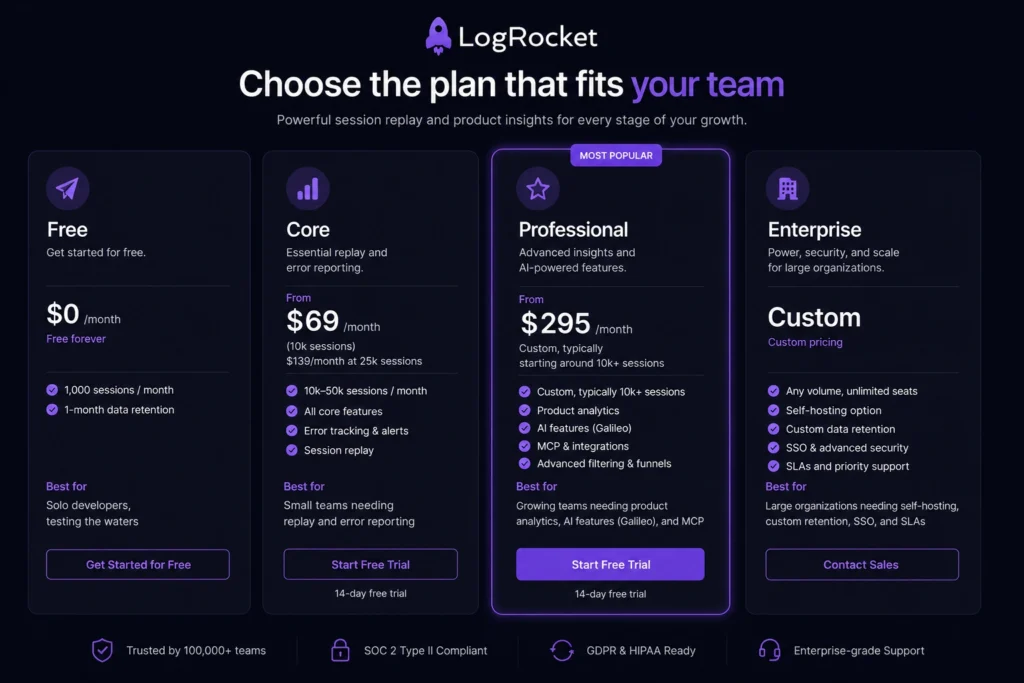
LogRocket pricing is based on monthly session volume and not seats alone, so it’s worth understanding before you compare it line-for-line with the other tools. Here is how the current plans break down, based on LogRocket’s published pricing:
| Plan | Starting Price | Sessions Included | Best For |
| Free | $0/month, free forever | 1,000 sessions/month, 1-month retention | Solo developers, testing the waters |
| Core | From $69/month (10k sessions); $139/month at 25k sessions | 10k–50k sessions/month | Small teams needing replay and error reporting |
| Professional | From $295/month | Custom, typically starting around 10k+ sessions | Growing teams needing product analytics, AI features (Galileo), and MCP |
| Enterprise | Custom pricing | Any volume, unlimited seats | Large organizations needing self-hosting, custom retention, SSO, and SLAs |
There are some things to be noted before you budget for this:
- Core is billed monthly with no annual discount option and Professional is an annual commitment and charges the same price whether billed monthly or annually.
- Data retention starts at just one month on the entry tiers, if your team wants to compare user behavior quarter to quarter, then you’ll probably need to pay for longer retention.
- Mobile pricing is separate from web pricing, and annual mobile plans have in fact been priced higher than monthly ones because the “annual” toggle can switch to a different session tier rather than applying a straightforward discount. Read the fine print before you commit annually on mobile.
- Teams with fewer than 20 employees can ask about a Startup Plan, which isn’t advertised prominently but is worth requesting directly from sales.
- The real-world spend, based on third-party procurement data, tends to run higher than the headline numbers once teams scale past the entry tier, small teams recording 5,000–10,000 sessions a month typically land in the $300-$600/month range once seats and add-ons are factored in, and that runs into four figures monthly for teams beyond 25,000 sessions.
The honest takeaway: The $69 starting price is real, but it is an entry point, not a ceiling. If your product analytics needs go beyond basic replay, funneling, heatmaps, Galileo AI, budget for Professional at $295/month and up, and view the published numbers as a starting point for a sales conversation rather than a fixed price tag.
LogRocket Free Trial: What You Actually Get
LogRocket offers two ways to test the platform before paying:
- A permanent free plan, 1,000 sessions a month, one month of data retention, three seats. Great for solo developers or very early-stage products and it doesn’t expire.
- A 14-day free trial on the Core plan, which unlocks the full feature set so you can see what pixel-perfect replay and error tracking look like at real usage volume. Professional plans typically come with a guided free trial or demo rather than pure self-serve access.
If you are assessing LogRocket for a team, the smart thing to do is run the 14-day trial against a real, moderately trafficked page rather than staging it with a real user’s behavior, session replay software is most useful for real user behavior, warts and all.
Pros of LogRocket
- Best-in-class session replay on the web. The DOM-reconstruction approach and searchable sessions are really way ahead of most screen-recording competitors.
- Autocapture removes the tagging burden. You don’t need to depend on a person remembering to instrument a new feature.
- Errors are tied to the session that created them. No more guessing what a user was doing when a stack trace fired.
- Galileo AI finds patterns humans would miss, particularly during high volumes of activity where manually reviewing recordings is difficult.
- It can be integrated with Redux, GraphQL, Slack, Jira, and GitHub all to make it part of our existing workflow.
- Conditional Recording keeps costs down for high-traffic products that don’t have to keep track of every single session.
- User satisfaction level is high on ease of use. LogRocket is consistently scoring well on setup and administration in comparison to more infrastructure-based monitoring tools.
Cons of LogRocket
- Mobile support lags behind the web. Several independent comparisons indicate the mobile SDK is much less mature than the web product.
- Entry-level data retention is short. One month is not enough if your team is on a quarterly review or if behavior needs to be compared across a release cycle.
- The costs are higher with the volume of sessions. What starts at $69/month goes up to thousands of dollars for consumer products with real traffic, and professional-level features need an annual commitment.
- Not a full observability platform. If you need backend infrastructure monitoring, distributed tracing across microservices, or deep APM, LogRocket is not designed for that.
- Teams that came from pure APM tools have a learning curve in log-based debugging and they are required to go back to replay-first.
- Enterprise pricing is opaque, which is common in this category but still means budgeting needs to be a sales conversation rather than a self-service calculator.
LogRocket vs Sentry
One of the most common comparisons in the space and the true answer is that LogRocket and Sentry solve genuinely different problems, even though their marketing pages make them sound interchangeable.
| Feature | LogRocket | Sentry |
| Core Strength | Session replay + frontend UX debugging | Error tracking + full-stack APM |
| Best for Answering | “Why did this user get stuck or rage-click?” | “Which deploy introduced this error, and who owns the service?” |
| Stack Coverage | Frontend-first, with backend context support | Frontend, backend, and mobile with deep observability |
| Session Replay | Best-in-class, DOM-based replay | Available, but generally considered less mature |
| Pricing Model | Based on monthly sessions | Based on events/errors sent |
| Starting Price | From $69/month (Core plan for web) | Lower published entry price, but costs can increase significantly once replay and tracing are enabled |
| Open Source | No | Yes |
If you had to pick one, which problem hurts more right now. Frontend UX issues, like confusing flows, broken checkout steps, and “it works on my machine” bugs, get more immediate value from LogRocket. Teams that need visibility across a distributed backend, with excellent release health tracking and CI integration, lean towards Sentry. Most mature engineering organizations eventually run both, using Sentry to catch and triage errors system-wide and LogRocket to understand the user-facing fallout of the ones that matter most.
Best LogRocket Alternatives
No one tool is right for every team, so here’s how LogRocket stacks up against the tools most often compared to.
1. Sentry
Let’s be clear, the best for teams that require full-stack error tracking and APM, not just frontend replay. Open source, huge community, strong CI/CD integration. Weaker UX-level insight compared to LogRocket.
2. FullStory
A strong session replay and product analytics competitor with a heavier focus on marketing and product teams rather than developers. Tends to be priced at a premium for enterprise-scale usage.
3. Hotjar
A cheaper and lighter option if you only need heatmaps and basic session recordings and don’t want to get into any kind of deep error tracking or AI-assisted issue triage. Hotjar Popular with marketing and smaller product teams.
4. Datadog
The right choice if you need LogRocket-like frontend visibility as one small piece of a much larger observability stack that includes infrastructure monitoring, logs, and distributed tracing. Much more expensive and complex to set up.
5. UXCam
Mobile-first alternative if your primary product is a native iOS or Android app, LogRocket’s mobile SDK is usable but not its strongest feature.
Just a fast reminder: if replay-driven frontend debugging is your main need and most of your users are on the web, LogRocket is hard to beat. If you need backend error tracking as well, pair it with Sentry rather than try to force LogRocket to do a job it wasn’t designed for.
Who Should Actually Use LogRocket?
- SaaS product teams who want to know how users experience their app, not just whether it is technically “up”.
- Engineering teams tired of unreproducible bug reports, “it doesn’t work” tickets are five-minute investigations instead of half-day ones.
- Product managers who want funnels, heatmaps and cohort data without waiting for an engineer to pull a custom report.
- Consumer apps where user experience directly drives revenue, and a broken flow costs real conversions, not just annoyance.
It is a bit weaker when you are a backend-heavy team with minimal frontend surface area, or when you have infrastructure-level observability rather than user experience monitoring.
LogRocket News & What’s New in 2026
LogRocket has continued to push its AI layer Galileo deeper into the product – AI-assisted issue triage, natural language session querying and MCP (Model Context Protocol) support that allows AI tools to query LogRocket data directly (now available on the Professional tier). The company has also gone a step further by adding Conditional Recording as a cost-control feature for high-volume products that record over a million sessions a month and still offers a self-hosted deployment option for businesses with strict data residency requirements. For the latest feature rollouts and pricing changes, check LogRocket’s official pricing and product pages because usage-based SaaS pricing tends to shift more frequently than flat-rate tools.
Final Verdict
LogRocket has earned a reputation as one of the best session replay and frontend monitoring tools in 2026, specifically for web-first product and engineering teams tired of chasing bugs blind. The pixel-perfect replay, autocapture and AI-assisted issue triage really save time, and the time your team spends debugging is time your team is shipping instead.
Where it asks for caution is cost predictability. The advertised starting prices are real, but real-world spend jumps as soon as you need product analytics, longer retention and go beyond a few tens of thousands of sessions a month. If your team is front-end-heavy, web-first and unable to turn rough bug reports into solutions, LogRocket is worth the trial. If you want to have good backend observability too, you should pair it with a tool like Sentry because you can make sure you have more than one platform doing the job.
Frequently Asked Questions (FAQs)
Q. What is LogRocket used for?
A. LogRocket is used to record and replay real user sessions on websites and apps, track JavaScript errors and network issues connected with those sessions, and analyze product usage through funnels, heatmaps, and cohort data, mainly to help engineering and product teams diagnose bugs and understand user behavior faster.
Q. Is LogRocket free to use?
A. Yes. LogRocket offers a permanent free plan covering 1,000 sessions per month with one month of data retention. Paid plans start at $69/month for the Core tier, with a 14-day free trial available to test the fuller feature set.
Q. Is LogRocket good for debugging?
A. Yes, it is, this is probably its greatest strength. There’s a lot of technical connection between error reports and stack traces that are directly tied to the user session where they were made, because it lets developers see what happened instead of trying to reproduce a bug from a vague description.
Q. How does LogRocket pricing scale with traffic?
A. Pricing is predominantly based on monthly session volume. Costs increase as the number of sessions increases, and higher tiers (Professional and Enterprise) offer deeper product analytics and AI features, but require longer contracts to support them (Professional plans need an annual contract).
Q. Is LogRocket better than Sentry?
A. LogRocket is better for frontend session replay and UX-level debugging and Sentry is better for full-stack error tracking and APM across frontend, backend and mobile. Most teams use them both at the same time.