
Your marketing team is in the process of launching a product, your dev team is starting to sprint, and your operations lead is buried deep in a spreadsheet that hasn’t been updated since last Tuesday. Sound familiar?
This is exactly the problem monday.com was built to tackle, and for years, it has been one of the most visually intuitive, genuinely usable work management platforms on the market. But 2026 isn’t 2022. The space has grown crowded, AI has changed everything, and monday.com has made what it calls the biggest transformation in its history.
So the question is not whether monday.com is still the best.
Let us find out.

What Is monday.com?
monday.com is a cloud-based work management platform to help teams plan projects, track progress, automate workflows, and collaborate, all in one centralized, customizable interface. Initially a simple visual board tool, it has evolved into a full operating system for businesses of all sizes.
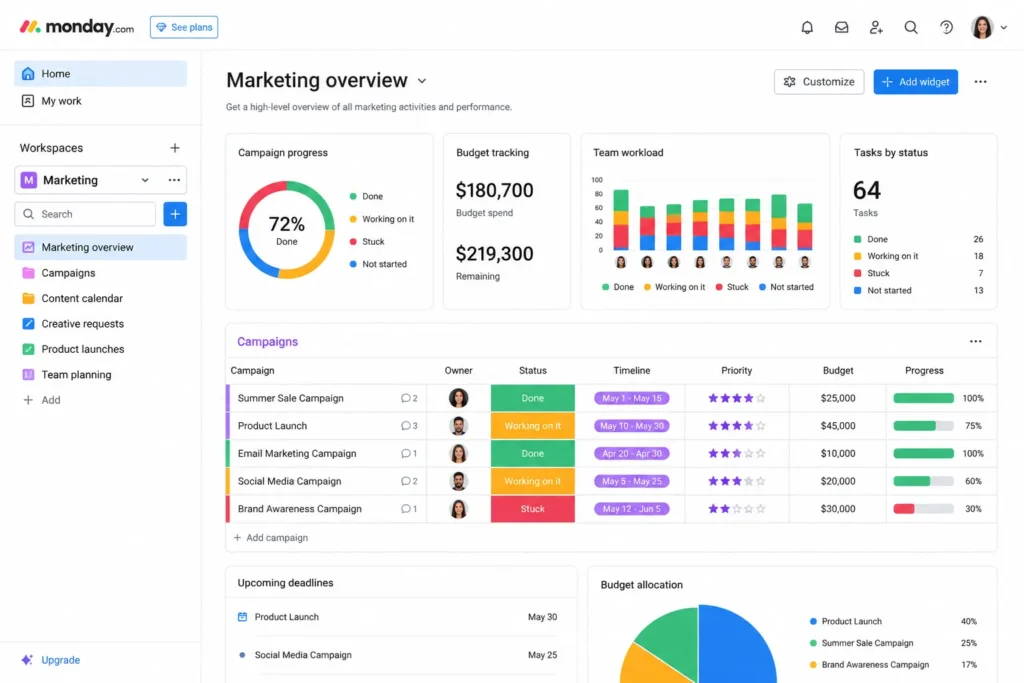
The platform is organized around “boards,” smart, visual spreadsheets that can be transformed into Kanban boards, Gantt timelines, calendars, maps, etc. Marketing, sales, product, HR, and operations teams use it to manage tasks ranging from simple task lists to complex multi-department campaigns.
With more than 200 native integrations (plus access to 8,000+ via Zapier), monday.com sits comfortably at the intersection of flexibility and power.
monday.com Pricing 2026
monday.com pricing is per seat, and there are five levels.
| Plan | Price (Per Seat/Month, Billed Annually) | Best For |
| Free | $0 (up to 2 seats) | Individuals and personal use |
| Basic | ~$9/seat/month | Simple task tracking |
| Standard | ~$12/seat/month | Small to mid-size teams |
| Pro | ~$19/seat/month | Advanced teams needing AI and tracking |
| Enterprise | Custom pricing | Large organizations with security and compliance requirements |
A few important pricing notes for 2026:
- All paid plans require at least 3 seats
- AI capabilities are now bundled into plans via a credit-based system
- Standard and Pro plans include AI credits, which are paid for by the company at $0.01 per credit annually
- Time tracking, private boards and advanced reporting all require the Pro plan or above
- The Enterprise plan has unlimited seats, custom security controls, dedicated support and early access to new AI features
For a team of 10 on the Pro plan, the annual cost is about $2,280 in seats alone. That’s not insignificant, and it’s one of the most common criticisms of monday.com from smaller teams.
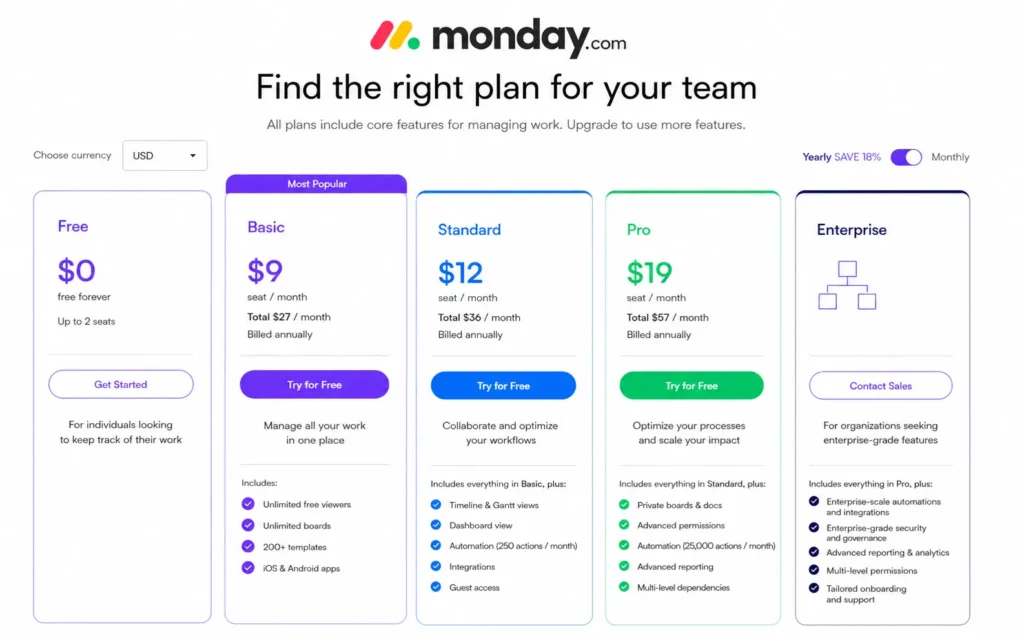
The Standard plan still remains a good fit for most 5–20 person teams. You can get automations, integrations, timeline views, and AI credits (and automations) without paying the full Pro premium.
What’s New in 2026: The AI Work Platform Shift
This is where monday.com’s story gets really interesting.
On May 6, 2026, monday.com made a landmark announcement: it was no longer just a work management platform. It had officially repositioned itself as an AI Work Platform, which it described as the most significant change in the company’s history.
Here’s what that actually means in practice.
AI Agents, Built Right In
monday.com now comes with native AI agents that any team member can configure and deploy (no technical background required). These agents are not just helping; they do their job. They can create marketing campaigns, qualify sales leads, process purchase requests, onboard new employees, and close support tickets in your live boards, workflows, and permissions.
The architecture is built for human oversight. For me, I think they look more like smart teammates, not like bots when they’re a whole lot smarter, but like smart teammates with a manager, not a programmer.
AI Sidekick Goes Mainstream
AI Sidekick debuted in beta in 2025 and officially departed beta in January 2026. It’s now the primary AI entry point to monday.com, working with boards, docs, and team data at once. You can summarize project updates, write content, pull cross-board insights, and stay updated without looking at dozens of boards manually.
monday Vibe: No-Code App Building
Vibe is monday.com’s response to the “vibe coding” trend. Tell Vibe what you need in plain language, and Vibe will create custom dashboards, views, and mini-apps right in the platform. No developers needed. For non-technical teams that have previously required IT tickets for any custom reporting, it is a huge improvement.
monday Vibe AI Notetaker
One of the most recent (released June 2026) is the Vibe AI Notetaker, a meeting intelligence tool that joins Zoom, Teams, or Google Meet calls, generates transcripts and summaries, and auto-fills CRM fields after every call. For sales and client-facing teams, this alone can save hours per week.
AI Blocks for Automation
AI Blocks are now part of automations. Need a summary of incoming support tickets? Translate project updates for your global team and pull key figures from uploaded documents. Now those things can be done automatically, based on what’s happening in your workflow.
The combination of Sidekick, Vibe, AI Agents, and AI Blocks effectively makes monday.com a different product in 2026 than it was even eighteen months ago.
monday.com Features Review
As far as AI is concerned, the core platform remains one of the strongest in the market. So here is a breakdown of what you actually get.
Boards and Views
monday.com’s board system is its foundation, and it’s really good. Every board can be viewed as a standard table, Kanban board, Gantt timeline, calendar, map, or workload chart. Switching between those views takes a single click, and visual clarity is unparalleled among competitors.
Automations
The automation builder is drag-and-drop and surprisingly powerful. Without code, you can create multi-step logic on “if this, then that.” The Standard plan has 250 automations per month, which is enough for small teams, but a major obstacle for mid-size marketing or operations teams. The Pro plan takes away most of that friction.
Dashboards
Custom dashboards pull live data from multiple boards into one visual command center. Widgets can include charts, timelines, workload views, number summaries, and embedded apps. Building your dashboard takes 15-20 minutes with your boards, and you will be able to do so in 15 to 20 minutes for the job.
Monday Docs
The platform’s native document tool allows teams to create wikis, meeting notes, and project briefs with live board embeds. It’s not a Notion replacement; the editing experience is simpler and database nesting is limited, but for project-based documentation, it does the job well.
Forms and CRM
Any board can be instantly converted into a shareable intake form, with public or private visibility. No monday.com account is needed to submit a response. On the CRM side, monday has a dedicated Sales CRM product with pipeline management, contact tracking, and now AI-powered deal insights.
Integrations
Monday connects directly with more than 200 third-party apps including Slack, Google Workspace, Microsoft Teams, Salesforce, HubSpot, Jira, and GitHub. Zapier extends that platform to 8,000+ tools.
Pros and Cons
What Works Exceptionally Well
- Visual clarity. One of the most intuitive interfaces for this category. New team members can get up and running in less than 30 minutes.
- AI integration depth. In 2026, monday.com’s AI isn’t a feature; it is part of the core product. Sidekick, Vibe, AI Agents, and AI Blocks work together rather than feel bolted on.
- Flexibility. The same platform is able to support marketing sprints, software development, HR onboarding, and sales pipelines without needing any separate tools for each of them.
- No-code automation. Even non-technical users can build meaningful workflow automation.
- 200+ integrations. Integrates into almost any existing tech stack.
Where It Falls Short
- Pricing adds up quickly. The 3-seat minimum, seat-bucket model, and AI credits can drive the true cost so much higher than the headline numbers indicate. A team of 8, for example, pays for 10 seats.
- Automation limits on Standard. 250 automation actions per month seems like a lot until a mid-size team hits week two.
- Board performance at scale. Boards with 500+ items and multiple automations running can slow down noticeably, a well-known problem across G2 reviews and Reddit discussions.
- Not good for solo users or very small teams. If you’re a freelancer or a 2-person operation, the price structure and features may be overkill.
- Form limitations. Forms can’t update existing items; they only create new ones.
monday.com vs. Competitors
What is monday.com like compared to its closest competitors in 2026?
| Feature | monday.com | ClickUp | Asana | Notion |
| Visual UI | Excellent | Good | Good | Moderate |
| AI Integration | Native (2026) | Bundled ($14) | Add-on (+$8/seat) | Limited |
| Free Plan | 2 seats | Generous | Limited | Generous |
| Automation | Standard+ | All plans | Standard+ | Limited |
| Starting Price | ~$9/seat | ~$7/user | ~$10.99/user | ~$8/user |
| Best For | Cross-functional teams | All-in-one productivity | Traditional project management | Docs and wikis |
The most relevant comparison is monday.com vs ClickUp. ClickUp has competitive AI features at a cheaper price point and a more generous free tier. For budget-conscious teams, ClickUp often wins on paper. Where monday.com wins is in interface polish, enterprise readiness, and depth of its AI agent infrastructure.
Asana is still better for traditional project management with portfolio tracking and goal management, but its new model that will charge separately for AI features in 2026 makes it a harder sell for teams that want AI embedded by default.
Who Should Use monday.com?
monday.com isn’t for everyone, and the best products rarely are.
It’s an excellent fit for:
- Focused teams of 5–50 people handling cross-functional work
- Marketing, ops, HR, product teams that need one central platform
- Organizations investing in AI-powered workflows in 2026
- Businesses that value visual clarity and ease of adoption over pure feature density.
It’s probably not the right fit for:
- Solo freelancers or teams of 2 (the 3-seat minimum creates unnecessary cost)
- Pure software development teams that need deep Jira-style sprint management
- Nonprofits or budget-constrained teams where free alternatives like Notion or ClickUp’s free tier are sufficient
- Teams needing complex nested databases or advanced document management.
Final Verdict
Monday.com in 2026 is a totally different product than it was two years ago, and in most ways, a far better one. The AI Work Platform transformation is not just marketing spin. Sidekick, Vibe, AI Agents, and AI Blocks are real infrastructure investments that put monday.com ahead of many competitors on the AI integration curve.
The core product remains as it has always been: visually elegant, broadly flexible, and fast to adopt. It’s still one of the best options for cross-functional teams that need a single place to work with all kinds of work without a steep learning curve.
The pricing model is the most persistent weakness. The 3-seat minimum, seat bucket pricing, and AI credit system can push real costs above what the headline numbers suggest. Teams of fewer than 5 should look elsewhere first. But for organizations in that 10–100 person range that are serious about building AI into their daily workflows, monday.com is hard to beat in 2026.
Frequently Asked Questions (FAQs)
Q. What is monday.com used for?
A. monday.com helps teams to manage projects, keep track of tasks and automate workflows, collaborate, and manage CRM activities from one platform.
Q. How much does monday.com cost in 2026?
A. Plans start at about $9/seat/month (Basic), Standard is $12/seat/month, Pro is $19/seat/month, and Enterprise is available via custom pricing.
Q. Is monday.com better than ClickUp in 2026?
A. monday.com has a better user experience and smarter AI tools for enterprise use, while ClickUp is more affordable and has a larger free plan.
Q. Does monday.com have AI features?
A. Yes, monday.com includes AI-powered assistants, AI agents, automation tools, and no-code AI features across paid plans.
Q. Is there a free version of monday.com?
A. Yes. Free plan supports up to 2 users and provides basic features and is suitable for individuals and small personal projects, so it is suitable for people and small personal projects.