

If you typed “Hotjar” in Google expecting a clean pricing page and a straightforward features list, you probably landed somewhere confusing. It’s not your fault and not outdated research either; it’s because Hotjar has changed in a way most “best heatmap tools” listicles haven’t caught up to yet.
This Hotjar review cuts through that confusion. We’ll discuss what Hotjar is in 2026, what happened to the brand, which features really move the needle for a SaaS product team, what you’ll realistically pay, and how it compares to the tools people keep asking about in the same breath: Microsoft Clarity, PostHog, and FullStory. No fluff, no recycled marketing copy. Just what matters when you’re trying to figure out why users sign up for your trial and then disappear quietly.
What Is Hotjar?
At its core, Hotjar is a behavior analytics tool. It shows you what people actually do on your site or in your app, where they click, how far they scroll, where they hesitate, and at what point they give up and leave. It does this through heatmaps, session recordings, and on-page surveys.
That aspect hasn’t changed since Hotjar launched out of Malta back in 2014. What has changed is who owns it, how it’s priced, and where you go to sign up.

The Big 2026 Story: Hotjar Is Now Part of Contentsquare
Here is the thing most Hotjar reviews from 2023 or 2024 won’t tell you: Hotjar had legally merged with Contentsquare Group, the Paris-based experience analytics company that bought it in 2021. By 2026 that merger is not only a corporate footnote, but it’s a complete transformation of the buying experience.
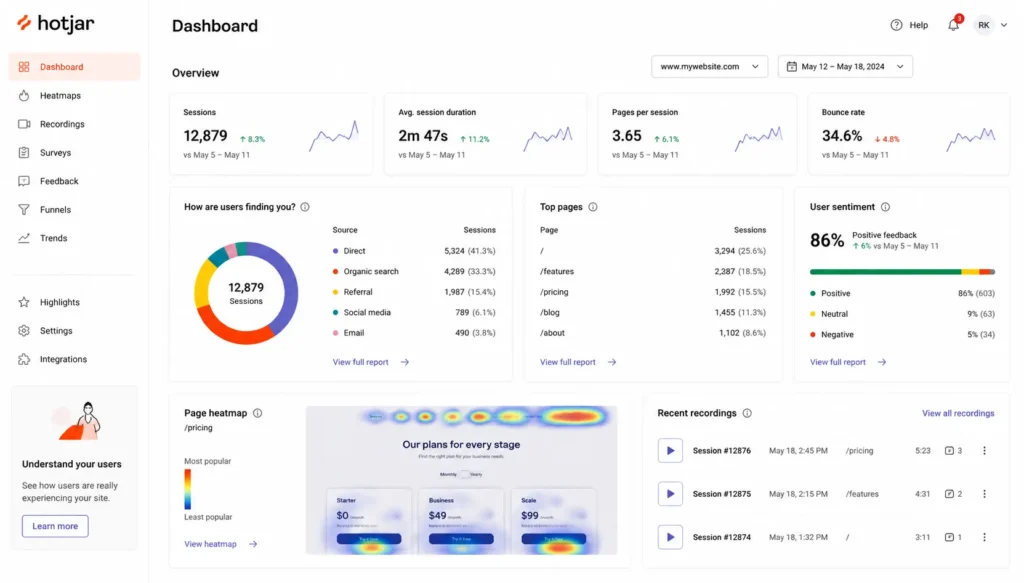
Once you click “pricing” on hotjar.com today, you will get to Contentsquare instead of a classic, self-service pricing page. The dashboards Hotjar customers know still work. New accounts have not been forced to migrate overnight. But new signups are being funneled into Contentsquare’s unified platform, where Hotjar’s heatmaps, recordings, and surveys now reside alongside Contentsquare’s own Experience Analytics, Voice of Customer, and Product Analytics modules.
In practice, this means a few things for anyone researching Hotjar right now:
- The free plan got bigger in some places and more confusing in others. Depending on the version of the product you purchase, you could have a 200K sessions a month free tier in the new Contentsquare model, and the old Hotjar free plan is much tighter at 35 sessions a day.
- Pricing tiers are shifting. Hotjar plans such as Observe, Ask, and Engage still exist for some accounts, and new customers are increasingly getting Contentsquare’s Free, Growth, Pro, and Enterprise structures.
- Features are converging, not disappearing. Heatmaps, recordings, funnels, and surveys are all still there, often even with capabilities Hotjar never had on its own, like AI-summarized session replays and error monitoring.
If you are evaluating Hotjar for a SaaS product in 2026, the honest framing is this: you’re not really choosing “Hotjar” as an independent product anymore. You’re choosing a tier within a larger Contentsquare platform that still includes some of the Hotjar features you’ve heard about. That’s not necessarily a downgrade; for many small SaaS teams, the new free tier is bigger than Hotjar solo. But it does mean that the research you have to do today has to focus on a bigger target.
Hotjar Pricing in 2026: What You’ll Actually Pay
This is the part where Hotjar reviews tend to get sloppy because the pricing itself has gotten really complicated. Depending on which version of the signup flow you hit, you’ll see one of two structures.
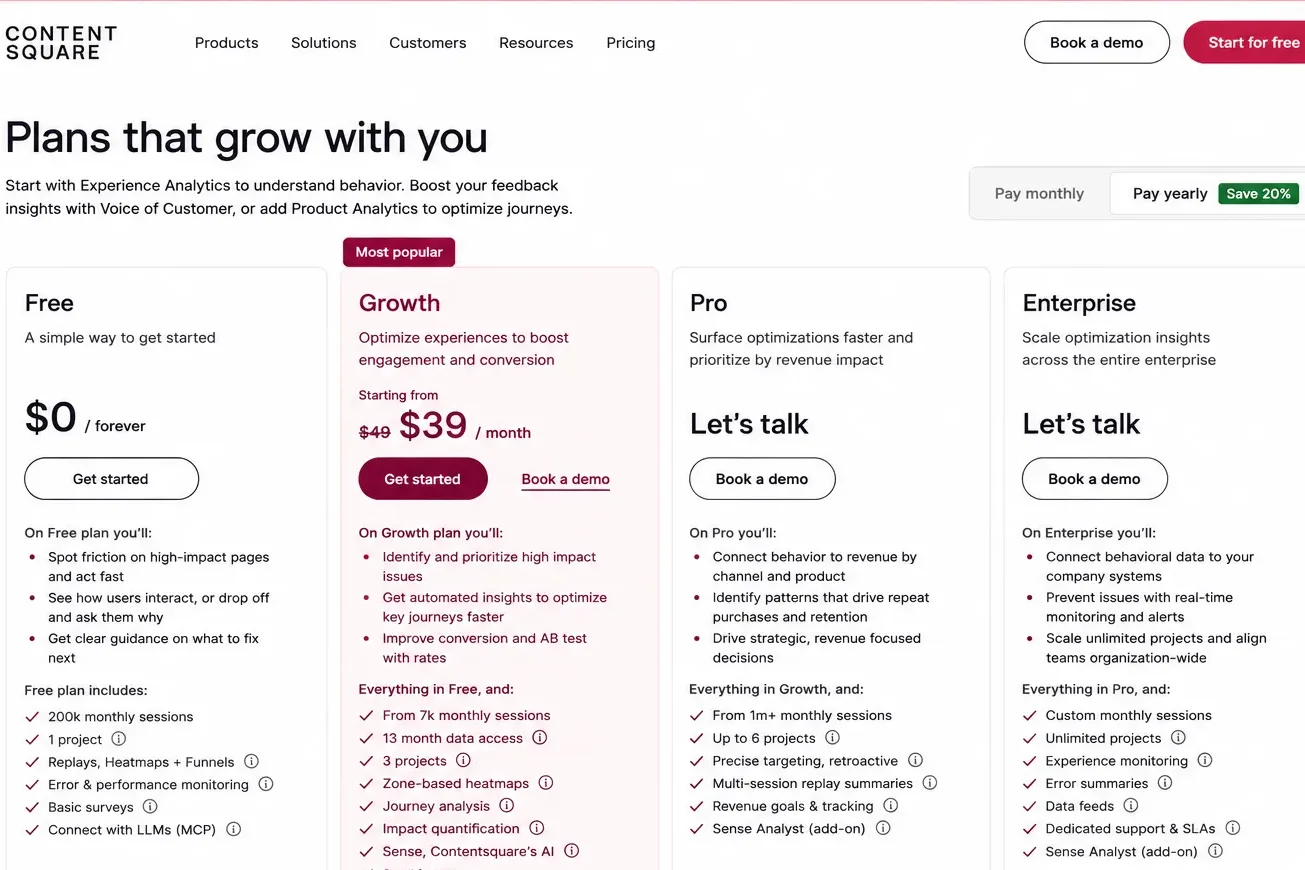
| Tier | What It’s Roughly Priced At | Best For |
| Free | $0 | Early-stage SaaS startups testing the waters and low-traffic products |
| Growth | Starting around $49/month (scales with session volume) | Growing SaaS teams that have outgrown the free tier |
| Pro | Custom pricing | Mid-market SaaS companies needing higher session volume and advanced AI features |
| Enterprise | Custom pricing | Large SaaS organizations requiring SSO, advanced monitoring, compliance, and dedicated support |
Including a few honest caveats to be taken into account before you budget for this:
- The “$49/month” starting price is for a relatively small number of sessions. As your traffic grows, that number grows quickly; customers can report bills well into the hundreds per month once they reach tens of thousands of monthly sessions.
- Surveys, behavior analytics, and deeper product analytics can be billed as separate product lines rather than one bundled plan, depending on which Hotjar/Contentsquare setup your account lands on.
- Annual billing typically knocks off 20% compared to paying month to month.
- Hotjar customers who signed up for old, simpler self-serve plans still haven’t been migrated yet, so that could actually be cheaper than the new one, at least for now.
The practical takeaway: Get an actual quote for your traffic level before assuming a number. Session-based pricing is the single biggest factor that will make or break whether Hotjar fits your SaaS budget.
Hotjar Features That Actually Matter for SaaS Teams
A lot of Hotjar features look really nice in a sales demo and then sit unused six months later. For SaaS companies, the real battle is onboarding, activation, and reducing churn, and only a few features actually pay for themselves. Here’s what’s actually worth your attention.
Hotjar Heatmaps and Attention Maps
Heatmaps show where users click, tap, and scroll on a given page. For a SaaS marketing site, this is how you find out that nobody is scrolling past your hero section or that everyone is clicking a button that isn’t actually clickable.
The 2026 platform also adds attention maps on top of classic click maps, which weight engagement rather than just clicks. That distinction matters more than it sounds, a button that yields one confused click isn’t the same signal as a pricing table that holds attention for forty-five seconds.
Hotjar Session Recordings With Frustration Scoring
That’s the feature most SaaS product managers actually open every week. Session recordings allow you to watch anonymized playback of real users moving through your onboarding flow, your dashboard, or your settings page. Hotjar auto-tags sessions and flags ones with rage clicks, dead clicks, or erratic mouse movement, so you’re not scrubbing through hours of footage looking for the moment someone gave up.
For a SaaS team working to fix a leaky trial-to-paid conversion, this is often where the real “aha” moments happen, not in a dashboard full of percentages but in watching one real user get stuck on a form field your team forgot even existed.
Hotjar Funnels and Drop-off Analysis
Funnels visualize exactly where users abandon a multi-step flow, signup, onboarding checklist, checkout, or whatever your critical path looks like and can pull up recordings of those specific drop-off moments. For SaaS companies, this is usually the single highest-leverage feature, because trial abandonment is rarely one big problem. It’s usually three or four small ones stacked on top of each other.
Hotjar Surveys, Feedback Widgets, and Voice of Customer
Behavior data tells you what happened. Surveys tell you why. On-page surveys, exit-intent polls, and feedback widgets let you ask real users directly what you’re thinking, what almost stopped you from signing up today? That’s a deceptive question that surfaces objections your sales team has never heard out loud.
This qualitative layer is truly a differentiator. There are many competing tools that do the “what” (recordings, heatmaps) but don’t provide an option to ask “why.”
Error and Performance Monitoring
Newer to the platform thanks to Contentsquare integration, this tracks JavaScript errors and slow load times and ties them back to user behavior. For SaaS products where a single broken API call can quietly tank activation for an entire signup cohort, this fills a gap Hotjar never covered well on its own.
Sense AI
The AI layer summarizes heatmaps and recordings in plain language and answers natural language questions about your behavioral data. It won’t replace real analysis, but it does cut down the hours teams used to spend manually reviewing footage, useful if you’re a small SaaS team without a dedicated UX researcher.
Hotjar vs. Competition
No Hotjar review is complete without an honest look at the alternatives SaaS teams are actually weighing it against in 2026.
| Tool | Free Tier | Strongest For | Weakest For |
| Hotjar | Generous session allowance with limited advanced features | Combining behavior analytics with direct user feedback, surveys, and heatmaps | Predictable pricing at scale for high-traffic websites |
| Microsoft Clarity | Unlimited and completely free | Cost-conscious teams needing heatmaps and session recordings | Surveys, feedback collection, and funnel analysis |
| PostHog | 5,000 recordings/month free | SaaS teams wanting session replay tied to product analytics and user identity | Teams seeking a polished, research-first UX platform |
| FullStory | No free tier | Enterprise SaaS companies requiring deep technical diagnostics and advanced analytics | Budget-conscious startups and early-stage teams |
What Using Hotjar Actually Looks Like for a SaaS Team
Imagine a 35-person SaaS company selling project management software to small agencies. Trial signups are healthy. Paid conversions are not. The product team has a hunch it’s something in onboarding, but they can’t say exactly where.
The first thing to do is usually the same: install Hotjar (or its Contentsquare-powered version), point a funnel at the signup-to-first-project flow, and wait a few days for real sessions to roll in. What it turns out to be is usually not so great. It’s small. A handful of recordings show users clicking a “Skip” button on the onboarding checklist almost immediately — not because they want to know what to do but because the button is where they’d expect it to be, in the place they’d expect a “Next” button to be.
That one single observation, from watching maybe a dozen session recordings tagged with rage clicks, can be more useful for activation than a month of A/B testing button colors. A follow-up survey right after the skip click, “What were you trying to do just now?” usually confirms the theory within a day or two, in the users’ words.
This is the pattern that makes Hotjar so useful for SaaS teams: it’s not always one big insight. It’s a steady accumulation of small, specific, and “oh, that’s why” moments that a quantitative dashboard alone would never surface.
Who Should (and Shouldn’t) Use Hotjar in 2026
Hotjar makes sense if you:
- Run a SaaS product where onboarding, activation, or trial conversion is the key growth lever
- Want behavior data and direct user feedback in roughly the same place
- Have budget flexibility, as the costs scale with traffic
- Don’t have a quality product analytics stack that goes hand in hand with what it is offering.
Look elsewhere (at least to start) if you:
- Need session recordings and heatmaps but have a tight or zero budget, Microsoft Clarity will cover that for free
- You already have a product analytics tool like PostHog or Mixpanel and just need recordings layered on top
- Run a high-traffic site where session-based pricing would scale into an unpredictable bill
- Need product analytics (retention, cohorts, feature adoption) as your primary use case, Hotjar’s core strength has never been so much about product analytics.
Final Verdict
Hotjar in 2026 isn’t quite the scrappy startup tool it was just a few years ago, and pretending otherwise does a disservice to anyone trying to budget for it. It’s now a feature set embedded in Contentsquare’s broader experience platform, which, depending on your traffic and needs, can mean a more generous free tier or a more complicated bill.
What hasn’t changed is the core value: for SaaS companies looking to understand why trials don’t convert, the combination of session recordings, funnels, and direct user surveys provides answers that a metrics dashboard alone won’t give you. If that’s the problem that you’re solving, and you’re going to do a serious check, go in knowing exactly what version of the product you’re signing up for and get a real quote before you get a budget line attached to it.
Frequently Asked Questions (FAQs)
Q. Is Hotjar still a separate company in 2026?
A. Not really. Hotjar was integrated into Contentsquare Group as of mid-2025. The brand and many of its dashboards remain, but new customers are now being directed to Contentsquare’s unified platform rather than Hotjar sign-up alone.
Q. What is Hotjar actually used for?
A. Hotjar is used to understand user behavior on websites and web apps through heatmaps, session recordings, funnels, and on-page surveys, essentially showing you what users do and letting you ask them why.
Q. Is Hotjar good for SaaS companies exactly?
A. Yes, especially when it comes to detecting onboarding and trial-conversion issues. Its combination of session recordings and direct user surveys can point out UX friction points that pure analytics dashboards miss.
Q. How much does Hotjar cost in 2026?
A. It all depends on the version of the platform your account uses. There will be a free tier with session limits and paid plans starting in the $30-$50/month range that scale up, sometimes steeply, based on monthly session volume.
Q. What is the closest free alternative to Hotjar?
A. Microsoft Clarity is the most commonly recommended free alternative for heatmaps and session recordings but has no built-in survey or feedback tools, which is where Hotjar still leads.